
Lieferung heute & morgen

Qualitätsgarantie

Willkommens-Angebote freischalten: KOSTENLOSE Lieferung | Bis zu 80 % RABATT | Kostenlose 30-Tage-JoyPlus-Testphase
App herunterladen
A wireless mechanical keyboard combines flexible working with a clearly defined keystroke. It can be practical for gaming, programming, writing long texts or switching between a PC, Mac and tablet. However, models vary considerably in terms of layout, wireless connection, battery capacity and expandability.
Anyone who focuses solely on RGB lighting or a high number of keys often overlooks important details. Our selection highlights which technical specifications matter before you buy and which wireless mechanical keyboard suits each type of user.
A Bluetooth keyboard is usually sufficient for office work, tablets and general typing. For fast-paced gaming inputs, a 2.4 GHz keyboard with a USB receiver is generally the more suitable option. That is why many models offer a tri-mode connection combining Bluetooth, 2.4 GHz and USB-C.
It is also important to check whether the manufacturer states the polling rate for each connection type. According to the product specifications, the Akko 3068B Plus offers up to 1,000 Hz in wired and 2.4 GHz modes, while Bluetooth mode is specified at 125 Hz. These figures should not be applied indiscriminately to every operating mode.
A compact mechanical keyboard saves space, but depending on its design may omit the number pad, function keys or navigation cluster. The most common formats include:
For programmers and prolific typists, desk space is therefore not the only deciding factor. Check whether you use Home, End, Insert or the number pad every day.
In Germany, a QWERTZ keyboard with a German key layout is the simplest choice for many users. On a QWERTY keyboard, Z and Y are positioned differently, while umlauts and special characters may be labelled differently or only accessible through an operating system layout.
A US layout can work with Windows and macOS, but the physical key labelling remains QWERTY. If you regularly write in German, look specifically for ISO-DE or QWERTZ. When switching between PC and Mac, you should also consider the positions of the Alt, Windows, Command and Option keys.
A tri-mode keyboard can be used in wired mode, via Bluetooth or over 2.4 GHz. This is useful if you plan to use one keyboard with several devices. Check the following:
For PC gaming, 2.4 GHz or USB-C is generally most suitable. Bluetooth is more convenient for smartphones and tablets, as they do not always have a USB port available for the receiver.
A hot-swap keyboard allows you to replace compatible switches without soldering. The specifications should clearly state whether 3-pin, 5-pin or both types of switch are supported. This feature is not a substitute for carefully checking compatibility: switches, stabilisers and keycaps must match the relevant layout.
Linear switches offer a smooth keystroke without a tactile bump. Tactile switches provide feedback when actuated. Clicky switches also produce a clearly audible sound, which can be disruptive in an office or when sharing a workspace. Descriptions such as “quiet” or “creamy” are only comparable to a limited extent without standardised measurements.
A large battery capacity can extend the intervals between charges, but actual battery life depends heavily on RGB brightness, wireless mode and firmware. For example, according to the product specifications, the Akko 3068B Plus has a 1,800 mAh battery, while the Akko 3084B Plus has a capacity of 3,000 mAh. A mechanical keyboard with RGB typically uses more energy when the lighting is active than when the backlighting is switched off.
A keyboard with a rotary knob can control the volume, media playback or lighting brightness directly. Before buying, check exactly which function the knob performs and whether it can be customised using software.
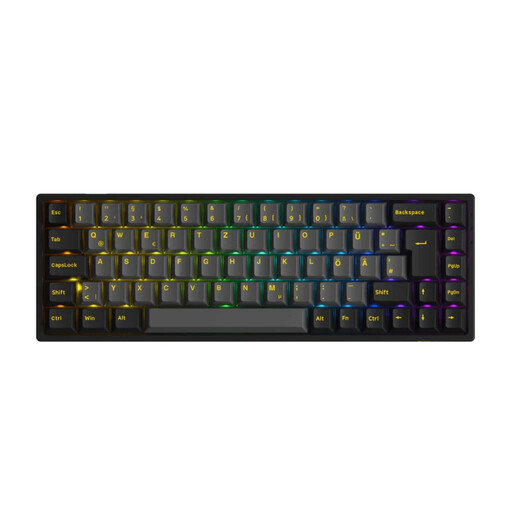
Why this product suits the profile: The 65% format with an ISO-DE layout combines compact dimensions with arrow keys and three connection options.
The specifications clearly list Bluetooth 5.0, 2.4 GHz, USB-C, hot-swap support for 3- and 5-pin switches, and N-key rollover separately.
PBT keycaps, RGB lighting, a 1,800 mAh battery and compatibility with Windows, macOS, iOS and Android.

Why this product suits the profile: The 98% layout retains the number pad and adds a rotary knob and TFT display.
The connection is specified as Bluetooth, 2.4 GHz and USB-C modes; hot-swap supports 3- and 5-pin connectors.
PBT keycaps, RGB lighting, a rotary knob, TFT display and a 10,000 mAh battery according to the product specifications.
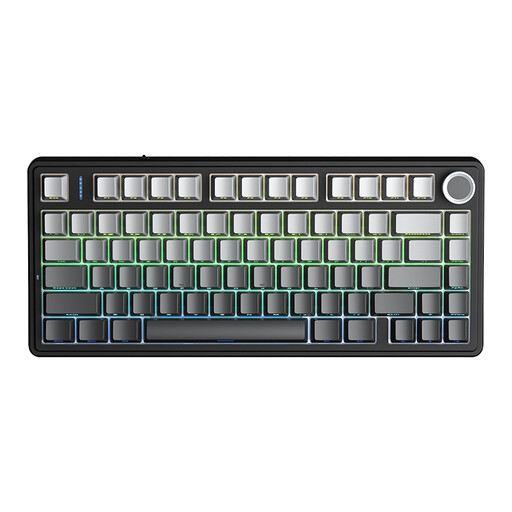
Why this product suits the profile: The 75% layout is designed for users who need arrow and function keys but do not require a number pad.
Tri-mode connectivity, hot-swap for 3- and 5-pin switches, and a 4,000 mAh battery are clearly specified.
RGB lighting, programmable macros, N-key rollover and a multifunction rotary knob.
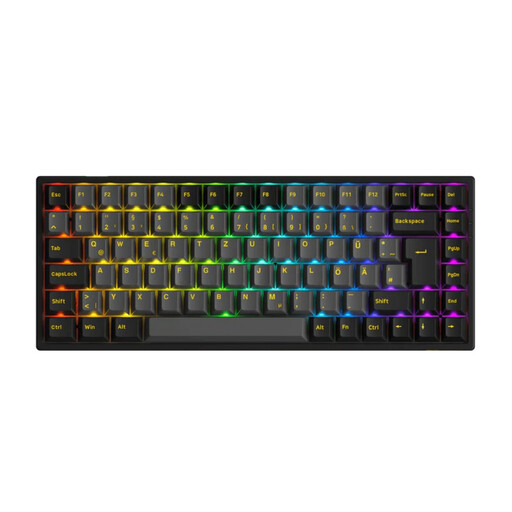
Why this product suits the profile: The 75% ISO-DE layout provides more function keys than a 65% keyboard while remaining compact.
The German ISO-DE layout reduces the risk of unsuitable US key labelling; hot-swap and tri-mode are specified.
3,000 mAh battery, PBT keycaps, RGB lighting and support for Windows, macOS, iOS and Android.
We have put together a complete, regularly updated list of products that fully meet these strict selection criteria and the safety regulations applicable in the EU.
Before buying a mechanical keyboard for PC and Mac, compare the following points:
Yes, provided it offers a stable 2.4 GHz mode or a wired USB-C connection. Bluetooth is suitable for many office and mobile applications, but depending on the device and surroundings, it may offer different transmission performance.
Its lifespan depends on the switches, keycaps, battery and how it is used. Mechanical switches are often rated for a specific number of actuations. This manufacturer specification is not a guaranteed lifespan for the entire keyboard, as the battery, wireless module and electronics can wear out separately.
With an integrated battery, there are usually no battery costs, but the keyboard must be charged regularly. Models with AAA batteries require replacement batteries or suitable rechargeable batteries. RGB lighting increases energy consumption and can shorten the intervals between charges.