
Lieferung heute & morgen

Qualitätsgarantie

Willkommens-Angebote freischalten: KOSTENLOSE Lieferung | Bis zu 80 % RABATT | Kostenlose 30-Tage-JoyPlus-Testphase
App herunterladen
A wireless mechanical keyboard needs to meet several requirements at once: a reliable connection, comfortable typing, compact dimensions and compatibility with different devices. In practice, however, poor purchases are not caused by technical specifications alone. Important details such as the layout, wireless technology or whether the switches can be replaced are often overlooked.
Many models are available with a QWERTY US keyboard. Its arrangement differs from a German QWERTZ keyboard, including the positions of the letters Y and Z and various special characters. A US layout may be suitable for gaming or programming. However, anyone who regularly writes German text should check whether an ISO-DE or QWERTZ version is actually available.
The operating system’s software layout must also be taken into account. A keyboard may technically work with Windows, macOS, iOS or Android without automatically having the physical labelling of a German keyboard.
A wireless keyboard may communicate via Bluetooth, a 2.4 GHz receiver or just one wireless technology. If you want to switch between a desktop PC, laptop and tablet, look specifically for a tri-mode keyboard. This usually supports:
It is also important to check how many devices can be stored or connected at the same time. “Up to five devices” should not be taken to mean five active connections running in parallel.
An RGB keyboard can display a range of lighting effects, but this says little about the switches, stability or noise level. The switch type, keyboard construction and case dampening are what really matter. Linear switches feel different from tactile or clicky variants. For an open-plan office or shared living spaces, noise should be considered when choosing a keyboard.
A 75% keyboard usually has around 81 or 82 keys. It retains the arrow keys and a function layer, but does away with the separate number pad and some of the gaps between key sections. This creates a compact keyboard that leaves more room for a mouse or other work equipment.
A 65% keyboard saves even more space, but often omits the top row of function keys. For spreadsheets, programming or shortcuts, a 75% form factor may be more practical. Anyone who enters a lot of numbers every day should instead consider a full-size model such as the Siukie keyboard with 104 keys.
A hot-swap keyboard allows compatible mechanical switches to be replaced without soldering. Depending on the product, the AULA, Akko, AJAZZ and Siukie models mentioned are specified as supporting either 3-pin or 5-pin switches. Before replacing a switch, check that the new one is electrically and mechanically compatible.
PBT keycaps are considered more resistant to wear and developing a glossy surface than many ABS variants. This does not mean, however, that every legend or keycap will last for the same length of time. Double-shot moulding and dye sublimation are different manufacturing processes which can produce different results in terms of legibility and durability, depending on the model.
Battery capacity alone does not indicate the actual runtime. Lighting, wireless mode and duration of use all affect power consumption. Figures such as 2,000 mAh, 4,000 mAh or 8,000 mAh are therefore technical points of comparison, not a universal guarantee of battery life.
A 2.4 GHz keyboard is often used for gaming on a PC, while Bluetooth makes it easier to connect to mobile devices. A Mac and Windows keyboard should also make clear whether it merely offers compatibility, or whether its labelling and special keys are designed for both systems.
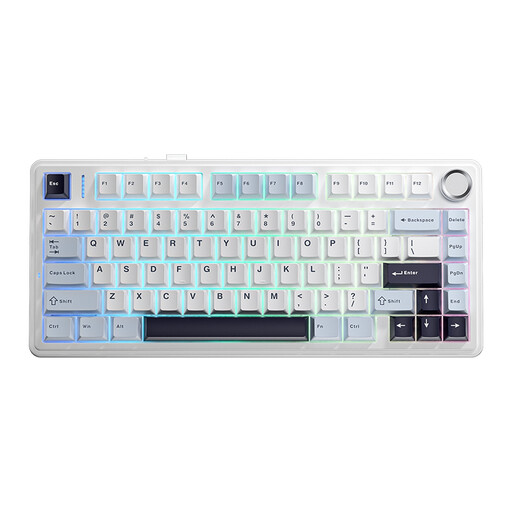
Why this product suits this profile: This model combines a 75% layout with a QWERTY US arrangement and three connection options. It is ideal for users who want to discover mechanical typing and flexible connectivity.
Wired, Bluetooth and 2.4 GHz operation are explicitly stated. This makes it easier to assess the wireless technology before buying.
Compact design and tri-mode connectivity; the US layout should be taken into account before buying.
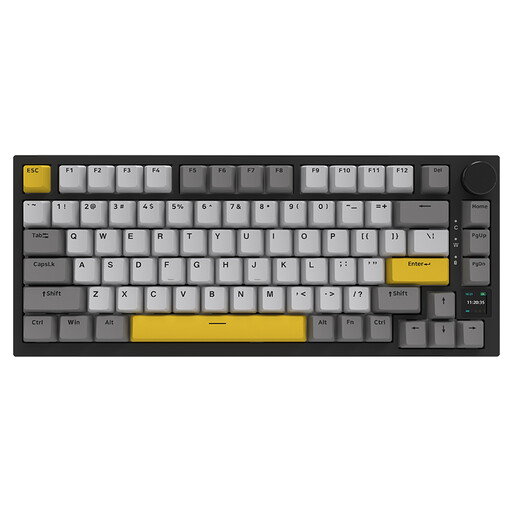
Why this product suits this profile: Features include a 75% layout, hot-swap functionality, RGB lighting, PBT keycaps, a TFT display and a rotary knob. It is aimed at users who want customisation options and status information directly on the device.
The connection can be made via Bluetooth 5.1, 2.4 GHz or USB-C. According to the product information, the display shows details including the battery level and connection mode.
Hot-swap support for 3- and 5-pin switches, RGB lighting and a multifunction rotary knob.
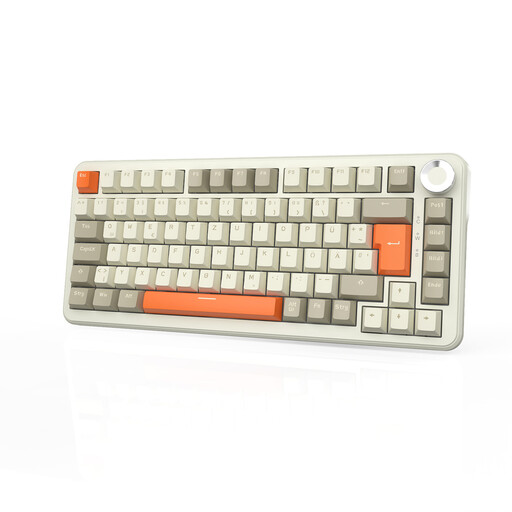
Why this product suits this profile: For prolific typists, German-speaking offices and users with long work or gaming sessions, the stated QWERTZ layout is an important consideration. Features include tri-mode connectivity, hot-swap functionality and a volume control.
The German layout reduces the risk of unsuitable labelling. The stated battery-life figures should be treated as guidelines, depending on RGB use and wireless mode.
QWERTZ layout, 8,000 mAh battery according to the product information, PBT keycaps and a 75% form factor.
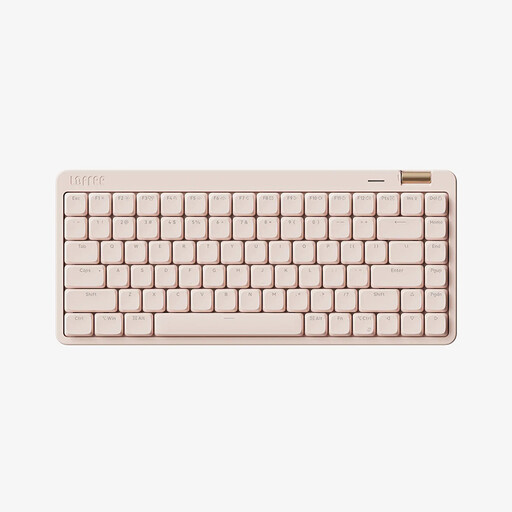
Why this product suits this profile: The 84-key form factor, low-profile switches and tri-mode connection are well suited to workstations with a laptop, tablet and desktop PC. Bluetooth 5.4, 2.4 GHz and USB-C cover a range of usage scenarios.
The product clearly specifies the switch type, layout, connection technologies and keycap material. The lighting can be adjusted across several modes or switched off.
Low-profile linear switches, PBT keycaps, volume control and compatibility with Windows, macOS, iOS and Android.
We have put together a complete, regularly updated list of products that fully meet these strict selection criteria and the safety regulations applicable in the EU.
For 2.4 GHz mode, plug the supplied USB receiver into an available port. Bluetooth is paired in the system settings of the computer or mobile device. When setting up the keyboard for the first time, USB-C operation is recommended so that the battery and wireless connection are not potential sources of problems at the same time.
Battery life depends on the lighting, connection type and intensity of use. Manufacturer figures of 2,000, 4,000 or 8,000 mAh describe the capacity and do not automatically indicate the same operating time. If you use RGB continuously, you should charge the keyboard more frequently or operate it via USB-C.
Yes, provided the switches and noise level are suitable for the workplace. Linear or dampened switches are often quieter than clicky variants. You should also check the layout, wrist rest, keyboard height and whether the RGB lighting can be disabled.