
Lieferung heute & morgen

Qualitätsgarantie

Willkommens-Angebote freischalten: KOSTENLOSE Lieferung | Bis zu 80 % RABATT | Kostenlose 30-Tage-JoyPlus-Testphase
App herunterladen
A wireless mechanical keyboard is more than just an input device—it's a central tool for gamers, programmers, and power users. But the market is saturated with marketing buzzwords and technical specs that make an informed decision difficult. Before you invest, it's crucial to understand the most common pitfalls that can lead to buyer's remorse.
As your Joybuy Product Recommendation Officer, I'll help you define objective criteria for your selection and find the perfect keyboard for your needs.
Many models advertise impressive features, but these often hide limitations that severely reduce their real-world usability.
The Connectivity Trap: Not All "Wireless" is Created Equal Many budget-friendly models only offer a Bluetooth connection. While this is convenient for use with multiple devices like tablets or laptops, the latency is often too high for demanding gaming. A stable, low-latency connection, essential for a mechanical gaming keyboard, is typically achieved via a dedicated 2.4 GHz wireless receiver. If this option is missing, you can experience noticeable lag in-game.
The Layout Trap: QWERTY vs. QWERTZ A significant portion of custom keyboards sold online comes from the international market and ships with a standard American QWERTY (ANSI) layout. For users in countries like Germany, who are accustomed to the QWERTZ (ISO) keyboard layout with its umlauts and different key arrangement, this leads to frustration and typos. Simply swapping the keycaps doesn't always solve the problem, as the physical key placement on the PCB (e.g., the shape of the Enter key) differs.
The "Custom" Trap: Limited Modularity The term "custom keyboard" is often overused. Some manufacturers market their keyboards as customisable when, in reality, only the RGB keyboard lighting or the keycaps can be changed. For enthusiasts, true customisation primarily means the keyboard is hot-swappable. Without this feature, changing the mechanical switches requires laborious soldering, which isn't a viable option for most users.
To avoid these pitfalls, focus on three crucial technical features.
A high-quality wireless keyboard today should be a tri-mode keyboard. This technology offers three connection options in one device:
For anyone looking to personalise their typing experience, a hot-swap keyboard is a must. This feature allows you to easily change mechanical switches without tools or soldering. This way, you can experiment with different switch types (e.g., linear, tactile, clicky) to find the perfect feel for gaming or writing. When buying, explicitly look for compatibility with both 3-pin and 5-pin switches for the widest selection. Equally important is choosing the right layout from the start. If you primarily type or work in a language like German, an ISO-DE (QWERTZ) layout is the only practical choice to avoid compatibility issues.
The way the PCB is mounted inside the case has a huge impact on the typing feel and sound. Older or cheaper models often use a rigid "tray mount" design. In contrast, modern enthusiast keyboards rely on a gasket mount keyboard structure. Here, the PCB is "suspended" between silicone or Poron gaskets. The result is a noticeably softer, more flexible typing feel and a dampened, richer sound with every keystroke.
Here are a few models that, based on the objective criteria above, are well-suited for specific user profiles.
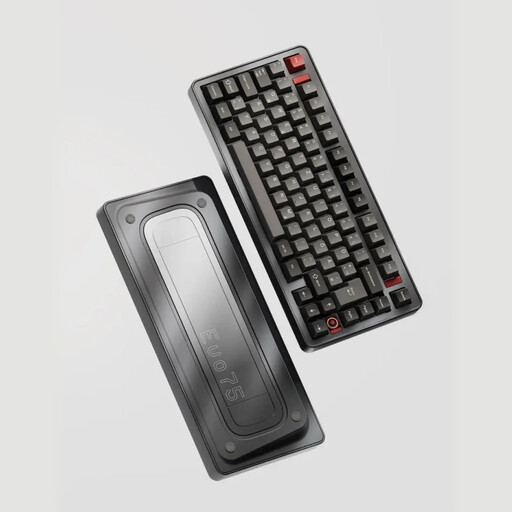
Why This Fits Their Persona: Ideal for users who refuse to compromise on materials, customisation, and layout. The full aluminium case and leaf-spring suspension deliver a premium typing experience that sets a new standard for the German custom keyboard scene.
This model completely sidesteps the layout trap with a true ISO-DE (QWERTZ) layout. Its VIA compatibility and hot-swap capability also offer deep, genuine customisation that goes far beyond simple RGB effects.
Full aluminium case for superior stability and a premium feel; Tri-mode connectivity (Bluetooth, 2.4GHz, USB-C); Leaf-spring suspension for a flexible typing experience.
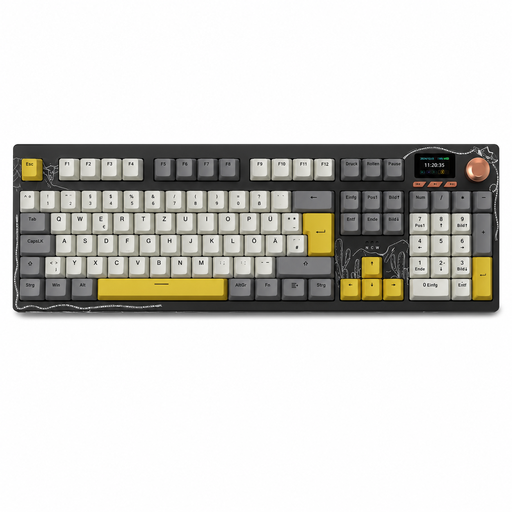
Why This Fits Their Persona: Perfect for programmers and prolific writers who need a full-size layout with a number pad. The tri-mode connectivity makes it easy to switch between work and personal PCs, while the gasket mount structure ensures comfort even during long workdays.
This model is explicitly delivered with a German QWERTZ layout in a full-size format, overcoming the biggest hurdle for productive users in Germany. The reliable tri-mode connection ensures the keyboard is ready for any situation.
Full 104-key layout with number pad; Hot-swappable for individual customisation; Integrated TFT colour screen for status displays.
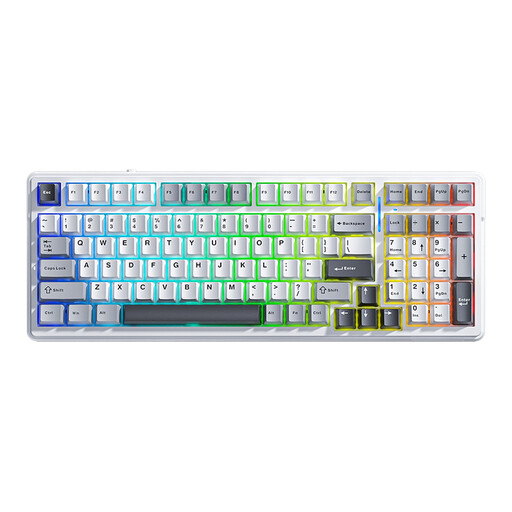
Why This Fits Their Persona: Offers an impressive feature set including gasket mount, hot-swap, and tri-mode connectivity at a very accessible price point. Ideal for beginners who want to experiment with different switches without a large investment.
This model offers true hot-swap functionality and a full-featured tri-mode connection. Warning: It ships with a US QWERTY layout, falling into the layout trap. It is therefore primarily suited for users who are comfortable with QWERTY or plan to use their own custom keycap sets anyway.
Excellent value for money, offering features like gasket mount and a large 8000 mAh battery; The 99-key layout is a great compromise between compactness and functionality.
We've compiled a complete, up-to-date list of products that fully meet these strict selection criteria and regional requirements.
Battery life varies greatly depending on the model and usage. Keyboards with large batteries (e.g., 8000 mAh) can last for several weeks or even months with the RGB lighting turned off. With lighting enabled, the runtime typically drops to a few days to a week. Most modern models can be used normally via the USB-C cable while charging.
For competitive gaming where every millisecond counts, a 2.4 GHz connection is the recommended choice due to its low latency. For casual gamers or standard office use, the latency of modern Bluetooth (version 5.0 and newer) is generally perfectly adequate. A tri-mode keyboard offers the flexibility to choose the right connection type for each scenario.
Technically, most keycap sets will fit on switches with the common MX-style cross stem. However, the real issue is the physical layout. A keyboard with an American ANSI layout has a long, narrow Enter key and a different-sized left Shift key compared to the German ISO layout. While you can swap the letter keys, the shape of the special keys won't match. For an authentic QWERTZ keyboard experience, it is crucial to choose a model with an ISO-DE layout from the outset.