
Lieferung heute & morgen

Qualitätsgarantie

Willkommens-Angebote freischalten: KOSTENLOSE Lieferung | Bis zu 80 % RABATT | Kostenlose 30-Tage-JoyPlus-Testphase
App herunterladen
For many tech enthusiasts, gamers, and professional users, a wireless mechanical keyboard is more than just an input device. It's a central tool that promises precision, customisation, and a clean, clutter-free workspace. However, finding the right model can quickly become overwhelming given the vast array of options, technical terms, and features.
As your Joybuy Product Recommendation Officer, my mission is to provide you with clear and objective guidance. This article will introduce you to key purchasing criteria and present a selection of models that cater to different user profiles with their unique features.
To make an informed decision, it's helpful to understand some of the core features that define modern mechanical keyboards.
Most high-end wireless keyboards today offer Tri-Mode connectivity. This means they support three connection types:
A custom mechanical keyboard is often defined by its hot-swap capability. A hot-swap keyboard allows you to change the mechanical switches without any soldering. This offers tremendous advantages:
For users in Germany, the ISO-DE keyboard layout, with its large Enter key and German umlauts (?, ?, ?), is crucial for a familiar typing experience. Pay close attention to this specification when selecting a product. In addition, there are various form factors:
Here is a selection of three models that cover different user needs.
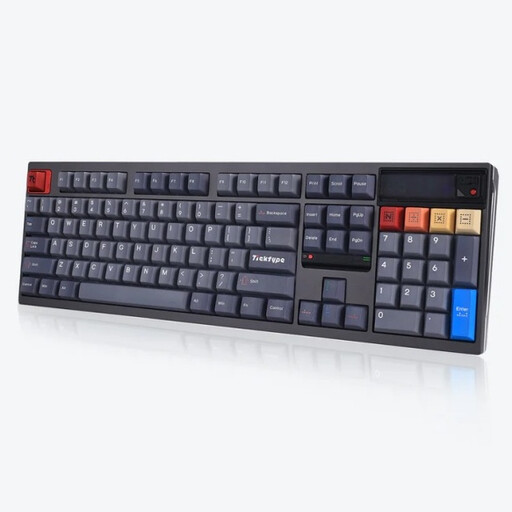
Why It Stands Out The Ticktype DP104 is a model for enthusiasts who value premium build quality and innovative features. Its solid aluminium case and leaf spring mounting structure provide a dampened, flexible typing feel. A special feature is the customisable pixel screen, which can display GIFs, system information, or logos. Note that this model comes with a US (ANSI) layout.
Pros
Who Is It For? Professional users like programmers or heavy typists who are looking for a robust, full-size keyboard, value a unique typing experience, and are comfortable with the US layout.
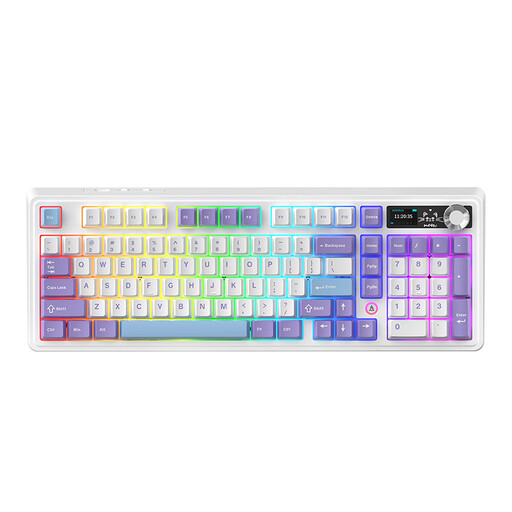
Why It Stands Out The AJAZZ AK980 V2 is a feature-rich keyboard with a rotary knob and an integrated TFT display. The knob allows for quick control of volume, lighting, and connection modes, while the display shows system status, the time, or even custom GIFs. With a 10000 mAh battery, it offers exceptionally long runtime. Its gasket-mount structure with multi-layer dampening contributes to a quiet and pleasant sound profile.
Pros
Who Is It For? Power users and gamers who appreciate high feature density, long battery life, and a space-saving yet nearly full-size key layout.
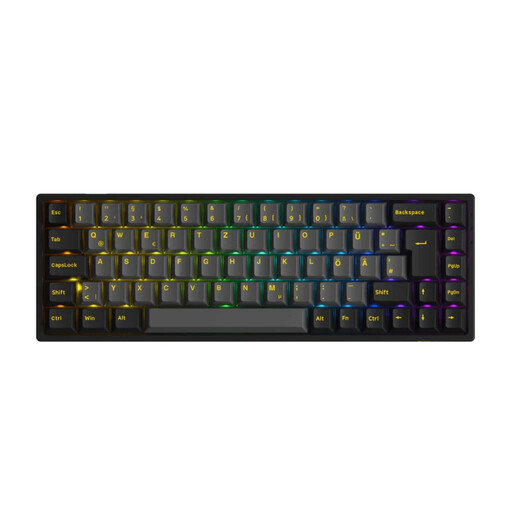
Why It Stands Out The Akko 3068B Plus is an excellent choice for anyone looking for a compact keyboard with a German layout. Its 65% form factor saves a significant amount of desk space while retaining the essential arrow keys. The ISO-DE layout makes it ready to use for German-speaking users right out of the box. The pre-installed Akko V3 Cream Yellow Pro switches are known for their smooth, linear typing feel, making it a great option for a quiet mechanical keyboard.
Pros
Who Is It For? For users with minimalist setups, mobile users, or gamers who prefer a compact, high-performance, and ready-to-use mechanical gaming keyboard with a German key layout.
If you prefer an even more compact model without a number pad or want to explore other form factors, there are numerous other options available. Explore our selection to find the perfect model for your desk.
Discover more tenkeyless keyboards
A hot-swap keyboard has special sockets on its printed circuit board (PCB) that allow you to change the mechanical switches without soldering. This enables easy customisation of the typing feel and straightforward repairs.
For a quiet mechanical keyboard, linear switches (e.g., red or yellow variants) are a great choice because they lack a tactile bump or click mechanism. Additionally, there are special "silent" switches that feature internal dampening elements to further reduce bottom-out and upstroke noise.
Tri-Mode connectivity means that a keyboard supports three different connection methods: a fast 2.4 GHz wireless connection via a USB dongle, a flexible Bluetooth connection for multiple devices, and a wired connection via USB-C, which also serves for charging.