
Lieferung heute & morgen

Qualitätsgarantie

Willkommens-Angebote freischalten: KOSTENLOSE Lieferung | Bis zu 80 % RABATT | Kostenlose 30-Tage-JoyPlus-Testphase
App herunterladen
The search for the right wireless mechanical keyboard can quickly become overwhelming. The market is flooded with technical jargon and marketing promises that often obscure more than they clarify. As a Joybuy Product Recommendation Officer, I'm here to help you identify the crucial features and avoid common purchasing pitfalls, so you can make an informed decision.
Many buyers regret their purchase because they fall for common marketing exaggerations or hidden defects. Pay close attention to these three points:
To make a future-proof investment, you should carefully examine three technical aspects. These define your keyboard's performance, longevity, and versatility.
The most advanced models offer Tri-Mode connectivity. This means the keyboard supports three connection types:
A Hot-Swap Keyboard allows you to change the mechanical switches without any soldering. This offers two key advantages:
Besides the switches, the internal construction significantly defines the typing feel. A Gasket Mount keyboard uses silicone or foam gaskets to isolate the circuit board from the case. The result is a more dampened, softer, and acoustically pleasing typing sound.
The layout is also crucial. While a full-size keyboard takes up a lot of space, compact form factors are often more practical. A 75% keyboard is a popular compromise: it's significantly more compact than a traditional keyboard but retains the dedicated function keys (F-keys) and arrow keys.
Note: The models featured here have an American QWERTY key layout. This is popular with developers and gamers, but it differs from other regional standards like the German QWERTZ layout.

Why This Fits Their Persona: Ideal for developers and creatives who switch seamlessly between a PC, Mac, and tablet. The tri-mode connectivity offers maximum flexibility, while the gasket-mount construction and 4000 mAh battery effortlessly handle long workdays.
Bypasses the connectivity trap with a reliable tri-mode solution (2.4G, Bluetooth, Wired) and offers a realistic 4000 mAh battery capacity for continuous use.
Full 5-pin hot-swap capability and a gasket-mount structure for a superior typing feel.
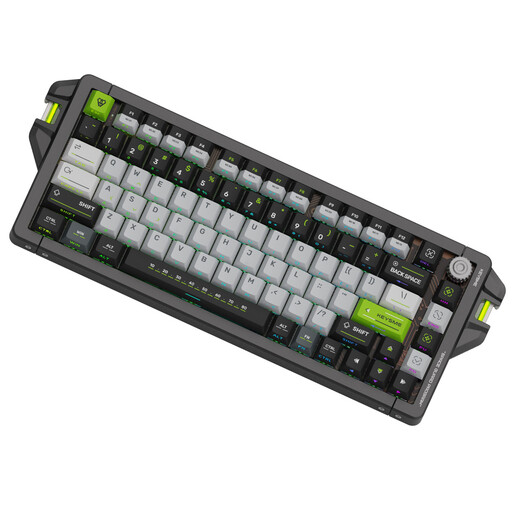
Why This Fits Their Persona: Engineered for esports athletes where every millisecond counts. The wired connection with an 8 kHz polling rate and adjustable magnetic switches delivers maximum responsiveness and precision.
Completely eliminates the latency trap with a wired 8 kHz connection. The magnetic Jade switches offer superior precision and a better feel than conventional mechanical switches.
Adjustable actuation point from 0.1–4.0 mm and Rapid Trigger technology for ultra-fast inputs. The CNC-milled aluminium case ensures maximum stability.
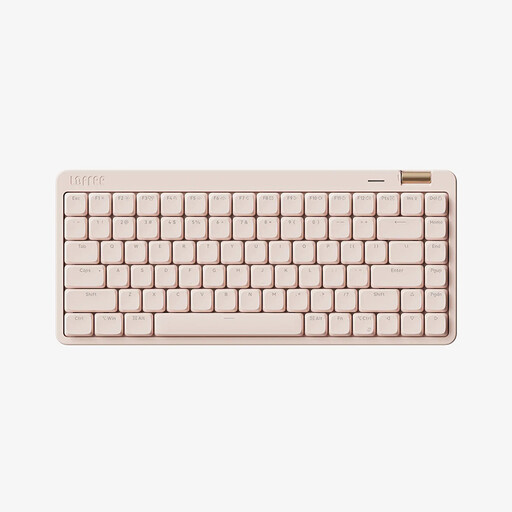
Why This Fits Their Persona: Perfect for users who value aesthetics and a quiet work environment. Its slim design and quiet, low-profile switches make it ideal for the office without sacrificing the premium feel of a mechanical keyboard.
Debunks the myth that mechanical keyboards must be loud. The linear low-profile switches provide a smooth, quiet typing experience. Tri-mode connectivity ensures a clutter-free desk.
Combines a stylish, compact design with functional features like a volume knob and durable PBT keycaps.
We have curated a complete, up-to-date list of products that fully meet these strict selection criteria and rigorous safety standards.
1. How long does the battery of a wireless mechanical keyboard really last? The actual battery life depends heavily on usage, and especially on the backlighting. A keyboard with a 3000–4000 mAh capacity will often last several weeks with the RGB lighting turned off. However, at full LED brightness, the runtime can drop to 20–40 hours. For extended wireless use, it's advisable to reduce the brightness or use the lighting selectively.
2. What does "hot-swap" mean, and do I need this feature? "Hot-swap" means you can easily pull out the keyboard's mechanical switches and replace them with others without soldering. While not essential for beginners, it's a very valuable feature for future-proofing. It allows you to change the typing feel, configure a quieter keyboard, or inexpensively replace a faulty switch, significantly extending the device's lifespan.
3. Are mechanical keyboards always loud? No, that's a common misconception. The volume is determined by the type of switch.