
Lieferung heute & morgen

Qualitätsgarantie

Willkommens-Angebote freischalten: KOSTENLOSE Lieferung | Bis zu 80 % RABATT | Kostenlose 30-Tage-JoyPlus-Testphase
App herunterladen
Finding the right keyboard for your workspace can be a challenge. Many professionals, developers, and creatives want the precise, tactile feedback of a mechanical keyboard but need to avoid loud clicking noises in the office or at home. At the same time, a clean, cable-free desk and the ability to seamlessly switch between a Windows PC and a MacBook are becoming increasingly important.
This article serves as your guide. We will introduce various models and explain the key features to look for when choosing a wireless mechanical keyboard to boost your productivity.
To make an informed decision, a few technical aspects are crucial. Instead of being swayed by marketing terms, the following objective criteria will help you make the right choice.
Mechanical switches determine how every keystroke feels and sounds. For work environments, quiet variants are particularly important.
A modern Bluetooth keyboard for Mac and Windows should offer flexible connection options.
The layout and design have a direct impact on daily comfort and efficiency.
Here is a selection of models that cover the different needs of professional users.

Why It Stands Out: The Logitech MX Mechanical is specifically designed for professional use. It combines a low-profile design with quiet, tactile mechanical switches. The smart backlighting, which activates as your hands approach and adjusts to ambient light, is a thoughtful feature for productive work at any time of day.
Advantages:
Who It's For: Professionals, developers, and power users looking for a reliable, quiet, and high-quality premium office keyboard who need to switch seamlessly between Windows and Mac devices.
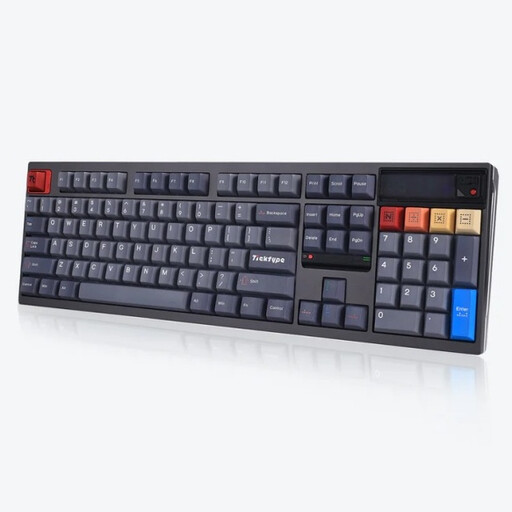
Why It Stands Out: The Ticktype DP104 is aimed at enthusiasts who value customization and a robust construction. Its full aluminum case, hot-swappable capability for easy switch replacement, and integrated, customizable pixel screen set it apart from standard keyboards. The "Silent Tactile Switches" make it office-friendly.
Advantages:
Who It's For: Users looking for a keyboard for programmers or content creators who want maximum customizability and exceptionally robust build quality. Important Note: This model typically ships with a US (QWERTY) layout.
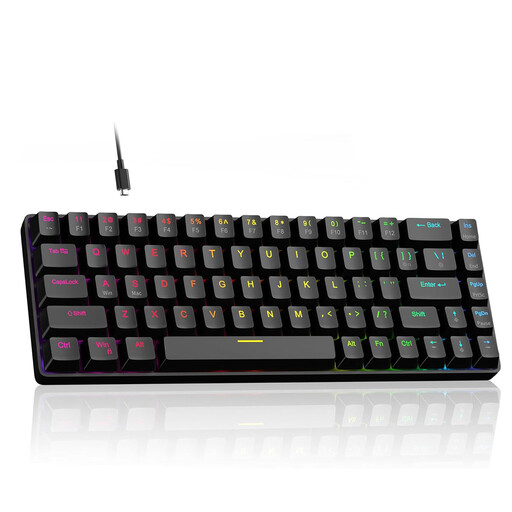
Why It Stands Out: Although marketed as a gaming keyboard, the MageGee 60% offers compelling technologies for power users. Its Hall Effect magnetic switches allow for the actuation point of each key to be customized (from 0.1 mm to 4.0 mm). The Rapid Trigger mode, which enables instant key reset upon release, can also be advantageous for very fast typing or in specialized applications.
Advantages:
Who It's For: Users who want an extremely responsive and customizable keyboard in a compact format and may also enjoy gaming as a hobby. It is a niche option for users who prioritize speed and customization over quiet typing.
If these recommendations didn't include the perfect model for your specific needs, don't worry. There is a vast array of other keyboards available with different switches, layouts, and features.
If you'd like to explore more alternatives, you can find a broader selection in our Wireless Switches category.
1. Are mechanical keyboards suitable for the office? Yes, as long as you choose the right model. A quiet mechanical keyboard with tactile or linear switches is an excellent choice for office environments. It offers the comfort and precision of mechanical typing without causing a disturbance with loud clicking noises.
2. What is the advantage of a wireless mechanical keyboard? The main advantages are a clutter-free desk without cables and more flexibility in positioning. Many models also offer multi-device connectivity, allowing you to seamlessly switch between multiple devices like a PC, laptop, and tablet with a single keyboard, which boosts productivity.
3. How do I connect a Bluetooth keyboard to multiple devices? Most multi-device keyboards have dedicated keys (often F1-F3 or separate buttons) to switch between paired devices. To pair a new device, put the keyboard into pairing mode (usually by long-pressing one of the device keys) and then select it in the Bluetooth settings of your computer or tablet.