
Lieferung heute & morgen

Qualitätsgarantie

Willkommens-Angebote freischalten: KOSTENLOSE Lieferung | Bis zu 80 % RABATT | Kostenlose 30-Tage-JoyPlus-Testphase
App herunterladen
A wireless mouse promises a clutter-free desk and greater flexibility. However, the selection process is filled with pitfalls that often only become apparent after your purchase. A high DPI value doesn't guarantee precision, and not every mouse marketed as "ergonomic" is truly comfortable. This guide will help you correctly interpret technical specifications and find a mouse that genuinely fits your needs—whether for the office, creative work, or gaming.
Before you choose a model, you should be aware of three common marketing traps that can lead to impulse buys.
Focus on the following three parameters to make an informed decision that goes beyond mere marketing buzzwords.
The type of wireless connection is one of the most important distinguishing features.
The sensor is the heart of every mouse. A high-quality optical or laser sensor ensures precise tracking on various surfaces. Instead of focusing on the maximum DPI value, you should check if the mouse offers multiple adjustable levels.
The power source is a crucial factor for convenience.
Here are some recommendations tailored to specific user groups and their requirements.
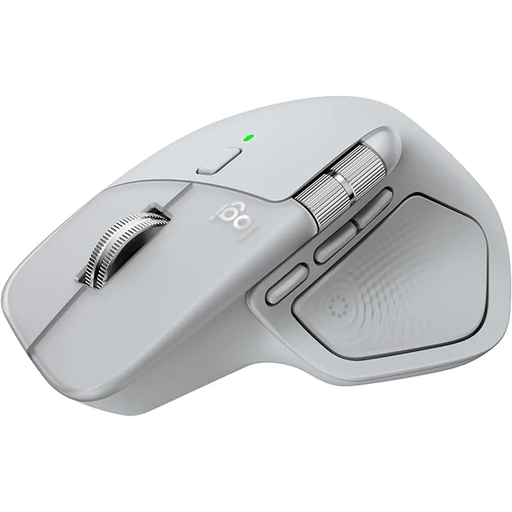
Why it's a great fit: Designed for long workdays, this mouse offers a distinct ergonomic shape for right-handed users that relieves wrist strain. The multi-device function allows seamless switching between up to three devices, perfect for managing both work and personal computers.
The ergonomics are specifically designed for a natural hand posture, not a vague one-size-fits-all approach. Connectivity via Bluetooth and the Logi Bolt USB receiver is stable and optimised for fast switching.
MagSpeed scroll wheel for rapid or precise scrolling; thumb wheel for horizontal navigation; long battery life and USB-C quick charging.
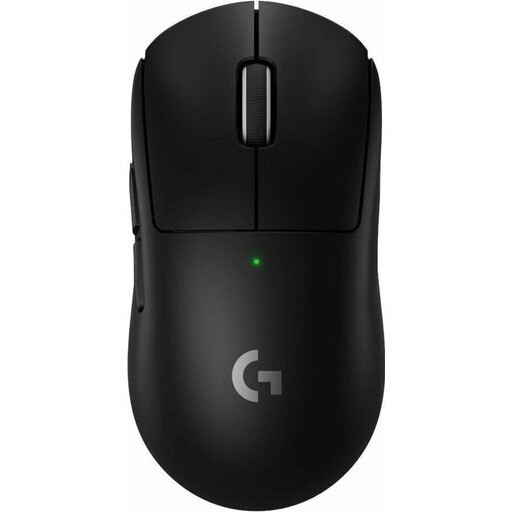
Why it's a great fit: This mouse was developed in collaboration with esports professionals. Its extremely low weight of just 60 grams enables lightning-fast reactions, while the LIGHTSPEED wireless technology ensures a connection with minimal latency.
Instead of focusing on unnecessarily high DPI values, this model concentrates on a high-precision sensor (HERO 2) and a high polling rate (8K) for extremely responsive and consistent tracking.
Lightweight gaming mouse (60g); professional-grade wireless technology; long battery life of up to 95 hours; PTFE feet for smooth gliding.
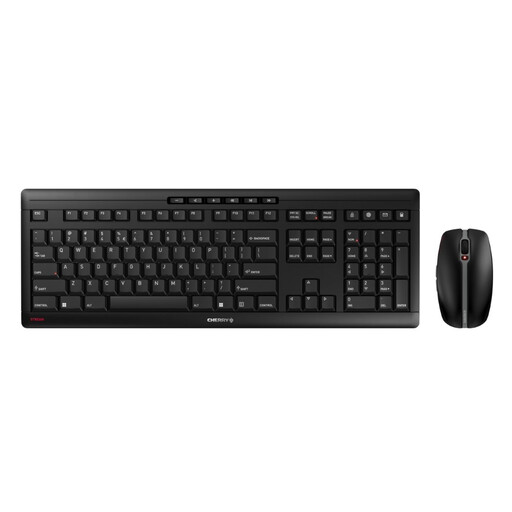
Why it's a great fit: This keyboard and mouse set is the ideal solution for anyone seeking a unified, wireless, and high-quality setup for their office or home office. Both devices connect via a single USB receiver and are rechargeable via USB-C.
The set focuses on the essentials: a stable 2.4 GHz connection with AES-128 encryption and practical features. The mouse offers three sensible DPI levels (1000/1600/2400) instead of an exaggerated maximum value.
Quiet mouse clicks and silent keystrokes (SX scissor technology); rechargeable NiMH batteries with months of battery life; high stability thanks to a metal plate in the keyboard.
We have compiled a complete, up-to-date list of products that fully meet these strict selection criteria and safety standards.
Battery life varies greatly depending on the model and usage. Office mice optimised for energy efficiency can last for several months on a single charge. High-performance gaming mice with intensive use and RGB mouse lighting often need to be charged every few days to a few weeks. Many models offer a quick-charge feature where a few minutes of charging is enough for a full day of work.
For casual gamers and less fast-paced game genres, a modern Bluetooth mouse (version 5.0 or newer) is generally sufficient. However, competitive gamers, especially in the esports scene, should opt for a mouse with a 2.4 GHz wireless connection. This offers lower latency and a more stable connection, which can be crucial in competitive games.
Most wireless mice are plug-and-play, so no driver installation is necessary for basic functions. You simply connect the mouse via its dongle or Bluetooth and can start using it immediately. However, to access advanced features like button programming, DPI level customisation, or RGB lighting control, you will need to install the manufacturer's provided software.