
Lieferung heute & morgen

Qualitätsgarantie

Willkommens-Angebote freischalten: KOSTENLOSE Lieferung | Bis zu 80 % RABATT | Kostenlose 30-Tage-JoyPlus-Testphase
App herunterladen
The search for the right wireless mouse can quickly become overwhelming. Manufacturers advertise high DPI counts, a wide range of connection options, and special gaming features. But not every advertised feature is relevant to your daily needs or worth the extra cost. Many users invest in features they never use, only to find out after a few weeks that fundamental aspects like comfort and battery life were neglected. This guide will help you recognise the typical marketing traps and make an informed decision.
gaming mouse or premium models. However, for most office applications and standard monitors, a value above 2400 DPI is rarely necessary. An excessively high or improperly configured sensitivity can actually make precise cursor control more difficult, meaning you end up paying for performance you don't use.mouse for Mac), but they can be more prone to interference in environments with many wireless networks. A poor choice here leads to daily frustration.ergonomic mouse that doesn't suit your hand size or grip style can lead to discomfort or even repetitive strain injuries with prolonged use. Especially in a home office or during long workdays, ergonomics is a crucial but often overlooked factor.To avoid a bad purchase, focus on the parameters that match your actual usage requirements.
The type of connection determines the performance and compatibility of your wireless mouse.
gaming mouse. Many wireless keyboard and mouse set combos also use this technology for a simple plug-and-play setup.Bluetooth mouse connects directly to the built-in Bluetooth module of your laptop, tablet, or PC without needing a dongle. This makes it ideal for mobile users and devices with limited USB ports. Modern Bluetooth versions are energy-efficient and often allow pairing with multiple devices simultaneously.The DPI number indicates how sensitive the mouse is to movement. Instead of blindly looking for a high-DPI mouse, you should tailor the value to your needs.
programmable mouse with adjustable DPI levels between 400 and 3,600 DPI or more allows for flexible adaptation to different situations.A good mouse should feel like a natural extension of your hand.
ergonomic mouse is often asymmetrically shaped to keep the wrist in a more natural position.silent mouse with dampened clicks can significantly improve the work environment. Additional programmable mouse buttons can be assigned shortcuts to speed up repetitive tasks.rechargeable mouse with a USB-C port is a sustainable and convenient solution. Some models even offer a mouse with a charging dock for maximum convenience.Here are some recommendations tailored to specific user groups and their requirements.
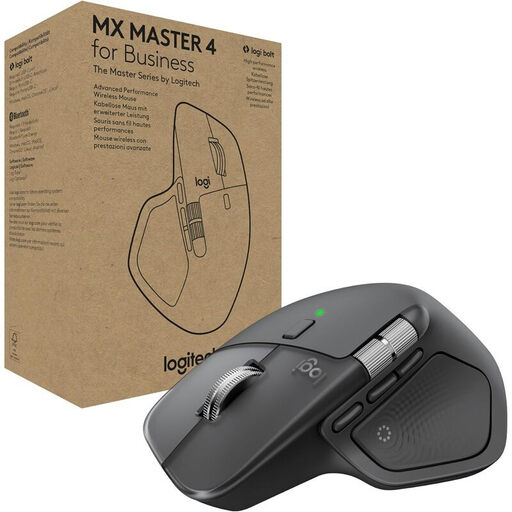
Why This Fits Their Persona: Ideal for developers, designers, and power users who switch between multiple devices daily. The ergonomic shape supports long workdays, while the MagSpeed scroll wheel and programmable buttons optimise workflow.
Solves the connectivity dilemma with dual connection via Logi Bolt (2.4 GHz) and Bluetooth. The focus is on productivity-boosting ergonomics and functionality, not just a high DPI count.
MagSpeed scroll wheel for precise or hyper-fast scrolling; 8K DPI sensor works even on glass, according to Logitech; multi-device control for up to 3 devices.
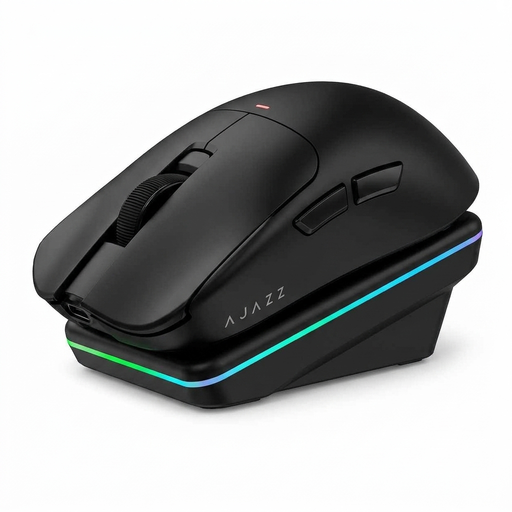
Why This Fits Their Persona: Designed for competitive players who value low weight, minimal latency, and maximum precision. The lightweight 63g design and high-performance sensor are built for fast reactions in esports titles.
The high DPI count of up to 24,000 DPI is not just a marketing gimmick here, but a functional necessity for precise tracking. The tri-mode connection (2.4G/BT/Wired) provides the necessary flexibility for gaming and everyday use.
PAW3311 sensor for high precision; 1000 Hz polling rate for low latency; convenient magnetic mouse with charging dock.
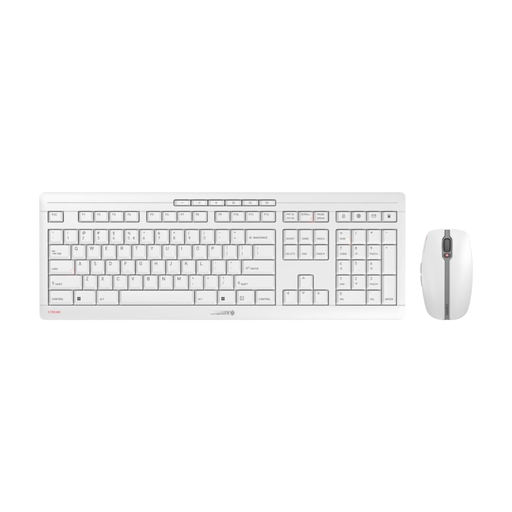
Why This Fits Their Persona: An all-in-one solution for a tidy and quiet workspace. This wireless keyboard and mouse set is ideal for open-plan offices or the home office, where silent clicks and keystrokes are appreciated.
Focuses on the office features that really matter: quiet operation, stability, and long battery life. The DPI is practical at up to 2400 DPI and not overkill.
Both the mouse and keyboard are rechargeable via USB-C; the mouse features silent clicks; stable and secure 2.4 GHz connection with AES-128 encryption.
We have compiled a complete, up-to-date list of products that fully meet these strict selection criteria and German regulations.
1. How long does the battery of a wireless mouse last? Battery life varies greatly depending on the model and usage. Mice with integrated, rechargeable batteries, like the Logitech MX series models, can last up to 70 days according to the manufacturer. Models that use standard AA or AAA batteries can also achieve a runtime of several months. Pay attention to the manufacturer's specifications and features like an automatic sleep mode to maximise battery life.
2. Is a Bluetooth mouse or a 2.4 GHz mouse better for the office? For most office applications, both technologies are well-suited. A Bluetooth mouse is convenient because it doesn't require a USB port for a dongle, making it ideal for modern laptops or a mouse for Mac. A 2.4 GHz mouse often provides a more stable connection in environments with a lot of wireless interference and is usually ready to use immediately after plugging in the dongle.
3. Do I need a mouse with programmable buttons? A programmable mouse is particularly useful for users who frequently perform repetitive actions. You can assign commands like copy/paste, opening programs, or complex macros to the extra buttons. This can significantly speed up the workflow for creative professionals, programmers, and even gamers. For general office use, the standard thumb buttons (forward/back) are often already a huge efficiency boost.