
Lieferung heute & morgen

Qualitätsgarantie

Willkommens-Angebote freischalten: KOSTENLOSE Lieferung | Bis zu 80 % RABATT | Kostenlose 30-Tage-JoyPlus-Testphase
App herunterladen
The search for the right wireless mouse can quickly become overwhelming. The market is flooded with models advertising high DPI counts, countless buttons, and aggressive "gaming" designs. But not every expensive mouse is a good investment, and often, it's the exaggerated marketing promises that lead to buyer's remorse. Before you decide on a model, it's crucial to know the most common pitfalls.
Common Pitfalls When Buying a Wireless Mouse:
To avoid these problems, you should focus on the core technical features that truly make a difference.
Instead of being swayed by marketing buzzwords, you should evaluate three objective criteria to make an informed decision.
The type of wireless connection is crucial for your mouse's performance and intended use case.
"Dots Per Inch" (DPI) describes the sensitivity of the mouse sensor. A high DPI value means the cursor moves a long distance with only a small hand movement.
For most users, even on 4K displays, values between 1600 and 4000 DPI are more than sufficient. Far more important than an extremely high DPI number is the quality of the installed optical sensor (e.g., PixArt sensors like the PAW3395 or PAW3311). A high-quality sensor ensures precise and flawless tracking on various surfaces and prevents unwanted cursor jumping.
The physical characteristics of the mouse are crucial for comfort during extended use.
Here are some recommendations tailored to specific user profiles and the criteria mentioned above.
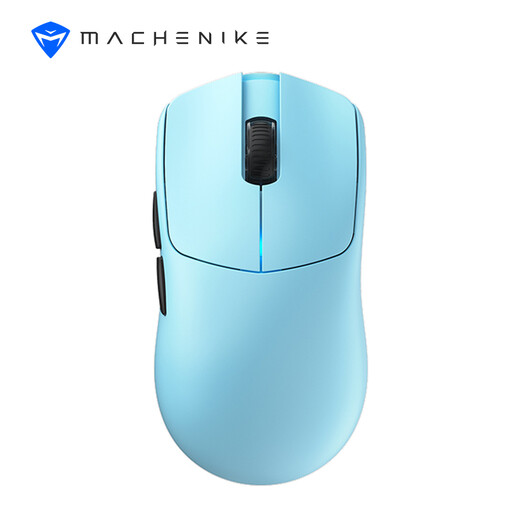
Why This Fits Their Persona: This model is engineered for competitive performance. Its ultralight 49-gram design and extremely high 8000 Hz polling rate enable lightning-fast reactions that can be decisive in fast-paced FPS games.
It bypasses the "gaming" trap by delivering verifiable high-end specifications like the PAW3395 sensor and an 8000 Hz polling rate, rather than relying solely on aesthetics.
The extremely low 0.125 ms latency from its 8K technology ensures virtually lag-free input. The ultra-low weight of 49 grams reduces fatigue during long gaming sessions.
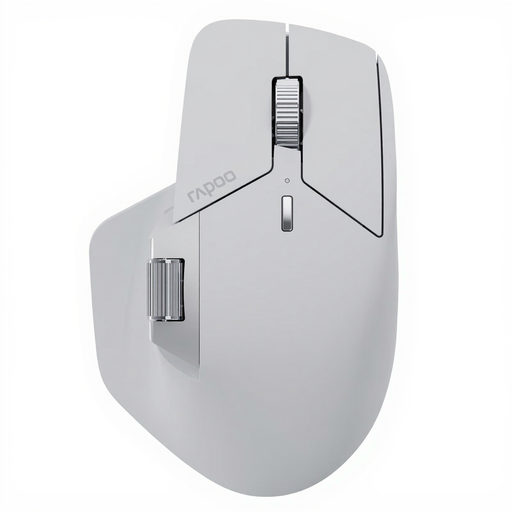
Why This Fits Their Persona: This multi-device mouse is designed for complex workflows. It can connect to up to seven devices simultaneously and, thanks to M+ Cross-Computer technology, allows you to seamlessly move your cursor and files between different computers.
It solves the connectivity chaos by using the new NearLink technology, which promises a more stable and faster connection than conventional Bluetooth, and offers easy management of up to seven devices.
The M+ Cross-Computer feature significantly boosts productivity. Additionally, 11 programmable buttons and a long battery life of up to 120 days ensure an uninterrupted workflow.

Why This Fits Their Persona: For anyone who spends long hours at a desk and values comfort. The unique 57° vertical shape promotes a natural "handshake" position, which Logitech claims can reduce muscle activity compared to a conventional mouse.
This mouse goes beyond superficial ergonomic promises. Its design is based on a scientifically-backed approach to reducing strain and isn't just a standard mouse in a different shape.
The 57° vertical posture can help prevent wrist and forearm discomfort. It also supports multi-device workflows and features a precise 4000 DPI sensor.
We have compiled a complete, real-time updated list of products that fully meet these strict selection criteria and all relevant safety standards.
The battery life of a rechargeable mouse varies greatly depending on the model, usage, and activated features like lighting. Many modern office mice last for several weeks or even months on a full charge (e.g., up to 70 or 90 days). High-performance gaming mice often have a shorter battery life due to higher polling rates, but it still covers many hours of intense gaming. Most models can continue to be used via their USB-C cable while charging.
For casual gamers, a modern Bluetooth mouse with Bluetooth 5.0 or higher is often sufficient. However, for competitive gaming, especially in fast-paced shooters, a 2.4 GHz radio frequency connection is recommended. This offers lower and more stable latency, resulting in more direct and responsive control. Many gaming mice therefore offer both connection types.
A silent mouse features special switches that reduce the clicking noise by up to 90%. The tactile feedback is preserved, but the audible "click" is almost completely eliminated. Such mice are ideal for open-plan offices, libraries, lectures, or for working at home when you don't want to disturb others in the room.