
Lieferung heute & morgen

Qualitätsgarantie

Willkommens-Angebote freischalten: KOSTENLOSE Lieferung | Bis zu 80 % RABATT | Kostenlose 30-Tage-JoyPlus-Testphase
App herunterladen
A wireless mouse replaces your trackpad, clears clutter from your desk and gives you flexible use with your laptop. The choice ranges from simple 2.4 GHz models through a Bluetooth mouse to a performance-oriented gaming mouse with a high polling rate. It's this very variety that makes comparison difficult: a high DPI number isn't automatically useful, a long battery life says little about the fit, and "wireless" can place different demands on your computer depending on the connection type.
This buying guide from the Joybuy Product Recommendation Officer shows which specifications matter before you buy and which models suit different usage scenarios.
DPI describes how far the cursor moves for a given mouse movement. A mouse with high DPI can be useful for large screens or fast gaming settings. For office programmes, word processing and web research, lower values are often sufficient. What's also important are sensor quality, surface compatibility and the ability to adjust sensitivity.
A wireless mouse with a 2.4 GHz receiver typically needs a free USB port. This can be inconvenient with modern laptops that have few USB-A ports. Bluetooth works without a separate receiver but requires a compatible Bluetooth module and occasionally manual pairing. A multi-device mouse can manage several devices, but may need software or a network connection for certain functions.
Compact mice are portable, but can be less comfortable for larger hands over time. An ergonomic mouse should suit your preferred hand position, hand size and movement style. Button layout also matters: many programmable buttons increase flexibility, but can be unnecessary for simple office use.
A 2.4 GHz wireless connection via a nano receiver is usually straightforward: plug in the receiver, switch on the mouse and you're ready to go. The range on many models is up to 10 metres, although obstacles and sources of interference can affect the actual range.
Bluetooth saves a USB port and is ideal for laptops, tablets and compatible smartphones. Before buying, check the supported operating systems. A combination of 2.4 GHz and Bluetooth offers more flexibility, especially if you want to use one mouse with both a PC and a laptop.
With a mouse that uses AA or AAA batteries, you'll have ongoing costs for replacements. Power-saving mode and automatic standby can extend battery life. A rechargeable mouse, on the other hand, needs regular charging but means fewer battery changes in daily use. Pay attention to the charging port, cable and whether you can continue using the device while it charges.
For office work, 800 to 1,600 DPI is usually sufficient. Several adjustable levels make it easier to switch between precise selection and fast navigation. For gaming mice, polling rate, response time, acceleration and software support are also important. However, a high polling rate places more strain on system resources and isn't necessary for word processing.
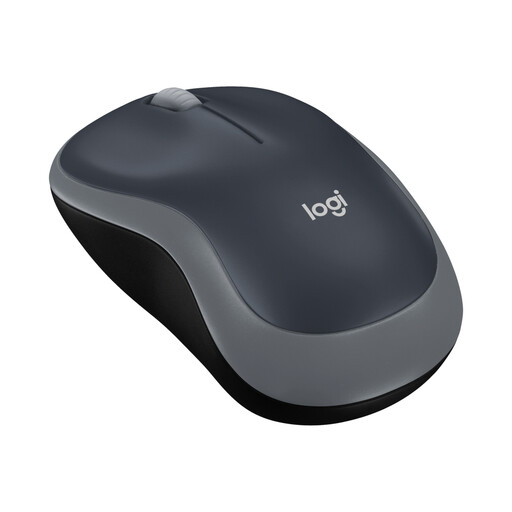
Why this product suits the profile: This compact wireless mouse is designed for everyday tasks, small to medium hands and changing workstations. The nano USB receiver enables simple setup on compatible devices.
The specifications clearly state the required USB connection, one AA battery and a sensor resolution of 1,000 DPI. This makes the connection type and features easy to assess.
2.4 GHz connection, up to 10 metres range and, according to the product information, up to 12 months battery life.

Why this product suits the profile: The vertical design with a 57-degree angle is aimed at users who value an alternative hand position and customisable controls during long working sessions.
The shape is clearly defined and not presented as a universal solution. Before buying, you should consider hand size, grip style and the available desk space.
Bluetooth and USB receiver, up to three devices, 400 to 4,000 DPI and a rechargeable USB-C battery.
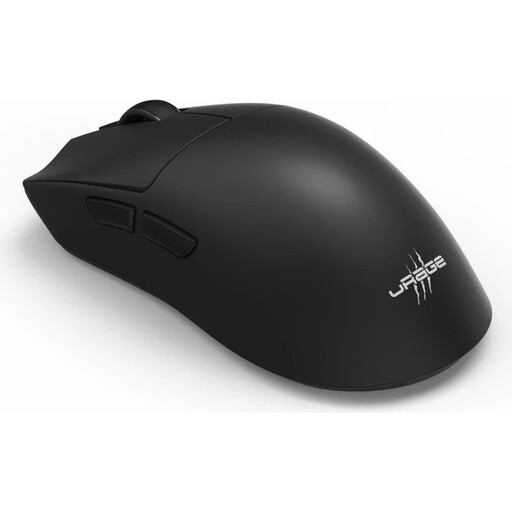
Why this product suits the profile: This model is aimed at PC gamers who want to combine wireless use, programmable buttons and high sensor resolution for fast-paced gameplay.
The specifications list connection type, polling rate, battery life and number of buttons separately. This lets you check whether the gaming features are actually needed.
26,000 DPI, 8,000 Hz polling rate, RF and Bluetooth connection plus USB-C charging; according to the product information, up to 72 hours battery life.
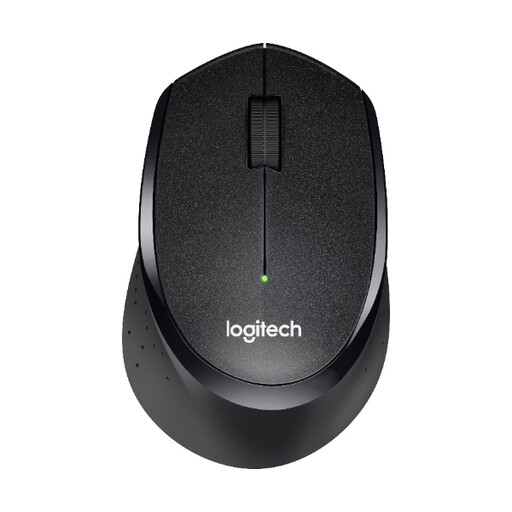
Why this product suits the profile: This quiet mouse is designed for offices, libraries and working from home where clicking sounds should be kept to a minimum.
The stated SilentTouch technology is described with a specific reduction in clicking noise of over 90 per cent. This is a product feature, but doesn't replace your own assessment of the noise level.
2.4 GHz nano receiver, up to 10 metres range and, according to the product information, up to 24 months battery life.
We've put together a complete, regularly updated list of products that fully meet these strict selection criteria and the safety regulations in force in the EU.
With a wireless mouse, plug the nano USB receiver into a suitable USB port and switch the mouse on. For a Bluetooth mouse, search for it in your laptop's Bluetooth settings and pair it. With multi-device models, you'll also need to select the intended connection channel.
Battery life depends on the power source, usage, lighting and power-saving features. Models with an AA battery can run for several months according to the manufacturer. Rechargeable mice are charged via USB-C; the actual time between charges varies depending on the connection and usage.
Yes, provided it offers a stable connection, suitable polling rate, low input lag and a sensor with adjustable sensitivity. For casual gaming, a simpler model is often sufficient. For competitive gaming, you should also check the software, button mapping, battery life and the possibility of wired operation.