
Lieferung heute & morgen

Qualitätsgarantie

Willkommens-Angebote freischalten: KOSTENLOSE Lieferung | Bis zu 80 % RABATT | Kostenlose 30-Tage-JoyPlus-Testphase
App herunterladen
A wireless mouse keeps your desk tidy and can be used flexibly with a PC, laptop or tablet. However, not every wireless mouse automatically leads to a good purchase decision. What really matters are the connection type, power supply, shape and the actual features.
A mouse with high DPI can move the cursor across the screen more quickly. However, this does not automatically mean it works more accurately for every application. For office programmes, lower to medium DPI settings are often closer to controlled operation. For gaming, higher values can be useful if the sensitivity can be adjusted individually.
What matters, therefore, is not just the maximum value, but whether the DPI can be set in several stages and whether the sensor suits the surface you are using.
A Bluetooth mouse connects directly to devices that support Bluetooth. In this case, a USB receiver is not required. A 2.4 GHz mouse, on the other hand, usually uses a small receiver. This can be practical for desktop PCs, but it takes up a USB port.
With tablets or slim laptops, you should check before buying whether Bluetooth is available or whether an adapter is needed. Models with both Bluetooth and 2.4 GHz offer more choice, but often require additional switching or pairing steps.
An ergonomic mouse must suit your hand size, preferred grip style and how often you use it. A heavily contoured right-handed mouse is not automatically comfortable for everyone. Compact, ambidextrous models are often better for travel or for multiple users.
Weight is also relevant: an ultra-light gaming mouse can make fast movements easier, while a heavier model sits more solidly on the desk. Your personal handling is more important than any single advertised specification.
For everyday use, three variants are common:
A stated range of up to 10 metres usually describes a laboratory or open-field situation. Furniture, metal surfaces and other wireless sources can affect the practical distance. With multiple devices, you should also be clear whether the mouse can actually switch between them.
The sensor determines how movements are detected. Designations such as PAW3311, PAW3950 or HERO 25K refer to specific sensor models. The DPI number describes sensitivity, not the overall product quality.
For gaming mice, the polling rate is also relevant. It indicates how many times per second the mouse reports its position. Values such as 1,000 or 8,000 Hz can be interesting for certain games, but they increase data processing and power consumption depending on the system. For office applications, a very high polling rate is usually not necessary.
A mouse with an AA battery can be made ready for use again quickly. With integrated rechargeable batteries, you should consider the charging time, the stated battery life and the possibility of wired use. Battery life figures depend on the connection type, lighting, polling rate and usage.
For models with a lithium battery, the usual safety instructions apply: do not open, do not damage, and only use suitable chargers or cables. Batteries and rechargeable batteries should be taken to designated collection points after use and not disposed of in household waste.
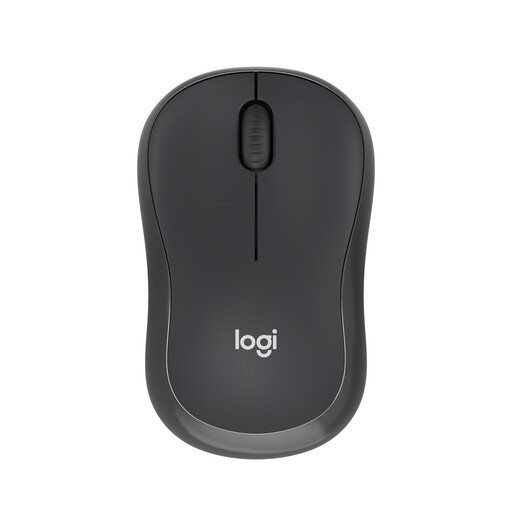
Why this product suits the profile: According to the product description, this compact Bluetooth mouse does not require a USB receiver and is intended for Windows, macOS, iPadOS, ChromeOS, Linux and Android.
The connection runs via Bluetooth, so no USB-A port is occupied. The symmetrical shape is designed for both right-handed and left-handed users.
According to Logitech's product information, up to 18 months of battery life and up to 10 metres of range.
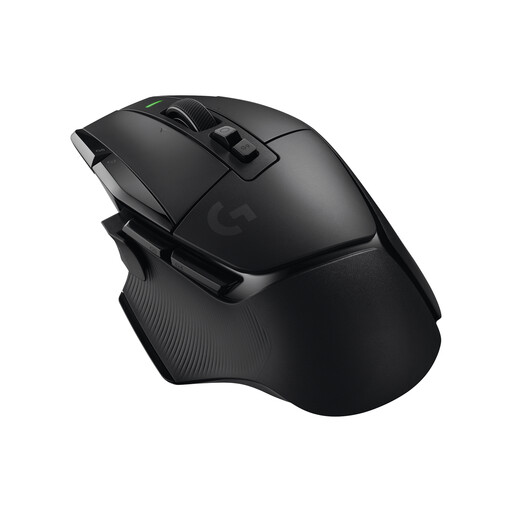
Why this product suits the profile: This gaming mouse is aimed at users who need programmable buttons, adjustable sensitivity and various scroll modes.
The features are not limited to a high DPI value: 13 programmable buttons, five profiles and wired USB-C use are mentioned.
According to the product information, a HERO sensor with 100 to 25,600 DPI, LIGHTSPEED wireless technology and a stated battery life of up to 140 hours.
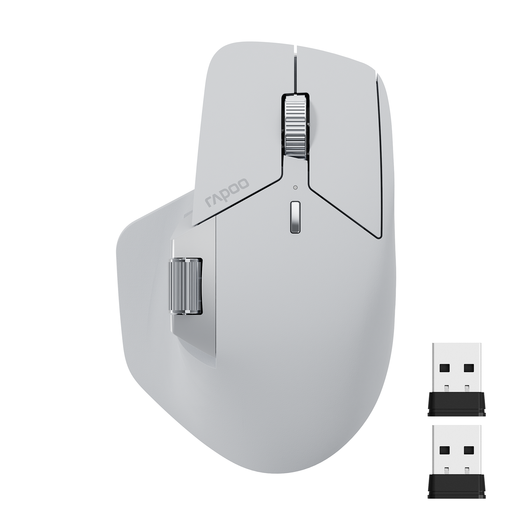
Why this product suits the profile: For home office, study and working on multiple devices simultaneously, this multi-device mouse offers Bluetooth 5.0, 2.4 GHz wireless and switching for up to four devices.
The connection options are clearly separated. Additionally, please note that the M+ function, according to the product information, requires a shared network connection and the appropriate software.
11 programmable buttons, seven DPI levels from 800 to 4,000 and an integrated rechargeable battery with a USB-C charging port.
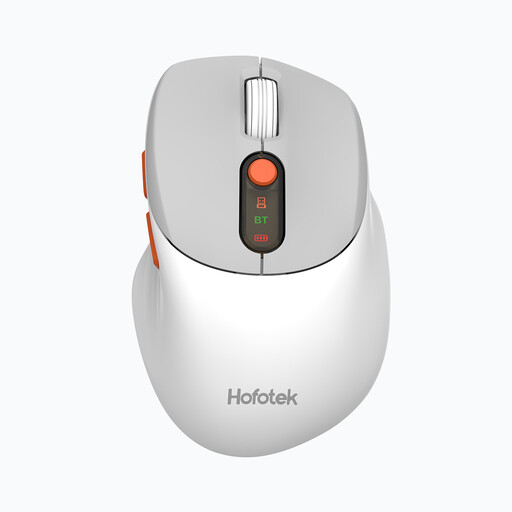
Why this product suits the profile: This silent mouse is designed for the office, library and home office, and supports Bluetooth 5.1 as well as 2.4 GHz wireless.
The choice is not limited to a single wireless technology. However, before buying, you should still check whether the stated noise reduction meets your own requirements.
62 grams in weight, DPI levels from 800 to 4,000 and stated support for up to three devices.
We have put together a complete, regularly updated list of products that fully meet these strict selection criteria and the safety regulations in force in the EU.
With a Bluetooth mouse, activate Bluetooth on your computer or tablet. Then select the device name that appears and complete the pairing. With a 2.4 GHz mouse, plug in the USB receiver. Many models then connect automatically. If you have problems, try changing the battery, switching it off and on again, or using a different USB port.
The lifespan depends on the switches, the battery or rechargeable battery, transport and care. A stated battery life describes the power supply, not the mechanical lifespan of the mouse. Dust, liquid and strong impacts can affect its function. Regular cleaning with a dry cloth and proper storage are advisable.
With battery models, there are costs for replacement batteries. An integrated rechargeable battery, on the other hand, needs electricity to charge and can lose capacity after prolonged use. With a mouse that uses a replaceable AA battery, the power supply can be renewed easily. Therefore, decide based on how often you use it, your charging habits and the mobility you desire.