
Lieferung heute & morgen

Qualitätsgarantie

Willkommens-Angebote freischalten: KOSTENLOSE Lieferung | Bis zu 80 % RABATT | Kostenlose 30-Tage-JoyPlus-Testphase
App herunterladen
A gaming mouse doesn’t need lots of extra features to perform reliably, whether you’re using it every day or gaming. What matters is whether the sensor, weight, connectivity and shape suit the way you’ll use it. If you focus only on a high DPI figure or eye-catching RGB lighting, you could miss some important details.
A high-DPI gaming mouse can move the cursor very quickly, but that’s only one aspect of sensor performance. Tracking speed, polling rate, surface compatibility and the ability to adjust sensitivity to suit your needs are also important. Lower DPI settings are often sufficient for office work or image editing, while fine-tuned profiles can be useful in fast-paced games.
A wireless gaming mouse can connect via Bluetooth or a 2.4 GHz wireless connection. Bluetooth is handy for laptops, tablets and switching between multiple devices. For competitive gaming, a dedicated receiver with low transmission latency is often preferred. Before buying, check whether your computer has USB-A, USB-C or Bluetooth connectivity.
A lightweight gaming mouse is quick to move, but may be less suitable if you have larger hands or use a pronounced palm grip. An ergonomic mouse with a more prominent thumb rest is often larger and heavier. Consider your hand size, grip style and whether you’ll be using the mouse for several hours at a time.
A precise optical sensor should offer several adjustable sensitivity levels. You may not need to use high maximum settings such as 12,000, 24,000 or 35,000 DPI in everyday use. What matters more is whether you can adjust the DPI in practical increments and whether the sensor tracks reliably during fast movements.
The polling rate indicates how often the mouse reports its position to the computer. 1,000 Hz means one report per millisecond. Higher rates can improve temporal resolution, but they use more system resources and may reduce battery life on wireless models. For many uses, having a choice of several polling rate settings is helpful.
A tri-mode mouse typically supports USB cable, 2.4 GHz wireless and Bluetooth. This makes it easier to switch between a PC, Mac, notebook and tablet. If you’re choosing a dedicated gaming model, position the receiver as close to the mouse mat as possible. When choosing a gaming mouse for PC and Mac, check which operating systems it supports and whether configuration software is available.
A mouse with programmable buttons can store shortcuts, media controls or gaming functions. Check how many buttons can actually be customised. Battery life figures usually depend on lighting, wireless mode and usage, so when choosing a mouse with long battery life, check the conditions under which the manufacturer measured it.
Wired models don’t need charging. An RGB gaming mouse, on the other hand, may use extra power depending on the brightness of its lighting. RGB is best viewed as a design or profile feature, rather than a measure of technical quality.
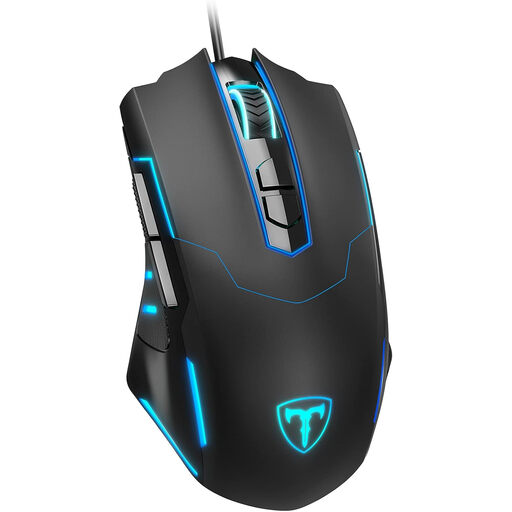
Why this product suits this profile: This wired mouse offers plug-and-play use, 7 programmable buttons and adjustable DPI from 1,200 to 7,200, making it suitable for PC and laptop gamers.
It doesn’t need a battery, so you can avoid charging breaks. The product information states that the DPI and polling rate settings are adjustable.
7 programmable buttons and RGB lighting; optical sensor with 1,200 to 7,200 DPI.
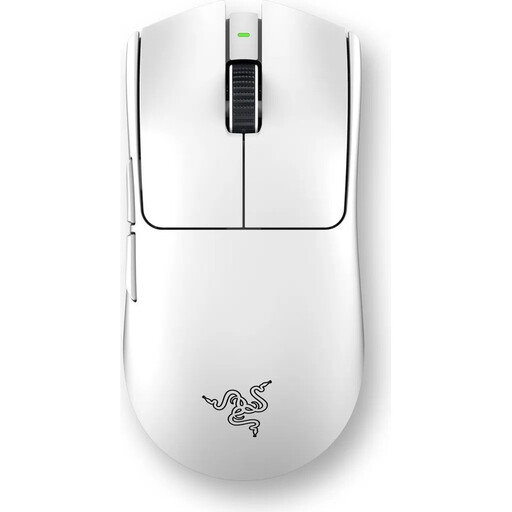
Why this product suits this profile: According to the product information, this model is aimed at gamers looking for a combination of low weight, high sensor resolution and a fast 2.4 GHz wireless connection.
Its weight is clearly stated as around 54 to 55 g. Wireless and polling rate settings can be adjusted using compatible settings; the HyperPolling Dongle may need to be purchased separately.
Focus Pro sensor with up to 35,000 DPI; up to 95 hours of battery life according to the manufacturer.
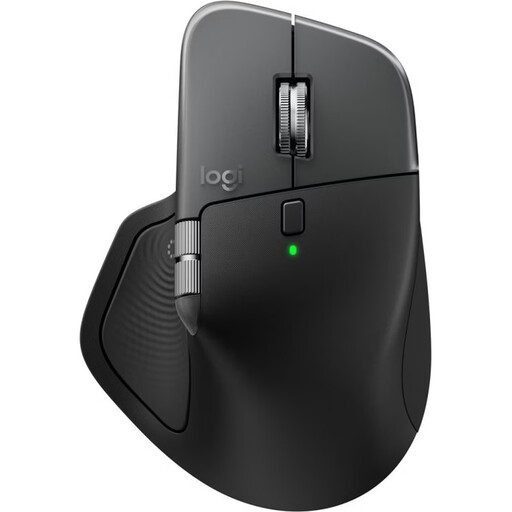
Why this product suits this profile: For working from home, creative tasks and use across multiple devices, the key features are Bluetooth, a Logi Bolt receiver, programmable functions and an ergonomic shape.
Compatibility with macOS, Windows and other systems is specified. You can pair up to three devices, so there’s no need to keep switching the receiver.
8K DPI sensor, MagSpeed scroll wheel and up to 70 days of battery life according to the manufacturer.
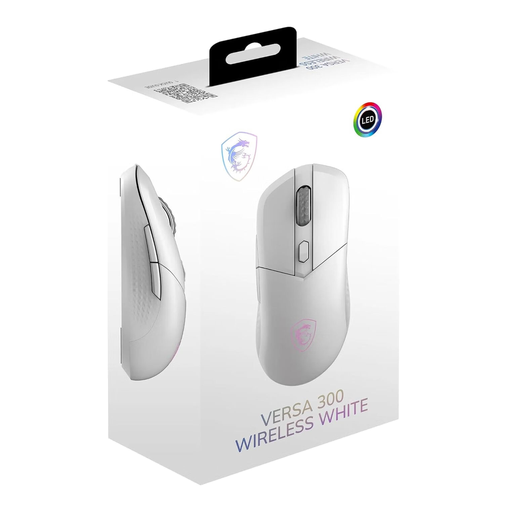
Why this product suits this profile: This mouse combines 2.4 GHz wireless, Bluetooth 5.3 and USB-C wired connectivity. It’s a good fit if you switch between gaming, a notebook and office work.
You’re not limited to a single wireless standard. You can also keep using the mouse via USB-C if the battery runs out.
Weighs 60 g according to the product information, with 400 to 8,000 DPI and stated battery life of up to 50 hours.
We’ve put together a complete, regularly updated list of products that meet these strict selection criteria and fully comply with the safety regulations in force in the EU.
A mouse with a USB cable, 2.4 GHz receiver and Bluetooth offers the most flexibility. Before buying, check which operating systems it supports and whether you’ll need any software. On macOS, some button or lighting features may only be available after installing the relevant configuration software.
It depends on the game, screen resolution and personal preference. Many people use settings well below the sensor’s maximum resolution. It’s useful to have several DPI settings you can save, so you can switch between precise cursor movement and faster control.
Battery life depends on the type of battery, wireless mode, polling rate and RGB lighting. Treat the manufacturer’s figures as a guide. A mouse with USB-C charging can still be used while it charges, while models with replaceable batteries can be changed easily.