
Lieferung heute & morgen

Qualitätsgarantie

Willkommens-Angebote freischalten: KOSTENLOSE Lieferung | Bis zu 80 % RABATT | Kostenlose 30-Tage-JoyPlus-Testphase
App herunterladen
A wireless mouse frees up desk space and makes using a laptop, MacBook or desktop PC much easier. However, not every model suits every workspace. A Bluetooth mouse can be practical for devices without a USB-A port, while a wireless mouse with a 2.4 GHz receiver is ideal for plug-and-play and gaming.
The Joybuy Product Recommendation Officer doesn't just look at DPI figures or design when making a selection — they focus on the real combination of connection, shape, power supply, noise level and intended use.
A high maximum resolution sounds impressive at first. For office work, spreadsheets or web browsing, however, lower settings are often perfectly adequate. What really matters is whether the sensitivity can be adjusted and whether the sensor works reliably on your preferred surface. For a wireless gaming mouse, polling rate, signal stability and response behaviour are also important.
A Bluetooth mouse doesn't need a separate receiver, but it does require a compatible Bluetooth module. This is available on many laptops, tablets and MacBooks. Desktop PCs or older computers don't always offer this option. A 2.4 GHz wireless mouse, on the other hand, needs a free USB port. With USB-C devices, an adapter may be necessary.
Before you buy, you should therefore check:
An ergonomic mouse must fit your hand size and grip style. A model that is too small can encourage a strained posture for larger hands; a heavy or very tall model is less practical for mobile use. For left-handed users, a symmetrical shape is also important. A vertical mouse or trackball mouse changes the way you operate it significantly, so you should consider how it fits with your personal habits before buying.
Bluetooth is suitable for minimalist setups and devices with few ports. A 2.4 GHz connection with a USB receiver is usually straightforward and often ideal for desktop PCs and gaming. A tri-mode mouse combines Bluetooth, 2.4 GHz and wired operation, offering multiple usage options.
Also pay attention to the range. Manufacturer claims of up to 10 metres depend on the environment, obstacles and wireless interference. For most desks, maximum range isn't necessary; what's more important is a stable connection at your workstation.
A rechargeable mouse needs a charging cable and should be charged regularly. Models with AA or AAA batteries avoid charging pauses, but require battery changes over time. Claims like "up to 18 months" or "up to 70 days" are usage estimates and can vary depending on working hours, lighting and connection.
For built-in lithium batteries: do not open, damage or expose to excessive heat. Batteries and electronic devices should not be disposed of in household waste in the UK, but taken to appropriate recycling points.
A lightweight gaming mouse can support fast movements. The CHERRY XTRFY M64 Wireless, for example, is specified at 53 grams, with a length of 120 millimetres and a Pixart 3395 sensor. For office work, however, the scroll wheel, side buttons and a comfortable palm rest are often more important than the lowest possible weight.
For a quiet mouse, look for explicitly stated noise reduction. Logitech models with SilentTouch technology are designed for workplaces, libraries or shared spaces. "Quiet" usually refers to clicks, not necessarily every sound from the scroll wheel.
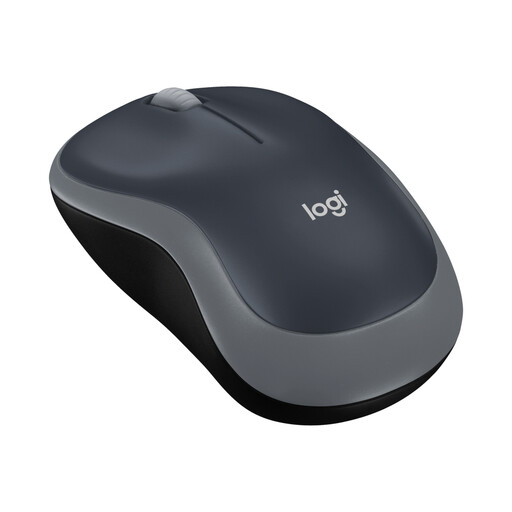
Why this product fits the profile: This compact wireless mouse works via a USB receiver and is designed for everyday tasks, study and mobile workstations. One AA battery is included according to the product listing.
The USB receiver enables simple setup without Bluetooth pairing. The 1,000 DPI resolution is tailored to standard tasks, rather than boasting unnecessarily high figures.
Optical tracking, symmetrical shape and a manufacturer-stated battery life of up to 12 months.
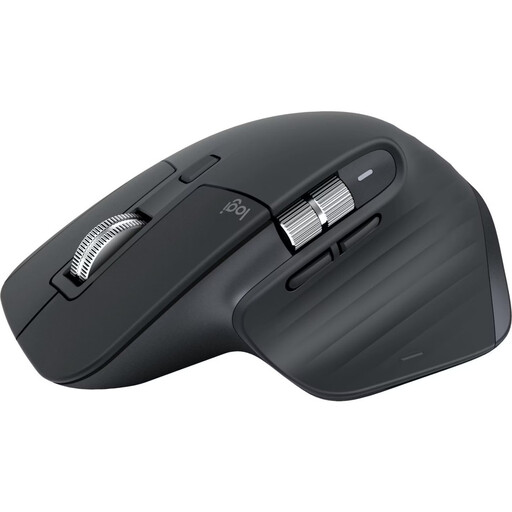
Why this product fits the profile: According to the product information, this Bluetooth mouse connects to up to three devices and is aimed at professionals, developers and users who work with extensive documents or spreadsheets.
The connection is made directly via Bluetooth, so no USB receiver is needed on compatible devices. The shape is designed for right-handed users and should be checked against your hand size before buying.
8,000 DPI sensor, programmable buttons, MagSpeed scroll wheel and a stated battery life of up to 70 days.
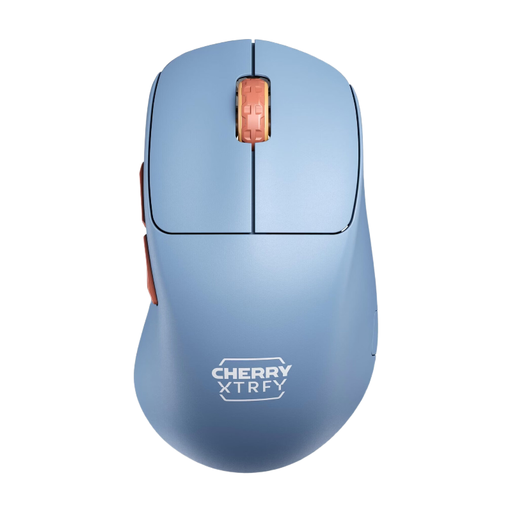
Why this product fits the profile: This lightweight gaming mouse is aimed at right-handed users and those who prefer a low weight and a 2.4 GHz connection for fast movements.
The technical specifications clearly state the sensor, polling rate and weight. According to the product description, settings can be adjusted directly on the mouse without additional drivers.
53 grams weight, Pixart 3395 sensor, 1,000 Hz polling rate and a battery offering up to 90 hours according to the product information.

Why this product fits the profile: The vertical design with a 57-degree angle is intended for users who prefer a different hand position than a traditional mouse offers.
The distinctive shape is clearly stated and is not positioned as an ordinary standard mouse. Before buying, you should consider how vertical operation fits into your personal workflow.
Bluetooth and USB receiver, four programmable buttons, 4,000 DPI sensor and a rechargeable battery.
We've put together a complete, regularly updated list of products that fully meet these strict selection criteria and the safety regulations in force in the EU.
For a wireless mouse, plug the USB receiver into a suitable port and switch the mouse on. A Bluetooth mouse is paired in the system settings of your computer or tablet. For multi-device models, you then select the desired device channel. If you experience connection problems, first check the battery or charge level, receiver position and Bluetooth settings.
The lifespan depends on the switches, casing, battery or battery compartment and daily use. The stated battery life describes the time between charges, not the overall product lifespan. A model with a replaceable AA battery can continue to be used after many charge cycles, whereas with a built-in battery, the charging capacity may decrease over time.
A wireless gaming mouse can be suitable for fast-paced games if the connection, polling rate, sensor and weight match your play style. For competitive use, a stable 2.4 GHz receiver and low signal latency are usually more important than an extremely high DPI count. For office work, study and general use, simpler wireless mice with suitable ergonomics are often sufficient.