
Lieferung heute & morgen

Qualitätsgarantie

Willkommens-Angebote freischalten: KOSTENLOSE Lieferung | Bis zu 80 % RABATT | Kostenlose 30-Tage-JoyPlus-Testphase
App herunterladen
A wireless mouse keeps your desk tidy and is often more practical than a wired model when you’re on the move. But choosing a wireless mouse doesn’t automatically mean making the right purchase. Differences in connectivity, sensor, power supply and shape often become clear only after extended use.
Check these three common pitfalls before you buy:
A Bluetooth mouse doesn’t need a spare USB port, making it particularly suitable for use with a laptop, MacBook, tablet or mobile phone. For desktop PCs, a 2.4 GHz wireless mouse with a receiver may be a good option, provided a USB port is available. Models with three connection options – Bluetooth, 2.4 GHz and USB-C – offer extra flexibility.
Check which operating systems are supported. Not every product works equally well with Windows, macOS, Linux, ChromeOS, iPadOS and Android. Use in Mac Boot Camp mode may also be limited. This information should be included in the technical specifications before you buy.
DPI describes how sensitively the cursor responds to movement. Medium settings are often enough for office work. For a wireless gaming mouse, finely adjustable DPI levels and a high polling rate can be useful for fast inputs.
However, a high DPI figure isn’t the only measure of quality. What matters more is:
A lightweight gaming mouse can make fast movements easier, while a heavier mouse may feel more controlled for office and home working. The right shape depends on your hand size and grip. Right-handed users should look for an ergonomic contour; left-handed users may need a symmetrical model or one specifically designed for left-handed use.
There are two common power options:
Figures such as ‘up to 70 days’ or ‘up to 250 hours’ are usage estimates from the product information. Lighting, connection type, polling rate and software settings can affect actual battery life.
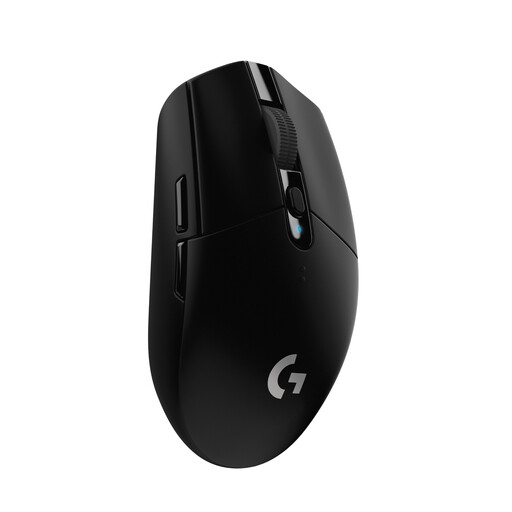
Why it suits this profile: This mouse combines a USB nano receiver with a HERO sensor offering up to 12,000 DPI, and is designed for PC, Mac and ChromeOS. It’s a versatile wireless mouse for everyday use and occasional gaming, making it a good choice for beginners.
The sensitivity is specified as adjustable from 200 to 12,000 DPI. It connects via a receiver with a 1 ms signal rate, rather than relying on Bluetooth alone.
Up to 250 hours of use from one AA battery, six programmable buttons and a built-in receiver compartment.
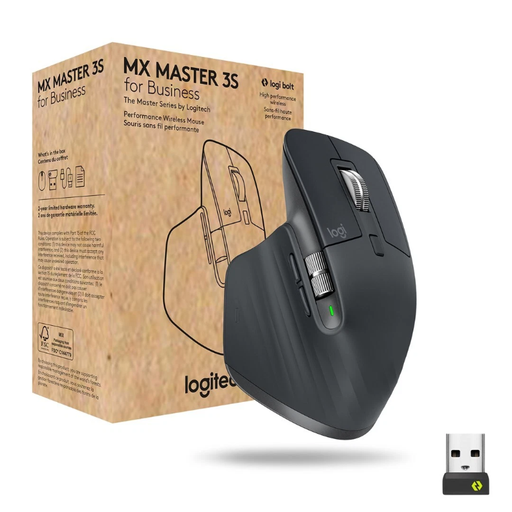
Why it suits this profile: This ergonomic mouse is designed for people who work long hours, use several devices and want plenty of programmable features.
You can connect via Bluetooth or a Logi Bolt receiver, and pair up to three devices.
8,000 DPI Darkfield sensor, MagSpeed scroll wheel, seven programmable buttons and USB-C charging.

Why it suits this profile: Its vertical design and 57-degree angle offer an alternative hand position for people looking for a more comfortable option during long sessions in the office or at home.
Its ergonomic design is easier to assess thanks to a clearly described shape and specified right-handed fit, rather than vague claims based on appearance alone.
Bluetooth and USB receiver, support for up to three devices, 400 to 4,000 DPI and a rechargeable battery with USB-C.
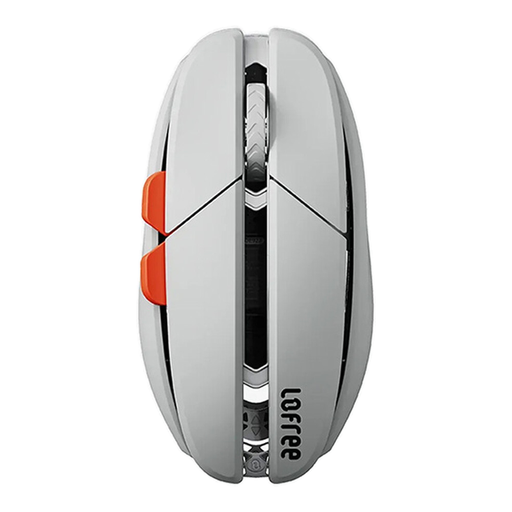
Why it suits this profile: This model weighs around 47 grams and offers Bluetooth, 2.4 GHz and USB-C connectivity. It’s a good fit if you’re looking for a lightweight mouse for your laptop, the office and gaming.
Its three connection modes mean you’re not dependent on a single wireless standard. According to the product information, the DPI setting ranges from 100 to 40,000.
47-gram weight, PAW3950 sensor, USB-C wired mode and up to 100 hours of battery life in Bluetooth mode.
We’ve put together a complete, regularly updated list of products that meet these strict selection criteria and comply fully with the safety regulations in force in the EU.
Turn on the mouse and activate pairing mode. Then open the Bluetooth settings in Windows, macOS, iPadOS or Android and select the model shown. If your mouse comes with a USB receiver, you can usually just plug it in and switch on the mouse.
Battery life depends on the battery or rechargeable battery, connection type and how you use the mouse. According to product information, models with an AA battery can last for several months or more. For rechargeable mice, stated battery life ranges from several days to several months, depending on the model. Even a mouse with long battery life should be charged regularly to avoid deep discharge.
Yes, as long as the connection, sensor and polling rate suit the way you play. For fast-paced games, 2.4 GHz wireless or a wired connection is often the obvious choice. Bluetooth is better suited to mobile use and office tasks, although some devices may have higher latency. Before buying a wireless gaming mouse, also check its weight, grip size and the number of buttons you need.