
Lieferung heute & morgen

Qualitätsgarantie

Willkommens-Angebote freischalten: KOSTENLOSE Lieferung | Bis zu 80 % RABATT | Kostenlose 30-Tage-JoyPlus-Testphase
App herunterladen
A wireless mouse can keep your desk tidier and make it easier to switch between your laptop, PC or tablet. However, technical buzzwords don't automatically lead to the right choice. All too often, people buy a model that boasts plenty of features but doesn't suit their hand size, operating system or available USB ports.
This buying guide shows you which criteria really matter when choosing a cordless mouse, and which product features you should check carefully before making a purchase.
A Bluetooth mouse connects directly to a compatible device. This saves you needing a USB receiver, but it does require Bluetooth to be switched on and supported by your operating system. An RF mouse with a 2.4 GHz receiver, on the other hand, usually works on a plug-and-play basis. For that, you'll need a USB-A port.
Before you buy, you should therefore check:
DPI describes the sensitivity of the sensor, not automatically the practical accuracy. For office work, word processing and web browsing, moderate values are often perfectly adequate. A very high resolution can be interesting for gaming, image editing or multiple monitors, but it's not essential for everyday use.
What matters more is consistent tracking, a suitable surface and a finely adjustable pointer speed.
A large, heavily contoured ergonomic mouse can be comfortable for bigger hands, but it may feel impractical for smaller ones. The orientation also matters: some models are ambidextrous, while others are designed exclusively for right-handed users.
If you work many hours a day, pay attention to the length, width, height, weight and the position of the thumb buttons. A compact mouse, on the other hand, is often better suited for travel.
A Bluetooth mouse is ideal for modern laptops, tablets and multi-device workstations. Models with multiple memory slots can switch between up to three devices. A wireless connection via USB receiver is practical when you want a quick setup without additional system settings.
A USB mouse with a cable doesn't need a battery and creates no wireless interference. It's suitable for a fixed workstation, whereas a wireless mouse offers more freedom of movement.
For battery-operated mice, the battery type and stated battery life are relevant data. A mouse with long battery life can reduce maintenance, although manufacturer specifications depend on usage, power-saving mode and connection type.
It's worth distinguishing between:
A quiet mouse can be useful in libraries, offices or shared living spaces. Terms like "Silent Touch" or "Silent Click" usually refer to the main buttons. The scroll wheel and additional side buttons may still produce audible noise.
The number of buttons should also match your intended use. Three buttons are enough for standard tasks. Programmable side buttons can save time with software, navigation or gaming, but sometimes require additional configuration software.
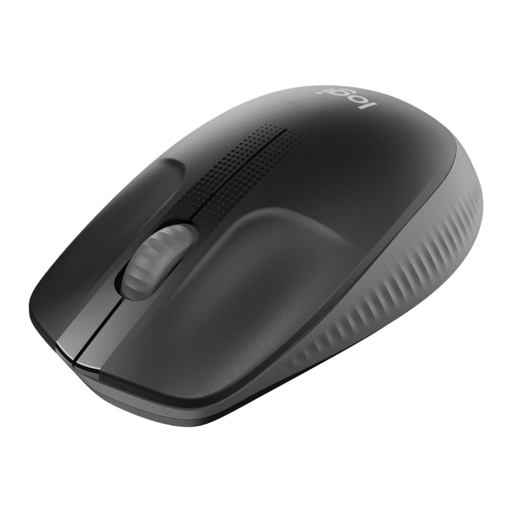
Why this product fits the profile: This full-size wireless mouse is aimed at users who want a straightforward solution for the office, studies or home working.
The 2.4 GHz USB receiver enables direct setup. The shape, suitable for medium to large hands, reduces the risk of choosing a mouse that's too small.
Optical sensor, ambidextrous design and a manufacturer-stated battery life of up to 18 months.
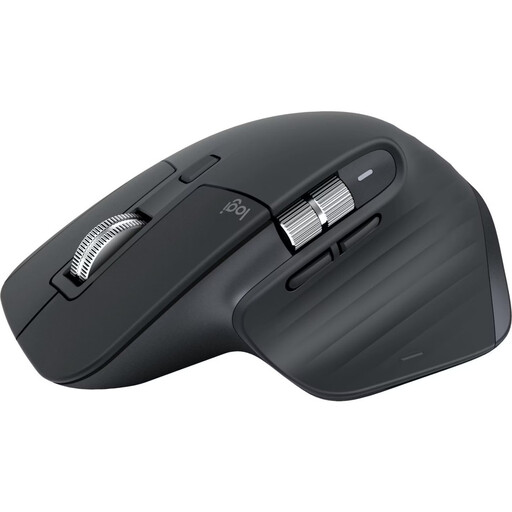
Why this product fits the profile: For professionals and creatives with multiple devices, this mouse offers Bluetooth connectivity, customisable buttons and a right-handed ergonomic shape.
Compatibility with up to three devices and Bluetooth connectivity avoid unnecessary receiver swapping in a multi-device setup.
8,000 DPI sensor, seven programmable buttons, MagSpeed scroll wheel and a USB-C rechargeable battery with a stated life of up to 70 days.
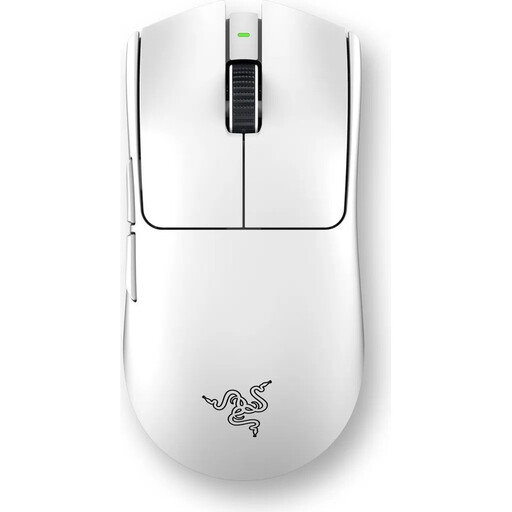
Why this product fits the profile: This gaming mouse is aimed at players who need a low weight, high sensor resolution and adjustable polling rates.
The technical specifications state weight, sensor, polling rates and battery life concretely, rather than just advertising "gaming performance" in general terms.
54 g weight, up to 35,000 DPI, six programmable buttons and a stated battery life of up to 95 hours.
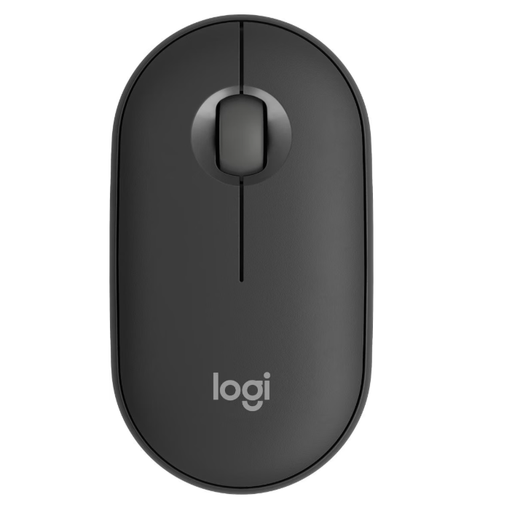
Why this product fits the profile: The flat, lightweight design and connectivity with up to three devices suit laptop users, students and changing workstations.
Bluetooth and RF Wireless are both available. Easy-Switch reduces the effort when switching between laptop, tablet and smartphone.
76 g weight, Silent Touch technology, up to 4,000 DPI and a manufacturer-stated battery life of up to 17,520 hours with one AA battery.
We've put together a complete, regularly updated list of products that fully meet these strict selection criteria and the safety regulations in force in the EU.
For an RF mouse, plug the USB receiver into a free port and switch the mouse on. A Bluetooth mouse is paired via your computer's Bluetooth settings. Drivers are often not required for basic functions; however, additional software may be necessary for programmable buttons or profiles.
The battery life depends on the model, battery type, usage duration and power-saving features. In our range, you'll find figures from several months to several years for battery-operated models, and up to 70 days for rechargeable ones. Manufacturer specifications are guidelines and may differ in everyday use.
Yes, provided the connection, shape and noise level suit your environment. For shared spaces, a quiet mouse is recommended. For long working days, hand size, weight, button position and a stable connection are more important than an especially high DPI number.