
Lieferung heute & morgen

Qualitätsgarantie

Willkommens-Angebote freischalten: KOSTENLOSE Lieferung | Bis zu 80 % RABATT | Kostenlose 30-Tage-JoyPlus-Testphase
App herunterladen
A wireless mouse keeps your desk tidy and can be used flexibly with a PC, Mac or tablet. The choice ranges from a basic wireless mouse for everyday tasks to a wireless gaming mouse with a high polling rate. However, price alone says little about whether a model suits your hand, workspace and way of using it.
DPI describes how sensitively the sensor responds to movement. A high maximum value is not automatically necessary. For office work, programming or image editing, moderate settings are often sufficient. Higher values can be useful for gaming, but sensor performance, polling rate, surface and adjustability are also important.
That is why you should look for an adjustable DPI range, rather than focusing only on the maximum figure in the product advertising. A lightweight gaming mouse with well-adjustable sensitivity can be more practical for everyday use than a heavier model with a theoretically higher peak value.
A Bluetooth mouse does not require a separate receiver and is particularly suitable for laptops with few USB ports. A 2.4 GHz connection with a USB receiver can provide straightforward plug-and-play use. Some models can also be used with a wired connection.
Before buying, check the following:
An ergonomic mouse should suit your hand size and preferred grip style. Length, width, height and weight all have a noticeable effect on handling. Large, highly sculpted models are often designed for the right hand. Compact mice are easier to transport, but offer less surface area to rest your hand on.
“Quiet” does not necessarily mean silent. Claims such as “90% less click noise” are manufacturer specifications and should be understood as comparisons within the relevant product range. For an office or home office, also consider the noise made by the scroll wheel, the surface material and the acoustic environment.
Bluetooth is suitable for laptops, tablets and modern desktop PCs. A 2.4 GHz receiver can be practical for fixed workstations. A multi-device mouse should clearly state how many devices it supports, how switching works and which operating systems are compatible. For work computers with restricted installation rights, a model that offers basic functionality without additional software can be advantageous.
For office work, browsing and word processing, 800 to 4,000 DPI is sufficient for many users. Creative applications benefit from finely adjustable movement, while wireless gaming mice often allow you to save additional profiles. The polling rate indicates how often the mouse reports its position to the computer. Higher values can improve the way reactions are displayed, but depending on the model, they may also increase power consumption.
An integrated rechargeable battery is usually charged via USB-C. Check whether a charging cable is included and whether the mouse can still be used while charging. AA or AAA batteries eliminate the need for regular charging, but create ongoing costs and additional waste. Battery-life figures depend on intensity of use, connection type and lighting.
A mouse with programmable buttons can store shortcuts for spreadsheets, editing software, development environments or games. It is important to know whether profiles are saved in the device’s memory or are only available while the software is running. On work devices, macro functions should comply with your organisation’s internal IT policies.
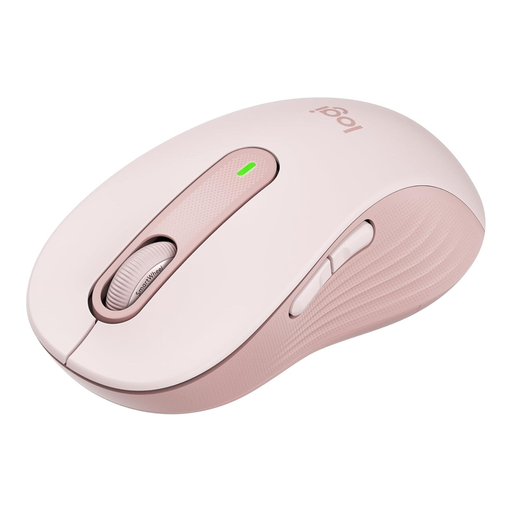
Why this product suits this profile: This model is designed for larger hands and combines Bluetooth with a Logi-Bolt receiver. One AA battery is included.
The specification for larger hands reduces the risk of choosing an unsuitable shape. AA battery power means that a USB-C cable is not required.
Quiet clicks according to the manufacturer, customisable side buttons and a stated battery life of up to 24 months.
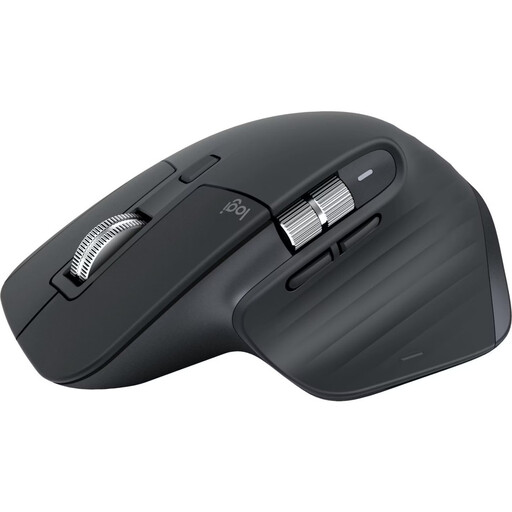
Why this product suits this profile: The right-handed ergonomic design, 8,000 DPI sensor and connection for up to three devices are ideal for long working sessions across a laptop, desktop and tablet.
The Bluetooth connection works without an additional receiver. The technical specifications state that it supports multi-device use, USB-C charging and a sensor suitable for different surfaces.
MagSpeed scroll wheel, seven customisable buttons and a manufacturer-stated battery life of up to 70 days.
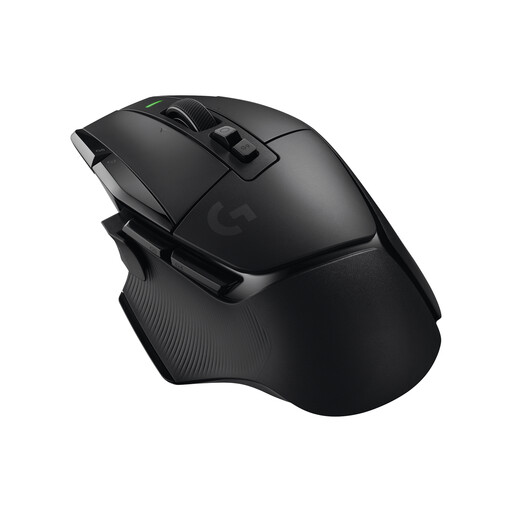
Why this product suits this profile: This wireless gaming mouse is aimed at users who need numerous commands, an adjustable scroll wheel and a low-latency 2.4 GHz connection.
The feature set is clearly specified: 13 programmable controls, five integrated profiles and a removable DPI switch.
HERO-25K sensor according to the product specifications, USB-C connection, weight of 102 grams and a stated battery life of up to 140 hours.
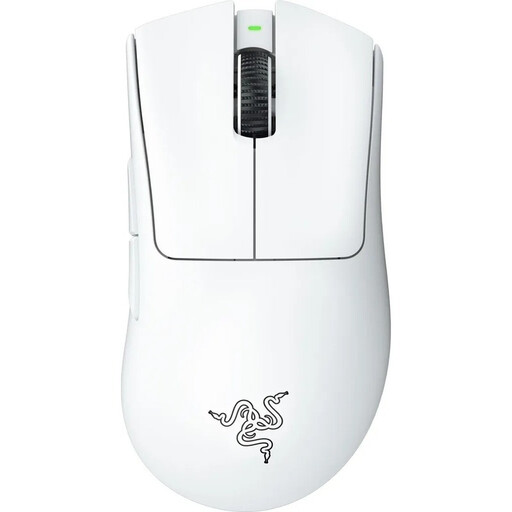
Why this product suits this profile: According to the product data, this right-handed model weighs 64 grams and combines an optical sensor with a wireless connection designed specifically for gaming.
The low weight is clearly specified. According to the product description, five DPI profiles can be switched directly on the device, with no software adjustment required for this function.
Focus Pro 30K sensor according to the product specifications, integrated memory and optical switches rated for up to 90 million clicks.
We have put together a complete, regularly updated list of products that fully meet these strict selection criteria and the safety regulations applicable in the EU.
For Bluetooth models, activate Bluetooth on your computer and start the mouse’s pairing mode. With a wireless mouse featuring a USB receiver, plug the receiver into a suitable USB port and switch on the mouse. Check beforehand whether the receiver requires USB-A or USB-C.
Battery life depends on the rechargeable battery or battery type, lighting, connection and usage. The manufacturer’s figure should therefore be treated as a guide. A mouse with USB-C can usually be recharged easily; with replaceable batteries, you can extend operating time by keeping a spare set to hand.
A quiet mouse can be more comfortable in shared workspaces, libraries or a home office. As well as the click noise, consider the sound made by the scroll wheel and when the mouse is placed down. Most importantly, the shape, size and connection should suit your workspace.