
Lieferung heute & morgen

Qualitätsgarantie

Willkommens-Angebote freischalten: KOSTENLOSE Lieferung | Bis zu 80 % RABATT | Kostenlose 30-Tage-JoyPlus-Testphase
App herunterladen
A wireless mouse keeps your desk tidy and makes using a laptop or desktop PC easier. However, not every wireless model automatically delivers a good buying experience. Small details often determine how practical a mouse is in everyday use: the wrong connection type, an unsuitable shape or battery life that falls well short of the advertising claims.
This buying guide explains which technical specifications really matter and which wireless mouse is suitable for different usage scenarios.
A high-DPI mouse can move the pointer very quickly. However, this does not automatically mean more precise control. Moderate settings are often sufficient for office work. For gaming, sensor quality, polling rate, signal stability and the mouse shape also matter.
So do not focus solely on the maximum DPI figure. Check whether the sensitivity can be adjusted in useful increments.
A radio mouse usually uses a 2.4 GHz USB receiver. This connection is straightforward for many PCs, but it occupies a USB port. A Bluetooth mouse connects directly to compatible laptops, tablets or MacBooks and does not require a separate dongle.
Models with both options offer greater flexibility. Before buying, check whether your device supports Bluetooth and which USB ports are available.
A mouse with a replaceable AA battery can work for a long time without recharging. According to the product specifications, the Logitech M190 offers up to 18 months of use with one AA battery. A rechargeable mouse, on the other hand, does not require regular battery purchases, but it must be charged via USB-C or a charging station.
Battery-life figures are generally manufacturer estimates based on specific usage conditions. Actual performance depends on factors including the polling rate, lighting, connection and daily usage time.
An ergonomic mouse should suit your hand size and preferred grip style. For medium to large hands, a full-size mouse such as the Logitech M190 may be more suitable than a particularly compact model. Right-handed users should look for a contoured shape, while symmetrical designs offer greater flexibility.
Weight is particularly relevant when working on the go and when gaming. An ultra-light gaming mouse such as the CHERRY XTRFY M64 is listed as weighing 53 grams. A heavier model, however, may sit more steadily on the desk when scrolling or carrying out long office tasks.
If you have specific ergonomic requirements, a vertical mouse or a trackball mouse may be worth considering. The Logitech MX Vertical has a 57-degree vertical design. The Logitech ERGO M575S controls the cursor with a thumb trackball, requiring less free space beside the device. These designs are not a universal solution for discomfort, so they should suit your individual hand position and working style.
Three options are particularly relevant for everyday use:
A multi-device mouse can switch between several computers. According to the product specifications, the Logitech MX Master 3S and MX Vertical support up to three devices. The HOFOTEK M311 is listed as offering Bluetooth 5.1, 2.4 GHz and switching between up to three devices.
Also check compatibility with Windows, macOS, ChromeOS, Linux, iPadOS or Android. Not every additional function is available on every operating system.
For office work, studying and working from home, an optical sensor with finely adjustable sensitivity is sufficient. According to the product description, the HOFOTEK M311 offers DPI settings from 800 to 4,000, as well as quiet clicks.
Gamers should consider the polling rate in addition to the DPI figure. This indicates how often the mouse reports its position to the computer. The CHERRY XTRFY M64 models are listed as offering up to 1,000 Hz, while the RAZER DeathAdder V3 Pro also features a wireless connection designed for gaming. For demanding games, the shape, weight, button layout and available software are also crucial.
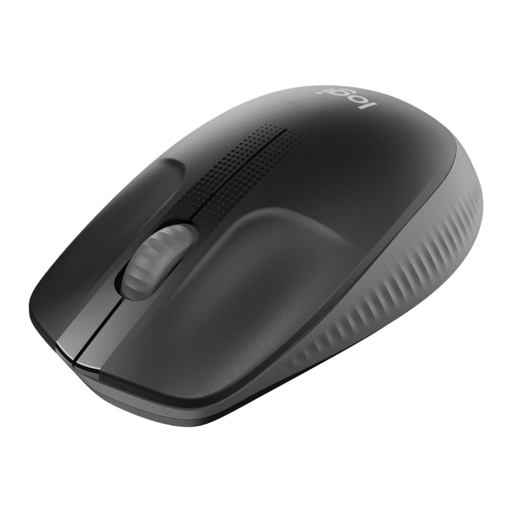
Why this product suits this profile: The full-size design is made for medium to large hands. The 2.4 GHz USB receiver and plug-and-play setup are suitable for the office, studying and everyday laptop use.
Rather than focusing on an overloaded feature set, this model concentrates on optical tracking, a stable wireless connection and a stated battery life of up to 18 months with one AA battery.
Full-size casing, 2.4 GHz connection, optical sensor and an AA battery included according to the product listing.
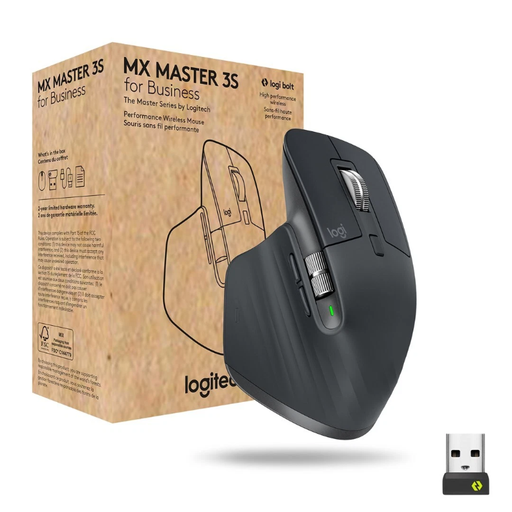
Why this product suits this profile: Designed for long working hours, large documents and multiple devices, this model offers programmable buttons, a MagSpeed scroll wheel, Bluetooth and a Logi-Bolt USB connection.
The product specifications list up to 8,000 DPI, multi-device support for up to three devices and USB-C charging instead of a permanently fitted, non-replaceable battery.
Up to 70 days of battery life according to the product specifications, seven programmable buttons and a Darkfield sensor.
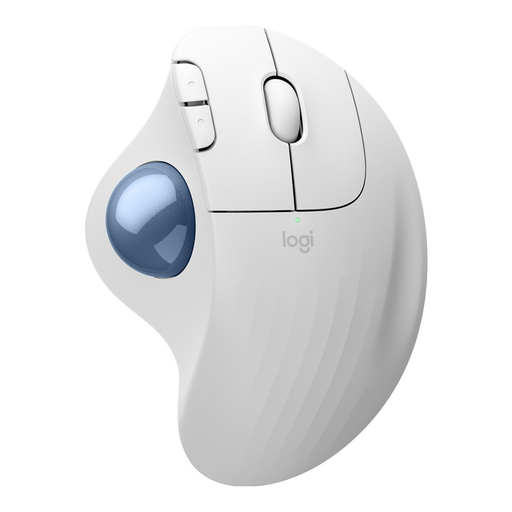
Why this product suits this profile: The trackball design requires very little space and is suitable for compact desks. Bluetooth and the Logi-Bolt receiver provide different connection options.
The cursor is moved using the thumb trackball. This means less space is needed to the side than with a traditional mouse.
Up to 18 months of battery life according to the product specifications, three customisable buttons and use on almost any surface.
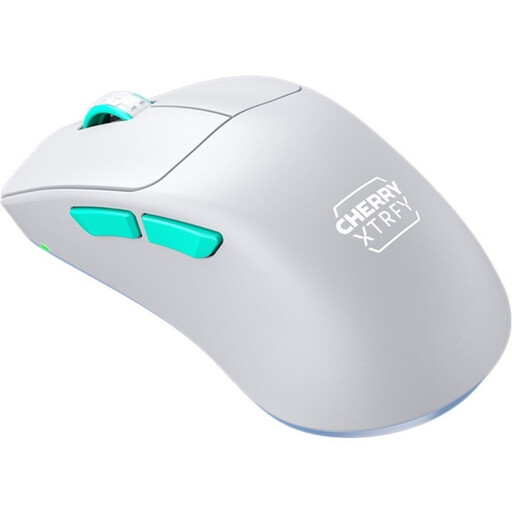
Why this product suits this profile: Weighing 53 grams, its ultra-light construction, Pixart 3395 sensor and 2.4 GHz connection are designed for PC gamers who make fast mouse movements.
In addition to the DPI figure, the weight, sensor, polling rate and battery life are clearly specified. These figures make it easier to assess the mouse for gaming, rather than relying on marketing terms alone.
Weighing 53 grams, offering up to 26,000 DPI, an adjustable polling rate of up to 1,000 Hz and a rechargeable battery according to the product specifications.
We have put together a complete, regularly updated list of products that fully meet these strict selection criteria and the safety regulations applicable in the EU.
With a radio mouse, plug in the USB receiver and switch on the mouse. A Bluetooth mouse is paired through the laptop’s Bluetooth settings. With a multi-device mouse, you may need to press and hold a connection button for the desired device slot.
This depends on the model and how it is used. For example, the products mentioned are listed as offering up to 70 days for certain Logitech models and up to 75 hours for the CHERRY XTRFY M64. Battery-powered models may offer significantly longer intervals between battery changes, according to the product specifications. Battery-life figures should therefore always be considered alongside the charging method and usage scenario.
Yes, especially when several people work in the same room or when you want to avoid background noise during video conferences. The HOFOTEK M311 is described as offering quiet clicks. The key question is whether only the main buttons are quieter, or whether the scroll wheel and other controls have also been designed to reduce noise. Check this information in the detailed technical product specifications.