
Lieferung heute & morgen

Qualitätsgarantie

Willkommens-Angebote freischalten: KOSTENLOSE Lieferung | Bis zu 80 % RABATT | Kostenlose 30-Tage-JoyPlus-Testphase
App herunterladen
A wireless mouse keeps your desk tidy and can be used flexibly with a PC, Mac, tablet or notebook. However, not every wireless mouse automatically creates a better workspace or delivers more precise gaming. Marketing claims such as high DPI values, long battery life or “ultra-lightweight” need to be considered in the context of how the mouse will actually be used.
The Joybuy Product Recommendation Officer selection is therefore based on clear, practical criteria: hand shape, connection, sensor, polling rate, weight, charging port and software support.
A high-DPI mouse can move the cursor particularly quickly. For office work, however, much lower settings are often used, while gamers adjust sensitivity to suit the game, screen resolution and personal style. What matters is whether the sensor detects movement smoothly and whether DPI levels can be saved or adjusted using software.
A sensor with 24,000 or 44,000 DPI should therefore not be the sole reason for choosing a mouse. Also check the sensor type, tracking speed and supported connection settings.
A gaming mouse with an 8K polling rate transmits position data up to 8,000 times per second. This can be relevant for fast movements and high-performance gaming hardware. At the same time, this setting requires more processing power and can reduce battery life. For word processing, spreadsheets or web browsing, a lower polling rate is sufficient in many cases.
It is also important to distinguish between 8K DPI and 8K polling rate: DPI describes the sensitivity of the sensor, while the polling rate describes how frequently data is transmitted.
A Bluetooth mouse does not require a separate receiver, provided that the device supports Bluetooth. This is practical for MacBooks, tablets and devices with limited ports. A 2.4 GHz wireless connection with a USB receiver, on the other hand, can offer a direct, low-latency connection for gaming or desktop PCs.
A tri-mode mouse generally combines Bluetooth, 2.4 GHz wireless and a USB cable. Before buying, check whether the receiver supplied is a USB-A or USB-C version and whether the desired software is available for macOS.
An ergonomic shape needs to suit your hand size and grip style. Right-handed users often benefit from a pronounced thumb rest, while symmetrical models may be suitable for both left- and right-handed users. For long periods of office work, a natural tilt angle, an easily accessible scroll wheel and buttons that do not require excessive pressure are important.
Weight depends on how the mouse will be used:
A lightweight gaming mouse is not automatically more comfortable for every user. If you frequently switch between documents, spreadsheets and multiple devices, you may benefit from a larger mouse with additional features.
Pay attention to the combination of:
With a USB-C mouse, check whether the charging cable is included. According to the product details, the Logitech MX Master 4 does not come with a charging cable. A fully charged mouse also does not guarantee a specific actual runtime, as the polling rate, lighting and frequency of use all affect power consumption.
For everyday use, sensors with moderate sensitivity are sufficient. Models with 8,000 DPI or more offer additional headroom and can also be used on more demanding surfaces. Battery-life figures are provided by the manufacturer and should be treated as a guide.
For gaming models, the wireless technology, polling rate and weight are also relevant. An 8K mode should be viewed as an optional feature, not a necessary setting for every application.
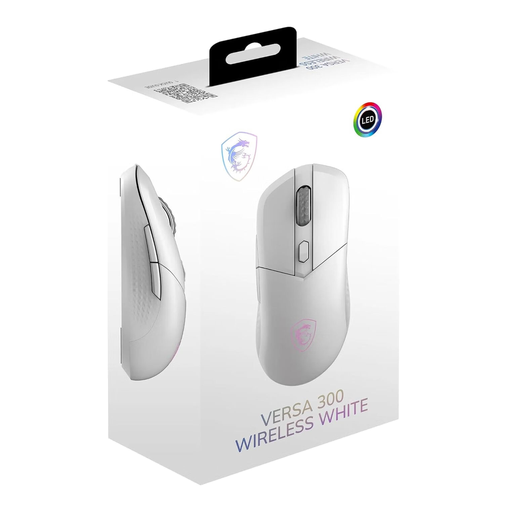
Why this product suits this profile: This mouse combines office and gaming features with three connection options and a weight of 60 grams. It is therefore suitable for users who want one device to cover a range of scenarios.
The 8 selectable DPI levels from 400 to 8,000, together with 2.4 GHz, Bluetooth 5.3 and USB-C modes, means your choice is not based on a single marketing figure.
Symmetrical design, 60-gram weight, up to 50 hours of battery life according to the manufacturer and a USB-C cable included.
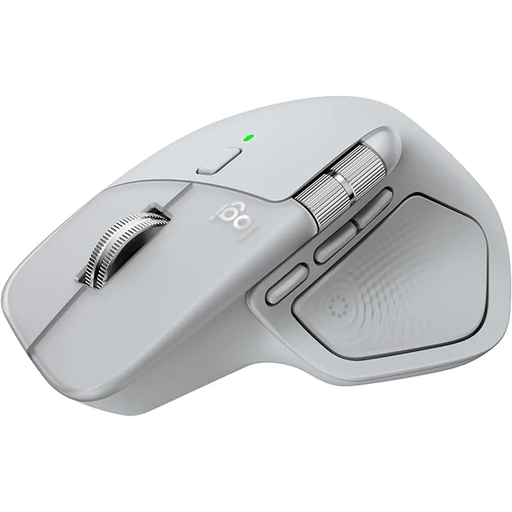
Why this product suits this profile: The larger right-handed design, thumb wheel and MagSpeed scroll wheel are aimed at office, home-office and multi-device users who work for long periods.
The specification is not limited to DPI: Bluetooth, the Logi-Bolt USB-C receiver, customisable buttons and the tilt angle all matter to your workflow.
8,000-DPI sensor, connection to up to three devices and a manufacturer-stated battery life of up to 70 days.
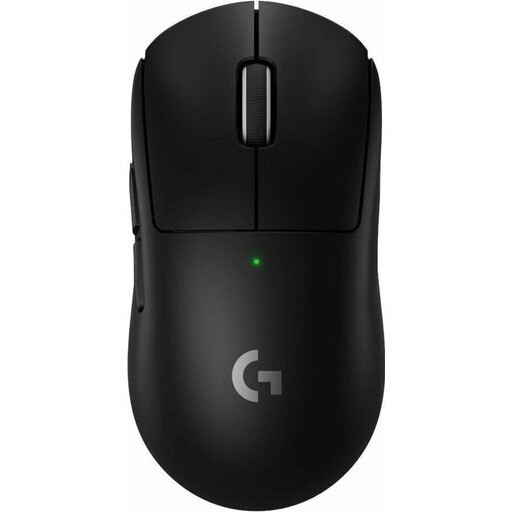
Why this product suits this profile: For ambitious PC and Mac gamers, low weight, USB-C charging and an optional 8K polling rate are more important than additional office features.
The product details list the polling rate, sensor resolution, weight and battery life separately. This makes it easier to assess DPI and transmission rate appropriately.
60-gram weight, HERO-2 sensor with up to 44,000 DPI, USB-C charging and up to 95 hours of battery life according to the manufacturer.
We have put together a complete, regularly updated list of products that fully meet these strict selection criteria and the safety regulations applicable in the EU.
With a wireless mouse, connect the USB receiver and switch on the mouse. With a Bluetooth mouse, open your computer’s Bluetooth settings and start the pairing process. A tri-mode mouse usually has a switch for Bluetooth, 2.4 GHz and wired USB-C mode. Check beforehand that the receiver is compatible with the port available on your device.
Battery life depends on the model, lighting, polling rate and usage. Manufacturer figures of up to 50, 70 or 95 hours, or several weeks, are guide values measured under specific conditions. For predictable use, a model with USB-C charging and wired operation while charging is recommended.
Yes, provided the connection, sensor and polling rate are suitable for the game. For competitive gaming, 2.4 GHz wireless and an optional 8K polling rate may be appealing. For office games, strategy games or casual gaming, Bluetooth and a lower polling rate are often sufficient. The right shape and a manageable weight remain crucial regardless of how the mouse is used.