
Lieferung heute & morgen

Qualitätsgarantie

Willkommens-Angebote freischalten: KOSTENLOSE Lieferung | Bis zu 80 % RABATT | Kostenlose 30-Tage-JoyPlus-Testphase
App herunterladen
A wireless mouse helps keep your desk tidy and makes working on a laptop, PC or tablet easier. However, not every model suits every workspace. Small housings can become uncomfortable during extended use, Bluetooth does not work with every older device, and supposedly long battery life depends heavily on the connection and how the mouse is used.
This buying guide explains which specifications really matter before purchasing a Bluetooth mouse, wireless mouse or radio mouse.
A compact mouse is easy to carry and fits neatly into a laptop bag. For larger hands, however, a short or low-profile housing can lead to an uncomfortable hand position during extended use. Mini models are therefore better suited to travelling, shorter work sessions or smaller hands.
Pay attention to the stated dimensions and shape. An ergonomic mouse does not have to be large, but it should suit your hand size and preferred grip style. Symmetrical models are practical for left- and right-handed users, while more heavily contoured housings are often designed for one hand only.
A wireless mouse with a 2.4 GHz connection usually requires a USB nano receiver. This enables straightforward plug-and-play setup, but requires a free USB-A port. On a slim laptop with limited ports, a Bluetooth mouse may be more practical because you do not need to plug in a receiver.
You should therefore check the following before buying:
Manufacturer claims such as “up to 12 or 24 months” refer to specific usage profiles. Power-saving mode, connection technology, sensor and daily operating time all affect actual battery life. With battery-powered models, you should also check the battery type. Rechargeable mice eliminate the need to regularly buy AA or AAA batteries, but they do need to be charged in good time.
A Bluetooth mouse is suitable for laptops, tablets and mobile workspaces when the target device supports Bluetooth. Pairing is carried out through the system settings. A 2.4 GHz wireless mouse, on the other hand, connects via a USB receiver and is often ready to use quickly.
A dual-mode mouse combines Bluetooth and wireless connectivity. It can be useful if you switch between a laptop without a free USB port and a desktop PC. For multi-device models, you should also check how many devices can be stored and whether switching is done using a button.
The DPI rating describes pointer sensitivity. Moderate settings such as 800 to 1600 DPI are often sufficient for office work. Higher ranges are useful if you want to adjust pointer speed for multiple monitors, creative applications or particular workflows.
The maximum DPI figure is not the only important factor. Check whether the sensor works on your desk surface. Glass, highly reflective surfaces or uneven materials can affect motion tracking with optical sensors. A mouse mat can improve tracking.
A quiet mouse reduces clicking noise and is suitable for open-plan offices, libraries, meetings or working from home in shared spaces. Claims such as “up to 90 per cent less clicking noise” should be understood as manufacturer specifications and generally refer to a comparison with conventional models from the same brand.
Additional side buttons can be useful for browser navigation, documents or frequently used shortcuts. For simple tasks, however, a PC mouse with three buttons and a scroll wheel is often sufficient.
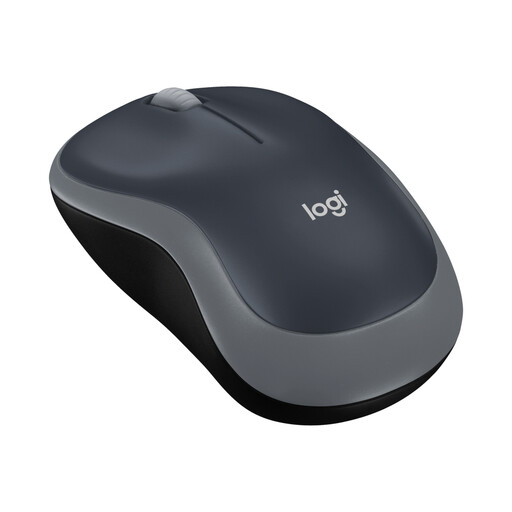
Why this product suits the profile: The 2.4 GHz connection with nano receiver and straightforward setup are ideal for everyday tasks on a laptop or PC.
The dimensions of 99 × 60 × 39 mm show that this is a compact model for small to medium-sized hands, rather than a full-sized mouse designed for long-term ergonomic comfort.
Optical sensor with 1000 DPI, symmetrical shape, up to 10 m range and a stated battery life of up to 12 months.
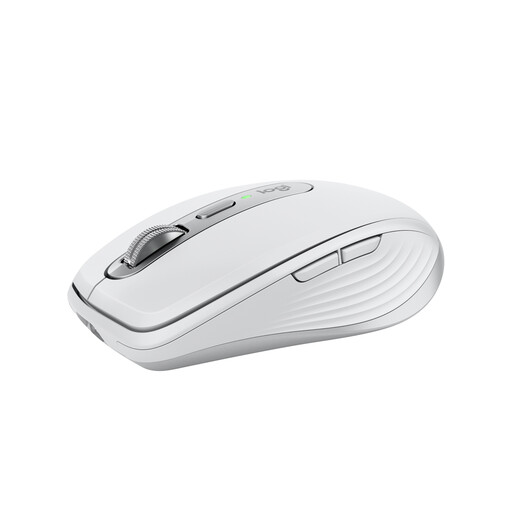
Why this product suits the profile: This model combines USB-C charging, customisable buttons and support for up to three devices, making it suitable for more demanding office and laptop setups.
The rechargeable battery eliminates the need to regularly buy disposable batteries. However, the compact shape remains an important consideration for your hand size.
Darkfield sensor with up to 8000 DPI, MagSpeed scroll wheel, quiet clicks, Bluetooth and a stated battery life of up to 70 days.
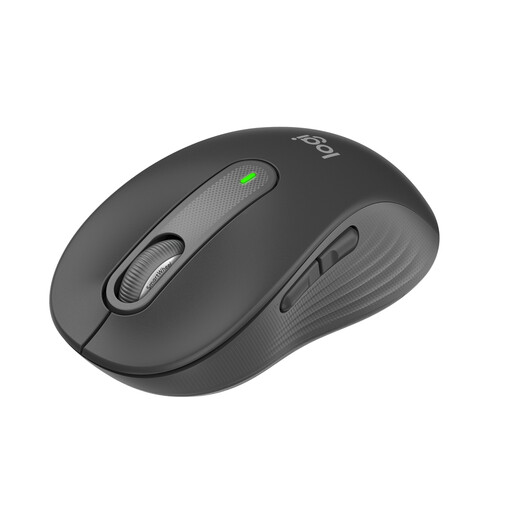
Why this product suits the profile: For office work, working from home and longer periods of use, the palm rest, quiet clicks and additional side buttons take centre stage.
This version is designed for small to medium-sized hands. This makes it easier to assess the fit before buying, rather than relying solely on the word “ergonomic”.
Bluetooth and Logi Bolt, SmartWheel scroll wheel, five buttons and a stated battery life of up to 24 months.
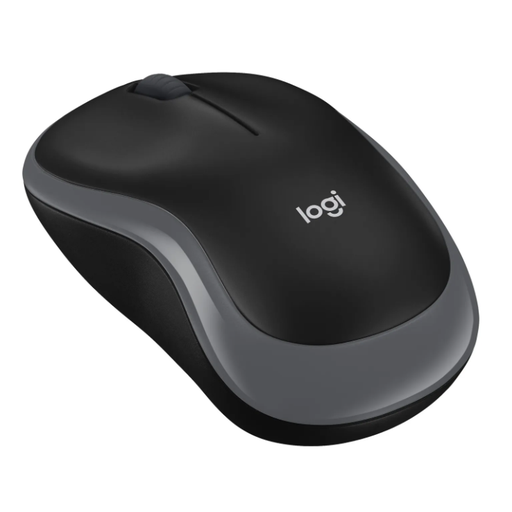
Why this product suits the profile: The mini format is designed for travelling, mobile workspaces and small laptop compartments.
At 81.9 × 49.4 × 31.8 mm, this mouse is clearly a mini model. For larger hands and long work sessions, you should choose a larger housing.
USB receiver with storage compartment, 1000 DPI, symmetrical shape and a stated battery life of up to six months with one AAA battery.
We have put together a complete, regularly updated list of products that fully meet these strict selection criteria and the safety regulations applicable in the EU.
With a Bluetooth mouse, activate Bluetooth in your device settings, switch on the mouse and select the model shown. With a wireless mouse using a receiver, plug the USB receiver into a suitable USB port. Many models then connect automatically.
Depending on the model, battery-powered mice can run for several months, up to two years or longer. With a mouse offering long battery life, usage, power-saving mode and connection type all affect the actual duration. Rechargeable models are charged via USB and do not require replacement batteries.
It depends on your device. Bluetooth leaves a USB port free and works with many laptops and tablets. A 2.4 GHz wireless mouse is practical when a USB-A port is available and you want straightforward setup. For several devices, a multi-device mouse with both connection types may be a sensible choice.