
Lieferung heute & morgen

Qualitätsgarantie

Willkommens-Angebote freischalten: KOSTENLOSE Lieferung | Bis zu 80 % RABATT | Kostenlose 30-Tage-JoyPlus-Testphase
App herunterladen
A wireless mouse can keep your desk tidier and make it easier to switch between a laptop, PC and Mac. However, wireless mice vary considerably in connectivity, sensor, button layout and power supply. A high DPI figure alone, for example, says little about how practical a mouse is for everyday use.
Before buying, you should pay particular attention to three common pitfalls:
A Bluetooth mouse can usually be paired with compatible laptops, tablets or Macs without an additional receiver. This saves a USB port. For desktop PCs without Bluetooth, a 2.4 GHz receiver is practical instead. This connection is often established directly via a nano receiver.
A multi-device mouse can be paired with several devices. Check how many devices it supports and how switching between them works. On some models, a button on the underside is all that is needed; others offer software-assisted switching.
A mouse with three operating modes usually combines 2.4 GHz wireless, Bluetooth and USB-C wired operation. This is useful if you switch between gaming, working from home and several devices. Also check whether the configuration software is available for Windows and macOS. According to the product details, the software for the ET model is intended for Windows only and can only be used in wired mode.
DPI describes how many pixels the mouse pointer moves across the screen for a given physical movement. Moderate settings are often sufficient for classic office tasks. Creative applications benefit from finely tuned sensitivity, while gamers should also consider polling rate, latency and smooth tracking.
A gaming mouse with 8,000, 24,000 or 44,000 DPI offers a wide adjustment range. However, this does not automatically mean greater precision in every situation. The following details are more relevant when choosing a mouse:
A rechargeable mouse avoids the need to replace batteries regularly. Important factors include the stated battery life, charging port and whether you can continue working while the mouse is charging. USB-C is convenient, but check whether a charging cable is included.
The Logitech MX Master 4 is stated to offer up to 70 days of battery life; according to the product data, a one-minute charge should provide up to three hours of use. However, the supplied USB-C cable is not included with the variants mentioned. The Logitech G PRO X SUPERLIGHT 2 is specified with up to 95 hours of battery life and USB-C charging.
The usual safety rules apply to lithium-ion batteries: do not open them, do not expose them to excessive heat and only use suitable or certified charging sources. A mouse should also feel comfortable in your hand. Weight, width, thumb rest and button position are practical factors that product images alone cannot fully show.
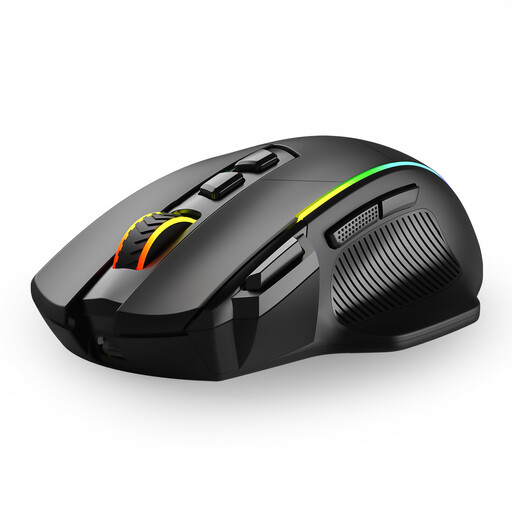
Why this product suits the profile: This mouse combines 2.4 GHz wireless, Bluetooth and USB-C wired operation. With six DPI levels up to 10,000 and eight programmable buttons, it is suitable for office tasks and occasional gaming.
The three modes reduce reliance on a single connection type. Before buying, however, note that the button programming is stated to work only under Windows in wired mode.
Tri-mode connectivity, USB-C charging, six DPI levels and eight programmable buttons.
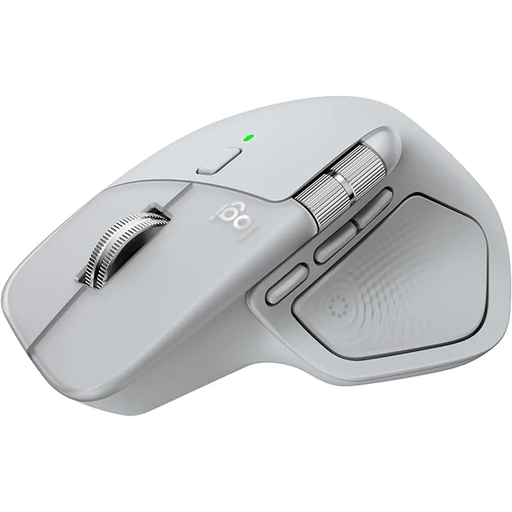
Why this product suits the profile: With its natural tilt angle, thumb wheel and seven controls, this mouse is aimed at home workers, office staff and creatives who frequently scroll and switch between applications.
The specifications list Bluetooth and a Logi-Bolt USB-C receiver. This lets you choose the connection that best suits your device. The dimensions of approximately 126 × 85 × 51 mm should be suitable for your hand size.
8K DPI sensor, multi-device use for up to three devices, USB-C charging and a stated battery life of up to 70 days.
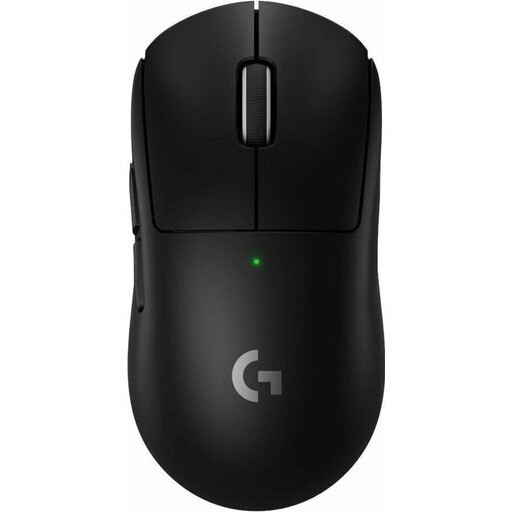
Why this product suits the profile: Weighing 60 g and featuring a HERO-2 sensor, up to 44,000 DPI and a stated polling rate of 8,000 Hz, this model is aimed at users who prioritise low weight and fast inputs.
The technical specifications are clearly stated. Buyers should nevertheless check whether five programmable buttons are sufficient and whether the USB receiver is available on the intended PC or Mac.
60 g weight, USB-C charging, up to 95 hours of stated battery life and compatibility with PC and Mac.
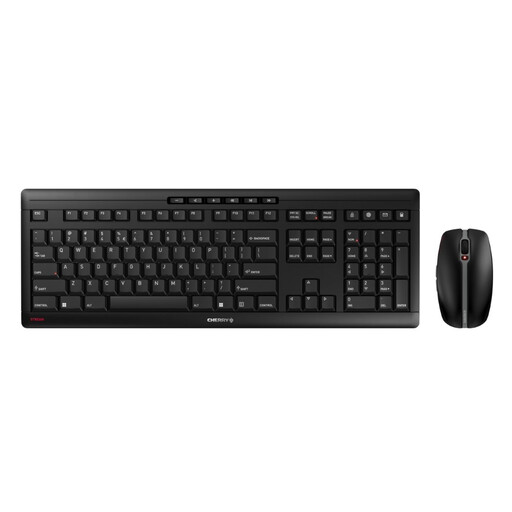
Why this product suits the profile: This set combines a keyboard and mouse via a 2.4 GHz receiver. It is suitable for workstations that need a coordinated input set with USB-C charging.
The mouse has three switchable DPI levels of 1,000, 1,600 and 2,400. This prioritises straightforward office functionality rather than maximum speed.
USB-C rechargeable NiMH batteries, six mouse buttons, quiet clicks and 2.4 GHz connectivity with AES-128 encryption according to the product details.
We have put together a complete, regularly updated list of products that fully meet these strict selection criteria and the safety regulations applicable in the EU.
For Bluetooth models, open your computer’s Bluetooth settings and select the mouse to pair it. For 2.4 GHz models, plug in the USB receiver and switch on the mouse. If a device only has USB-C ports, you will need a suitable receiver or a mouse with a USB-C connection. Some models also support wired operation.
Battery life depends on the sensor, lighting, polling rate and usage. Manufacturer claims such as “up to 50”, “70” or “95 hours”, or several weeks, are comparison figures measured under specific conditions. RGB lighting and high polling rates can increase power consumption. So also check whether the mouse can be used while charging.
No. DPI primarily refers to sensitivity. For precise work, smooth tracking, a suitable surface, a stable connection and finely adjustable software are important. Choose the DPI setting based on your screen resolution and personal working style, rather than simply choosing the highest advertised figure.