
Lieferung heute & morgen

Qualitätsgarantie

Willkommens-Angebote freischalten: KOSTENLOSE Lieferung | Bis zu 80 % RABATT | Kostenlose 30-Tage-JoyPlus-Testphase
App herunterladen
A wireless mouse keeps your desk tidy and can be used flexibly with a laptop, PC or tablet. However, not every model leads to the right buying decision. Features that have little relevance in everyday use are often promoted, while important details such as hand size, connection technology and power supply are overlooked.
Descriptions such as quiet mouse, Silent Click or SilentTouch usually refer to the main buttons. The scroll wheel or middle mouse button may still produce audible sounds. For example, the Logitech M220 is advertised as reducing click noise by more than 90%; according to the product description, this does not automatically apply to every function.
If you want to use the mouse in a library, an open-plan office or late in the evening while working from home, you should therefore consider click and scrolling noise separately.
A high sensor resolution is not a general indicator of quality. Moderate DPI settings are often sufficient for word processing, web research and spreadsheets. Higher values are more relevant for certain working styles, large screens or gaming. Consistent tracking, a suitable pointer speed and the surface on which the mouse is used are also important.
A Bluetooth mouse does not require a USB receiver, but it does require a compatible Bluetooth module. A wireless mouse with a 2.4 GHz nano receiver, on the other hand, needs a free USB-A port. Modern ultrabooks and tablets may not have one. Multi-device models should not only support several devices, but also have an easily accessible switch.
Windows, macOS, ChromeOS, Linux, iPadOS and Android have different requirements depending on the model. You should therefore check the following:
An ergonomic mouse should suit your individual hand position without dictating how you move or hold it. Longer and wider housings are usually easier to control for larger hands. Left-handed users should look for a symmetrical shape or a model specifically designed for left-handed use.
According to the product data, the Logitech Signature M650 L is designed for large hands and right-handed users. The M650 L Left version, on the other hand, is designed for large left hands. Compact models such as the Logitech Pebble Mouse 2 or the M240 are better suited to mobile workspaces and smaller hands.
Battery-powered models usually require one AA battery. This reduces charging breaks, but creates replacement costs over time. Rechargeable models are charged via USB-C and do not require disposable batteries, but they do need to be connected in good time.
Pay attention to the specific battery-life information: the Logitech M220 and M240 are stated to last for up to 18 months according to the product description, while the Signature M650 L lasts for up to 24 months. The MX Master models use an integrated battery and are stated to offer up to 70 days of battery life. Such figures depend on usage, settings and environmental conditions.

Why this product suits the profile: This mouse combines 2.4 GHz wireless and Bluetooth 5.1, supports up to three devices and offers several DPI settings for office work, studying and working on the move.
The connection technology is clearly specified, and the DPI selection ranges from 800 to 4000. This means you do not have to make your decision based solely on the highest maximum figure.
62 g weight, Silent Touch design and connections for three devices according to the product data.

Why this product suits the profile: Developers, creatives and heavy users get an 8,000 DPI sensor, programmable buttons and a shape designed for right-handed users.
The product data lists Bluetooth, three devices, USB-C charging and Quiet Click separately. This makes it easier to check whether the features suit the way you work.
MagSpeed scroll wheel, seven programmable buttons and up to 70 days of battery life according to the supplier.
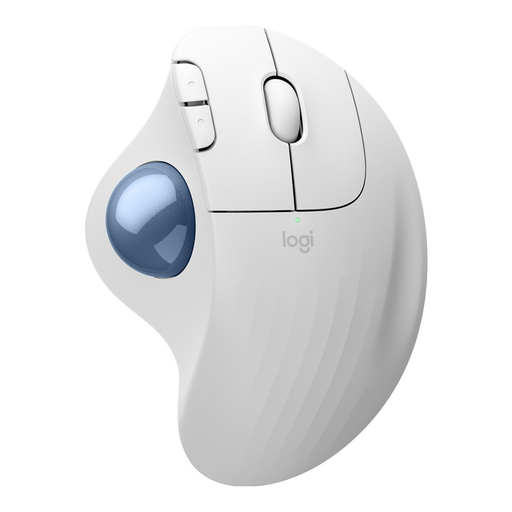
Why this product suits the profile: The trackball is suitable for small work surfaces or users who prefer to control the cursor with their thumb.
The design is not marketed as a standard mouse, but is explicitly identified as a trackball. This lets you check before buying whether this type of control is right for you.
Bluetooth and Logi-Bolt receiver, three customisable buttons and up to 18 months of battery life according to the product information.
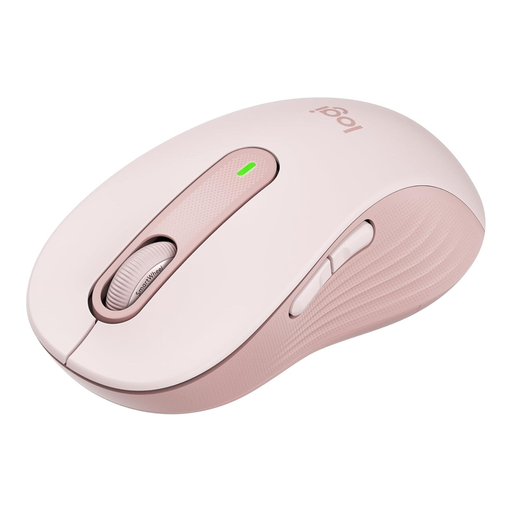
Why this product suits the profile: This model is designed for large hands and right-handed users, and is aimed at office and home-working users who work with lots of documents and web pages.
The size, hand orientation and power supply are clearly specified. This helps you avoid choosing a compact model for a large hand.
SmartWheel, customisable side buttons and up to 24 months with one AA battery according to the manufacturer's information.
We have compiled a complete, regularly updated list of products that fully meet these strict selection criteria and the safety regulations applicable in the EU.
With Bluetooth models, activate Bluetooth on your computer, switch on the mouse and select it from the device list. With a 2.4 GHz model, connect the USB receiver and switch on the mouse. Beforehand, check whether your device requires USB-A or only has USB-C ports.
This depends on the battery, rechargeable battery, usage and power-saving functions. According to manufacturers, AA models can last for around 18 to 24 months. Rechargeable models are often advertised with a battery life of several weeks. Actual battery life may vary.
For gaming, tracking rate, sensor performance, weight, number of buttons and battery life are all important in addition to the wireless technology. A traditional office mouse is designed for text work and browsing. If you are looking for a gaming mouse, choose a model with an explicitly stated gaming function, suitable software and an appropriate wireless connection.