
Lieferung heute & morgen

Qualitätsgarantie

Willkommens-Angebote freischalten: KOSTENLOSE Lieferung | Bis zu 80 % RABATT | Kostenlose 30-Tage-JoyPlus-Testphase
App herunterladen
A clean, cable-free desk isn't just about aesthetics; it's about efficiency. A wireless mouse is often the first step towards better organisation and flexibility. But the market is crowded and full of marketing promises that often lead to buyer's remorse. Before you invest, it's crucial to understand the common pitfalls that cost users both money and frustration.
As your Joybuy Product Recommendation Officer, I'm here to help you navigate the jungle of information. We'll focus on the facts that truly matter, so you can make a well-informed decision.
Many products advertise impressive numbers and features, but not all of them are relevant for daily use. Here are three common issues that lead to dissatisfaction:
To avoid these traps, you should focus on three core aspects. These define the performance and usability of a wireless mouse in everyday life.
The choice of connection technology is fundamental and depends on your use case.
DPI (Dots Per Inch) indicates how sensitive the mouse is to movement. A higher value means the cursor travels further across the screen with the same hand motion.
The days of constantly changing batteries are largely over. A rechargeable mouse is now the standard for convenience and sustainability.
Look for a USB-C port. This modern standard not only enables fast charging but is also reversible. Many models offer a quick-charge feature where a few minutes of charging provide several hours of use. A long battery life of several weeks or even months per charge ensures uninterrupted work.
Based on these objective criteria, we have identified a few models that are particularly well-suited for specific user groups.
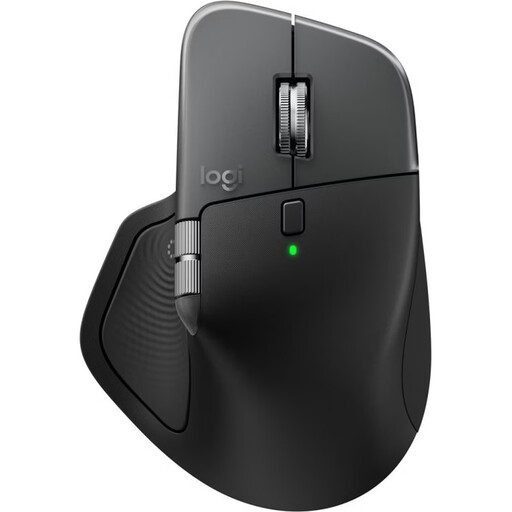
Why This Fits Their Persona: Designed for users who seamlessly switch between multiple devices (e.g., MacBook and iPad). The ergonomic design supports the hand during long workdays, while the MagSpeed scroll wheel accelerates navigation through long documents or lines of code. An ideal mouse for Mac users in creative or business fields.
This mouse focuses on productivity-enhancing features like customisable haptic feedback and the Actions Ring instead of distracting RGB lighting. Its ergonomics are functional and designed for comfort, not just for show.
The 8K DPI sensor works even on glass (min. 4 mm thick). The multi-device function for up to 3 devices and a long battery life of up to 70 days are clear advantages for power users.
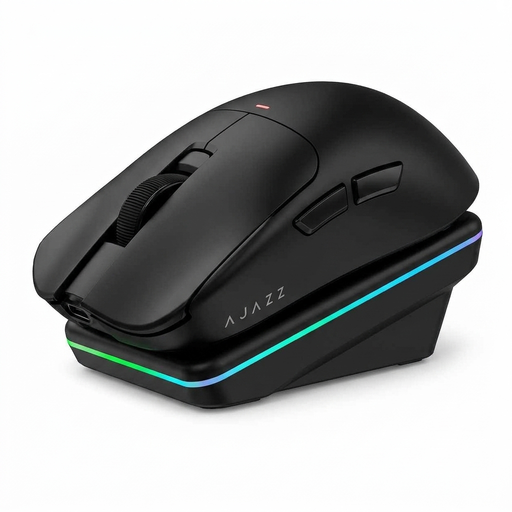
Why This Fits Their Persona: For gamers seeking a wireless gaming mouse with low latency and high precision. The light weight, high-resolution sensor, and customisable polling rate are crucial for fast reactions in games like CS2 or Valorant. The tri-mode connectivity also offers flexibility.
This mouse delivers the specs relevant to gaming (high DPI, low latency) without compromise. The AI features are an added bonus for productivity, but the core focus is on gaming performance.
Equipped with a PAW3311 sensor with up to 24,000 DPI and a 1000 Hz polling rate. The low weight of just 63 grams and the magnetic charging dock are clear advantages for intense gaming sessions.
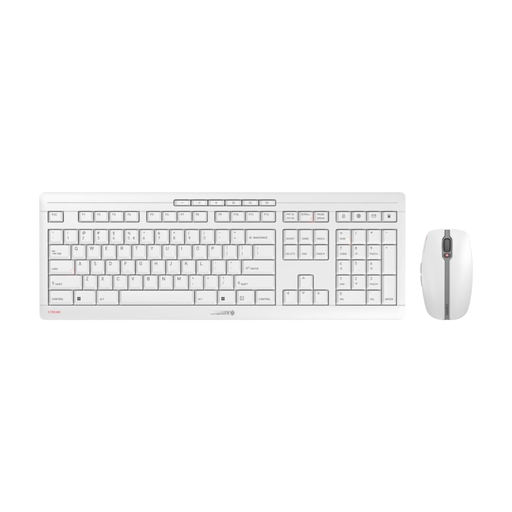
Why This Fits Their Persona: This wireless keyboard and mouse set is the ideal solution for a tidy and functional workspace. The quiet keys and mouse clicks won't disturb anyone in the office or at home. The reliable 2.4 GHz connection and long battery life ensure smooth operation.
As an all-in-one solution, this set avoids compatibility issues between the keyboard and mouse. It focuses on the essentials: stability, quiet operation, and a reliable, encrypted connection, rather than unnecessary gaming features.
The keyboard's CHERRY SX scissor mechanism provides a precise and quiet typing experience. Both devices are rechargeable via USB-C and offer secure AES-128 encryption.
We have compiled a complete, up-to-date list of products that fully meet these strict selection criteria and German safety regulations.
1. How do I connect a wireless mouse without a USB receiver? A mouse without a USB receiver (dongle) typically uses Bluetooth to connect. To pair it, enable Bluetooth on your computer or tablet. Put the mouse into pairing mode (usually by long-pressing a dedicated button). The mouse should then appear in the list of available Bluetooth devices on your screen, where you can select it.
2. How long does the battery of a rechargeable mouse last? Battery life varies greatly depending on the model and usage. Efficient office mice can last up to 70 days or more on a single charge. Gaming mice, especially with RGB lighting and a high polling rate enabled, often have a shorter battery life of 40 to 100 hours. However, most modern mice can be quickly recharged via USB-C.
3. Does every wireless mouse work with a Mac? Most wireless mice are compatible with macOS, especially those that use a standard Bluetooth or 2.4 GHz connection. However, for full functionality, such as programmable buttons or special gestures, manufacturer-specific software (e.g., Logi Options+) is often required. Always check the manufacturer's system requirements before purchasing to ensure the software is available for your version of macOS. There are also special mouse for Mac models that are optimally tailored to the Apple ecosystem.