
Lieferung heute & morgen

Qualitätsgarantie

Willkommens-Angebote freischalten: KOSTENLOSE Lieferung | Bis zu 80 % RABATT | Kostenlose 30-Tage-JoyPlus-Testphase
App herunterladen
Choosing a new wireless mouse can quickly become overwhelming. Manufacturers advertise high DPI counts, multi-device capabilities, and extreme battery life. However, not every advertised feature is relevant for daily use or delivers on its promise. Many users invest in expensive models whose potential they never fully utilise, or opt for budget-friendly alternatives that start to fail after a short time.
This guide will help you understand the key criteria and avoid common purchasing pitfalls. We focus on the technical features that truly make a difference and show you how to find a mouse for your PC or laptop that perfectly matches your needs.
Before we dive into the technical details, let's examine three common marketing promises that often lead to disappointment:
To make an informed decision, you should focus on three core aspects. These determine the performance, comfort, and versatility of your future wireless mouse.
The type of wireless connection is a fundamental choice. Both technologies have specific advantages and disadvantages.
The sensor is the heart of every mouse. Two values are important here:
A mouse is often used for hours on end, so its fit is crucial. An ergonomic mouse is shaped to support a natural hand posture and reduce strain on the wrist and arm.
Based on the criteria above, we have identified a few models that represent thoughtful solutions for specific user profiles.
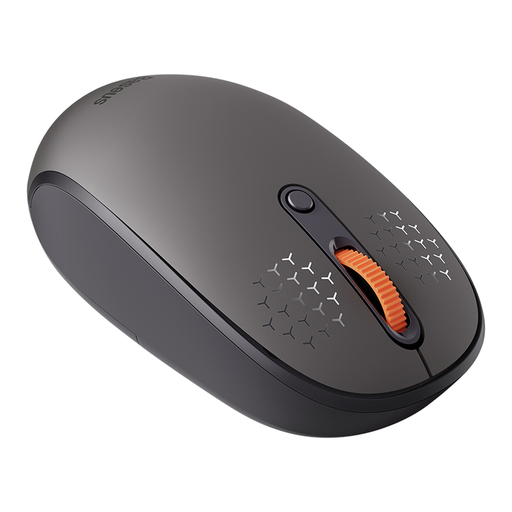
Why This Fits Their Persona: This model is ideal for users looking for a flexible and straightforward mouse for daily use across various devices like laptops, tablets, or PCs, without breaking the bank.
It solves the problem of cumbersome multi-device use with a simple switching function for up to three devices (via 2.4 GHz and two Bluetooth channels) and offers a sensitivity of up to 1600 DPI, which is perfectly adequate for everyday tasks.
Tri-mode connectivity for three devices and silent clicks for a quiet work environment.
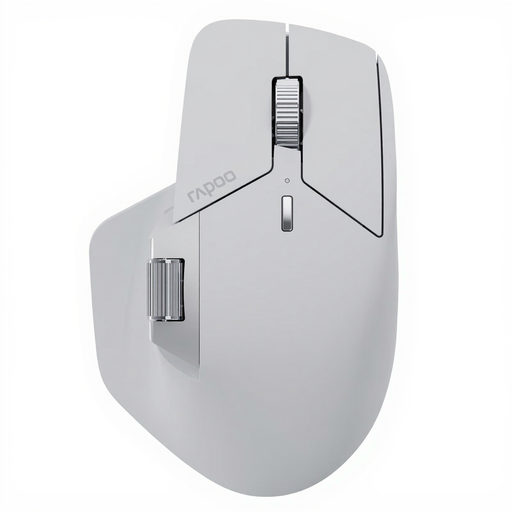
Why This Fits Their Persona: Designed for professional users who need to switch seamlessly between multiple computers, tablets, and operating systems. This mouse is engineered for maximum productivity and complex workflows.
It delivers on the promise of seamless multi-device control with M+ Cross-Computer Technology, which enables cursor flow and even file transfers between screens. The long battery life of up to 120 days, according to the manufacturer, also avoids the pitfall of frequent charging interruptions.
M+ Cross-Computer Technology, connectivity for up to 7 devices, and 11 programmable buttons for workflow optimisation.
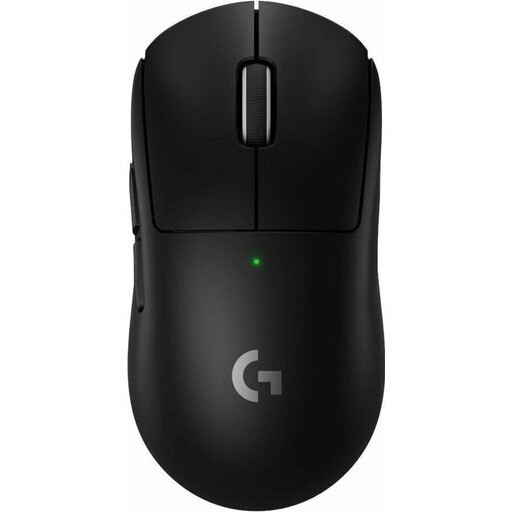
Why This Fits Their Persona: This lightweight mouse was developed in collaboration with esports professionals. It is designed for maximum speed, precision, and reliability in competitive play, where every millisecond and every movement counts.
Here, the high DPI value isn't just marketing; it's part of a complete package featuring the precise HERO 2 sensor, a very high 8 kHz polling rate, and an extremely low weight. This combination justifies the specifications for demanding gaming use, avoiding the trap of paying for performance you won't use.
Extremely low weight of 60g, professional-grade LIGHTSPEED wireless technology, and a high-precision HERO 2 sensor.
We have compiled a complete, up-to-date list of products that fully meet these strict selection criteria and safety regulations.
Battery life varies widely depending on the model and usage. Simple office mice with AA batteries can last up to 12 months or more, according to manufacturers. Rechargeable, high-performance gaming mice with high polling rates and lighting often provide 70 to 180 hours of use per charge. The actual duration depends on usage intensity, connection type, and enabled features.
The main difference lies in the connection method. A 2.4 GHz mouse requires a dedicated USB receiver and offers a very stable, responsive connection, making it ideal for gaming. A Bluetooth mouse connects directly to the device, saving a USB port, and is convenient for mobile use with laptops and tablets.
For most users working on standard resolution monitors (1080p or 1440p), a high DPI value is not necessary. A range of 800 to 1,600 DPI provides a precise and well-controlled cursor speed. Higher DPI values are only useful in specific scenarios, such as for gamers who need to execute very fast turns in-game, or for users with very large 4K/8K monitors.