
Lieferung heute & morgen

Qualitätsgarantie

Willkommens-Angebote freischalten: KOSTENLOSE Lieferung | Bis zu 80 % RABATT | Kostenlose 30-Tage-JoyPlus-Testphase
App herunterladen
A wireless mouse keeps your workspace tidy and is often more practical than a wired model when you are out and about. However, technical terms such as DPI, polling rate and multi-device connectivity do not automatically lead to the right buying decision. What matters is whether the connection, shape, power supply and features suit your everyday needs.
DPI describes how far the mouse pointer moves in response to a particular movement. A high value is mainly useful for users who want fast pointer movement or fine adjustments. Lower settings are often sufficient for office work or browsing the web. However, a high DPI figure alone says nothing about how suitable the sensor is for everyday use.
A Bluetooth mouse does not require a spare USB-A port, but it does require a compatible Bluetooth module. A mouse with a USB receiver usually works as soon as you plug in the receiver, but it does take up a port. For laptops with limited connectivity, a multi-mode mouse that combines Bluetooth and 2.4 GHz wireless may be a sensible choice.
Also check whether the receiver can be stored securely inside the mouse. Losing a nano receiver can make using a basic wireless mouse considerably more difficult.
With a rechargeable mouse, battery life is affected by the connection mode, how often it is used and, where applicable, the lighting. Models with AA batteries often quote a runtime of several months or more, while gaming mice usually need charging more frequently. Figures such as ‘up to’ are guidance values, not a guarantee for every use case.
For a desktop PC, a wireless mouse with a 2.4 GHz receiver is practical when a stable plug-and-play connection is important. Bluetooth is particularly well suited to modern laptops, tablets and smartphones. A multi-device mouse can switch between several devices, although you should check the exact number supported and how switching works.
For demanding games, a low-latency wireless connection is often preferred. For office applications, however, range, easy setup and a secure receiver are often more important than maximum transfer rates.
An ergonomic mouse should suit your hand size and preferred grip style. Compact models are easy to carry, but may offer less support for larger hands. Right-handed models often feature a thumb rest on the side, while symmetrical designs are also suitable for left-handed users.
Weight affects how the mouse feels to use. A lightweight gaming mouse can make fast movements easier. A heavier mouse, on the other hand, may feel more stable during slow, controlled movements. This is a personal preference and should not be judged solely by marketing terms.
Additional programmable mouse buttons are useful if you want frequently used commands, media controls or macros to be readily accessible. For basic office tasks, three buttons and a scroll wheel are usually enough. When buying a gaming mouse, check whether the required software is compatible with your operating system and whether profiles can be saved to the onboard memory.
A quiet mouse reduces clicking noise, but does not replace a careful assessment of the shape, sensor and connection. Claims about noise reduction should be regarded as manufacturer specifications.
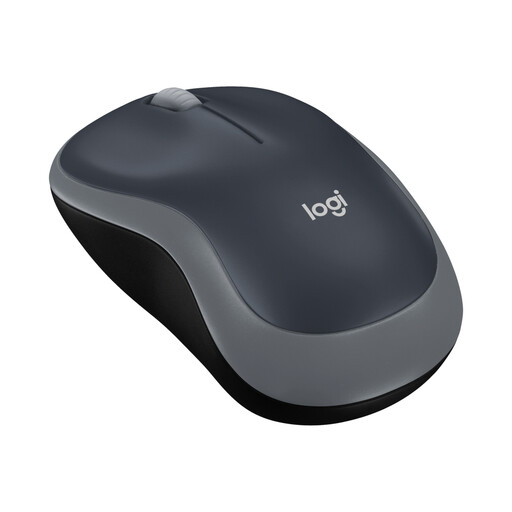
Why this product suits this profile: This compact wireless mouse is aimed at users looking for a simple mouse for a laptop, PC or use on the go. The USB nano receiver simply plugs in and requires no complicated setup.
The product details specify a 2.4 GHz connection, three buttons, 1000 DPI and an AA battery. This keeps the features straightforward and easy to understand.
According to the product details, up to twelve months of battery life, an ambidextrous design and compatibility with Windows, macOS, Chrome OS and Linux.
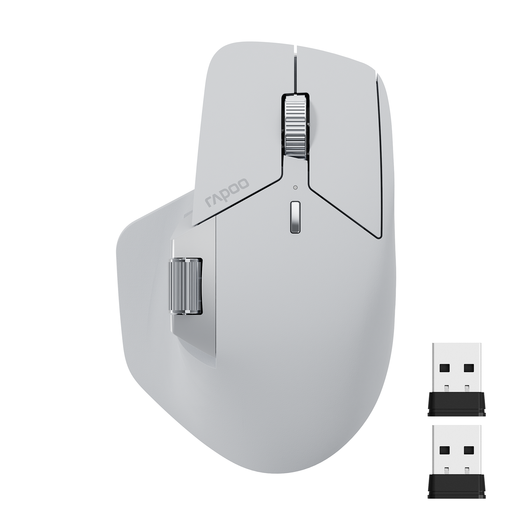
Why this product suits this profile: This multi-device mouse is ideal for people working from home who switch between several computers or mobile devices. It supports Bluetooth 5.0 and 2.4 GHz wireless.
Switching between up to four devices and using multiple connection modes reduces reliance on a single port.
According to the product details, up to eleven programmable buttons, seven DPI levels up to 4000 DPI, USB-C charging and a stated runtime of up to 90 days.
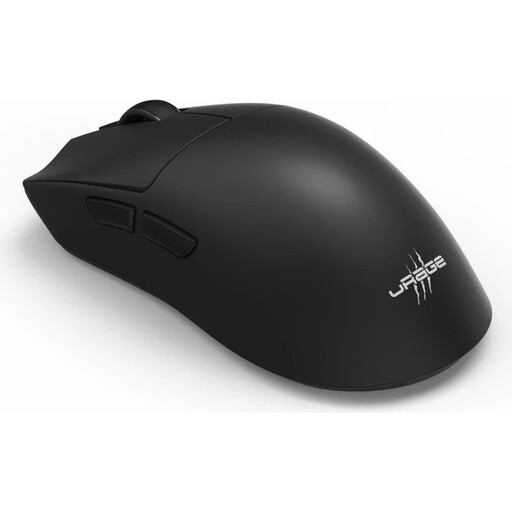
Why this product suits this profile: This gaming mouse is aimed at PC gamers who want to combine a low weight, high sensor resolution and several connection options.
Alongside RF Wireless, this model supports Bluetooth 5.3 and wired operation. This gives you a backup option when the battery needs charging.
According to the product details, a weight of 57 g, up to 26,000 DPI, six programmable buttons, an 8000 Hz polling rate and up to 72 hours of battery life.
If you work in a shared office or late in the evening, you may prefer a quiet mouse with reduced clicking noise. According to its product description, the Logitech M220 SILENT uses SilentTouch technology, a 2.4 GHz nano receiver and a stated battery life of up to 18 months. Its symmetrical design is suitable for both right- and left-handed users. Before buying, you should still check whether the scroll wheel and side buttons are also quiet enough for your needs.
We have put together a complete, regularly updated list of products that fully meet these strict selection criteria and the safety regulations applicable in the EU.
With a wireless mouse, plug the USB receiver into a suitable port, switch on the mouse and wait for the automatic connection. A Bluetooth mouse is paired in your computer or tablet’s system settings. Gaming models may require additional software if you want to adjust DPI levels, profiles or programmable buttons.
Its lifespan depends on the switches, casing, battery or rechargeable battery, and how heavily it is used each day. Depending on the model, manufacturers quote power-related runtimes ranging from several months to several years for battery-powered mice. A rechargeable mouse should be charged before the battery runs completely flat. If it becomes unusually hot or shows visible damage, stop using it.
Battery-powered models incur ongoing costs for replacement batteries. A rechargeable mouse requires electricity to charge, but can avoid the need to buy batteries regularly. The key considerations are therefore not just the purchase price, but also the intended lifespan, your charging habits and whether a USB-C cable is available.