
Lieferung heute & morgen

Qualitätsgarantie

Willkommens-Angebote freischalten: KOSTENLOSE Lieferung | Bis zu 80 % RABATT | Kostenlose 30-Tage-JoyPlus-Testphase
App herunterladen
A wireless mouse keeps your desk tidy, makes it easier to switch between a laptop and desktop PC, and is practical when you’re out and about. However, models vary considerably in terms of connectivity, power supply, ergonomics and click noise. If you focus only on a high DPI count or long battery life, you can easily overlook important details.
A high-DPI mouse can move the pointer a long way across the screen with only small movements. This is particularly useful for certain games or large monitors. For word processing, spreadsheets and web browsing, lower settings are often sufficient.
What matters is whether the DPI level can be adjusted easily and whether the sensor works reliably on the surface you use. A high maximum resolution alone says little about how suitable a mouse is for everyday use.
A wireless mouse may work via a 2.4 GHz USB receiver, Bluetooth or both transmission methods. A USB receiver usually enables straightforward plug-and-play setup, but it occupies a port. A Bluetooth mouse, on the other hand, requires a compatible Bluetooth module and pairs directly with the device.
Before buying, check the following:
A compact mouse is easy to carry, but may be less comfortable for larger hands over extended periods. Conversely, a full-size model takes up more space in your bag. Hand orientation is also relevant: some shapes are designed for right-handed users, while others can be used with either hand.
A quiet mouse reduces clicking noise, but it cannot replace a shape that fits your hand. Quiet main buttons are particularly useful in offices, libraries and home offices. Claims such as “up to 90% less click noise” should be understood as manufacturer specifications; the actual perception depends on the environment and the model used for comparison.
For a fixed workstation, a 2.4 GHz connection with a nano receiver is straightforward. If you switch between several devices, choose a multi-device mouse with Bluetooth and a separate wireless receiver. Also check the operating system compatibility explicitly stated by the manufacturer. Windows, macOS, ChromeOS, Linux, Android and iPadOS are not supported equally by every model.
Mice with an AA battery do not need a charging station, but the battery will need replacing occasionally. With a rechargeable mouse, you avoid regularly buying disposable batteries; however, it needs to be charged via USB-C. The stated battery life is usually a maximum figure and may vary depending on lighting, polling rate, usage time and connection type.
Weight affects how freely the mouse moves, while its shape influences hand position. Lightweight models are useful for fast movements, whereas larger mice can provide more support for your hand. When choosing DPI, several practical settings are more important than the highest possible peak value. For gaming, polling rate, programmable buttons, sensor response and the option to use the mouse in wired mode may also be relevant.
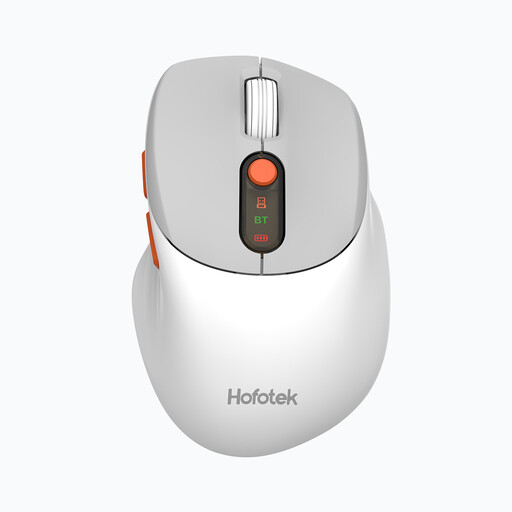
Why this product suits the profile: This compact mouse is suitable for everyday tasks, studying and mobile workstations. It can switch between up to three devices and supports Windows, macOS and Android.
Rather than offering just one connection method, it provides both 2.4 GHz and Bluetooth 5.1. The DPI settings range from 800 to 4000 and can be adjusted.
Weighing 62 g, it features quiet buttons and comes with an AA battery. Switching between three devices makes it suitable for a simple multi-device workstation.
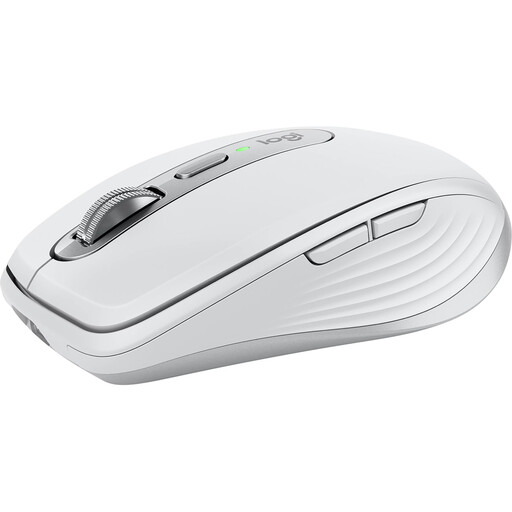
Why this product suits the profile: This model is designed for flexible workstations, travel and use with multiple operating systems. Bluetooth connects up to three devices.
Connectivity is not limited to a USB receiver. Up to 8000 DPI, USB-C charging and stated compatibility with several systems make it easy to adapt.
Quiet clicks, programmable buttons, a MagSpeed scroll wheel and an integrated battery with a stated runtime of up to 70 days.

Why this product suits the profile: For users with a PC, laptop and other compatible devices, this multi-device mouse offers Bluetooth, 2.4 GHz and connectivity for up to four devices.
The number of devices and supported modes are clearly stated. DPI can also be set across seven levels, up to 4000.
11 programmable buttons, USB-C charging, a side scroll wheel and a manufacturer-stated battery life of up to 90 days.
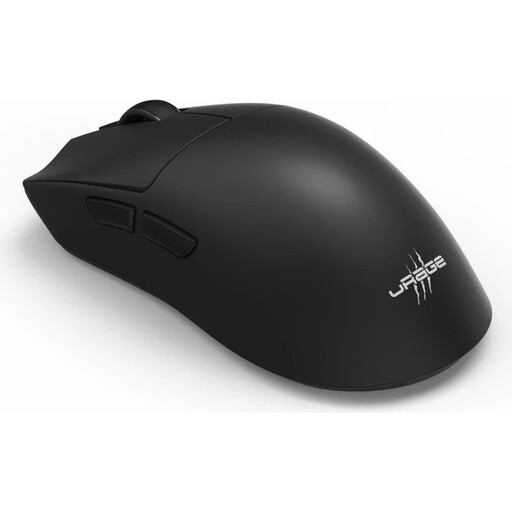
Why this product suits the profile: This gaming mouse is aimed at users who need low response times, high polling rates and customisable buttons for PC gaming.
In addition to 2.4 GHz wireless connectivity, Bluetooth 5.3 is available. For gaming, DPI, button assignments and profiles can be customised using the software.
26,000 DPI, an 8000 Hz polling rate, six programmable buttons, a weight of 57 g and a stated battery life of up to 72 hours.
For a mouse for office and home office use, quiet buttons, a comfortable shape and straightforward connectivity are usually more important than maximum DPI. If you’re looking for a mouse for PC and Mac, check the list of supported operating systems and the pairing method you need. Gamers should also compare polling rate, sensor resolution, weight and wired emergency operation.
Also check whether the receiver can be stored inside the mouse, whether a USB-C cable is included and what replacement or disposal options are available for batteries and rechargeable batteries. Keep small USB receivers out of the reach of children. Built-in batteries must not be opened or replaced yourself.
We’ve put together a complete, regularly updated list of products that fully meet these strict selection criteria and the safety regulations applicable in the EU.
With a USB model, plug the receiver into a suitable port, insert the battery and switch on the mouse. A Bluetooth mouse is paired via the computer’s Bluetooth settings. With multi-device models, you often need to select a connection channel first.
Service life depends on the switches, casing, battery or rechargeable battery, and how often the mouse is used each day. Manufacturer specifications such as 18 or 24 months for battery-powered models, or several weeks for rechargeable models, are guidelines. Frequent lighting use and high polling rates can increase energy consumption.
A rechargeable mouse uses electricity when charging and may require replacement by the manufacturer after several years, or you may need to buy a new device. A mouse with an AA battery, on the other hand, involves regular battery costs. The right choice therefore depends on your expected period of use as well as the purchase price.