
Lieferung heute & morgen

Qualitätsgarantie

Willkommens-Angebote freischalten: KOSTENLOSE Lieferung | Bis zu 80 % RABATT | Kostenlose 30-Tage-JoyPlus-Testphase
App herunterladen
A wireless mouse keeps your desk tidy and can be used flexibly with a PC, MacBook or multiple devices. The choice ranges from a simple wireless mouse to a Bluetooth mouse with USB-C charging, programmable buttons and a high-resolution sensor. However, technical figures alone are not a reliable indication of which model is best suited to your needs.
Three common misconceptions are particularly likely to lead to the wrong choice:
A wireless mouse with a 2.4 GHz receiver is often a good choice for gaming and devices without a reliable Bluetooth connection. The USB receiver is connected directly or via an extension cable. On laptops with few ports, however, a Bluetooth mouse may be more practical.
For flexible workstations, a multi-device mouse is useful if it can store several devices and switch between them at the touch of a button. Check the following:
In business environments, models with an encrypted enterprise receiver may be a sensible choice. Before buying, check their specific IT compatibility against the relevant system environment.
The DPI figure describes the sensitivity of the sensor. A mouse with 8000 DPI offers a wide adjustment range, but it is not automatically more precise for every application. Lower settings are often sufficient for office programmes. Creative applications tend to benefit more from smooth cursor movement and suitable profiles.
The polling rate is also relevant for a wireless gaming mouse. According to the technical definition, 1000 Hz corresponds to one report per millisecond. 8000 Hz can increase the frequency of positional updates, but requires suitable hardware and software. A high rate can also affect battery life.
Pay attention to the surface as well. According to some manufacturers, certain sensors work even on glass, while others may be limited on reflective or transparent surfaces. A suitable mouse mat therefore remains a simple and reliable solution for many desks.
An ergonomic mouse must suit your hand size, grip style and preferred hand. Right-handed designs may feature a pronounced thumb rest, while symmetrical bodies offer greater flexibility for different grip styles. Larger models are not automatically more comfortable if your palm needs little support.
The following points are useful for longer periods of use:
A quiet mouse can be useful in shared offices, libraries or when working in the evening. “Quiet” should refer to the specific button mechanism rather than being applied generally to every sound made by the scroll wheel.
The following models meet different requirements. Technical specifications and battery-life figures should be understood as manufacturer claims or information taken from the respective product data.
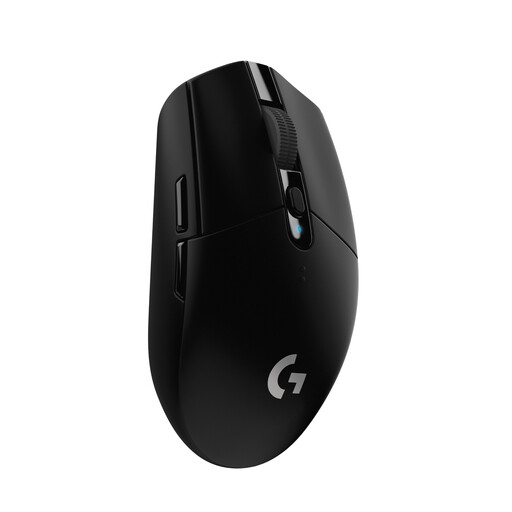
Why this product suits this profile: According to the manufacturer, this wireless mouse combines a HERO sensor offering up to 12,000 DPI with a 2.4 GHz LIGHTSPEED receiver. It is powered by an AA battery, making it quick and easy to replace when you are on the move.
The specifications clearly state the sensor resolution, polling rate and power supply. This makes it easier to compare the features with your personal budget.
Up to 250 hours of battery life according to the manufacturer, six programmable buttons and compatibility with Windows and macOS.
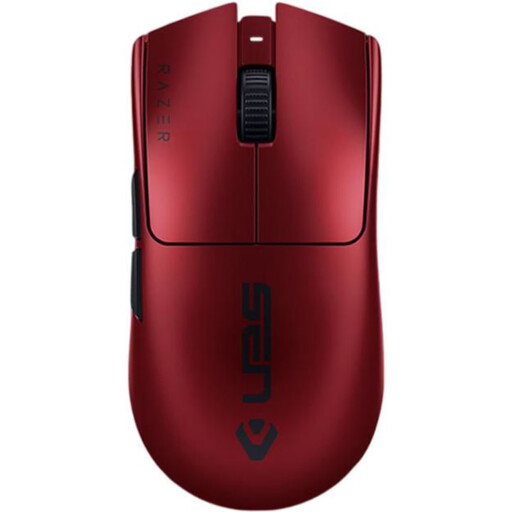
Why this product suits this profile: According to the manufacturer, this wireless gaming mouse weighs 54 g and features an optical sensor offering up to 35,000 DPI. It can be connected wirelessly or via a USB-C cable.
The stated 8000 Hz polling rate is not essential for every application. If you want to use it, check the system requirements beforehand.
54 g weight, six programmable buttons and up to 95 hours of battery life according to the manufacturer.

Why this product suits this profile: According to the product data, this ergonomic mouse is designed for right-handed users, supports up to three Bluetooth devices and has seven programmable buttons.
Before buying, make sure the pronounced right-handed shape suits your hand. The Bluetooth connection does not require an additional USB receiver.
Up to 8000 DPI, USB-C charging, quiet clicks and up to 70 days of battery life according to the manufacturer.
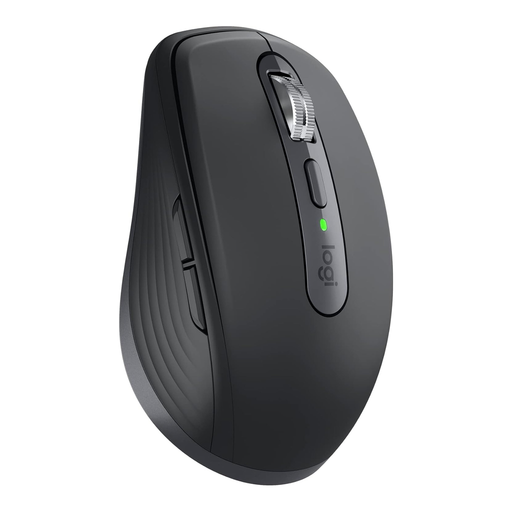
Why this product suits this profile: According to the manufacturer, this compact wireless mouse can connect via Bluetooth or Logi Bolt and supports up to three devices. With its 99 g body, it is well suited to mobile workstations.
The connection options are clearly distinct: Bluetooth saves ports, while Logi Bolt provides a receiver option. Before buying, check that the required port is available.
8000 DPI sensor, USB-C charging, quiet clicks and up to 70 days of battery life according to the manufacturer.
Alongside the recommendations above, you will find models with different sensors, shapes, button layouts and connection technologies. For a specific use, such as a laser mouse for labelling, it is worth looking at the relevant category. You should still pay attention to the contents of the box, supported operating systems, returns policies and safety information for the integrated battery.
We have put together a complete, regularly updated list of products that fully meet these strict selection criteria and the safety regulations applicable in the EU.
With a wireless mouse, plug in the USB receiver, switch on the mouse and wait for automatic pairing to complete. A Bluetooth mouse is connected through your computer’s Bluetooth settings. With multiple devices, you can usually select the required one using an Easy-Switch or connection button. Additional software is only needed if you want to customise buttons, DPI levels or profiles.
This depends on the battery, wireless standard, polling rate and usage profile. Rechargeable models often claim several weeks of battery life, while gaming models may offer considerably less at a high polling rate. A mouse with long battery life should also be rechargeable via USB-C or use a readily available battery. The relevant manufacturer figures should be treated as a guide.
Yes, provided the connection, sensor and polling rate suit the type of game. Competitive gamers often prefer low-latency 2.4 GHz connections, low weight and freely configurable DPI settings. For office and creative applications, quiet buttons, an ergonomic shape, multi-device functions and smooth control are often more important than an especially high polling rate.