
Lieferung heute & morgen

Qualitätsgarantie

Willkommens-Angebote freischalten: KOSTENLOSE Lieferung | Bis zu 80 % RABATT | Kostenlose 30-Tage-JoyPlus-Testphase
App herunterladen
A wireless mouse frees up space on your desk and makes it easier to use a laptop, tablet or several computers. However, not every model is suitable for every workplace. High DPI values, exceptionally long battery life or striking ergonomic features are not, on their own, sufficient buying criteria.
As a Joybuy Product Recommendation Officer, I filter the most important information from the product data and organise it according to specific usage scenarios. This helps you avoid common unsuitable purchases.
A wireless mouse with a 2.4 GHz receiver usually requires a free USB-A port. This makes connecting to many desktop PCs straightforward, but it can be inconvenient with modern laptops that have few ports.
A Bluetooth mouse connects directly to compatible devices and does not require a separate USB receiver. However, the device must support Bluetooth. Some models offer both options or an additional wired connection. Before buying, you should therefore be clear about whether the mouse will mainly be used with a PC, notebook, tablet or several devices.
Manufacturer claims such as ‘up to 18 months’ or ‘up to three years’ often refer to an AA battery and specific energy-saving conditions. This is not the same as an integrated, rechargeable battery.
Models with a replaceable AA battery are practical if you do not want to stop and recharge while out and about. A mouse with long battery life and a USB-C connection, on the other hand, reduces the need for replacement batteries. The key factors are therefore the battery type, charging method and how frequently the mouse is actually used.
A high-DPI mouse can move the pointer across a larger area of the screen with small movements. For office applications, however, moderate settings are usually sufficient. Very high DPI values are more relevant to users who want to adjust sensitivity and sensor behaviour precisely, for example when gaming or using large monitors.
More important than the maximum figure are an adjustable DPI range, stable tracking and a suitable shape. A 30,000 DPI sensor is not automatically more useful in the office than a 1,000 or 4,000 DPI sensor.
Pay attention to the exact connectivity technology:
If you want to switch between a work computer, tablet and smartphone, look for multi-device support and a switch button. According to the product specifications, the Logitech Pebble Mouse 2 can connect to up to three devices and supports Bluetooth and RF Wireless.
An ergonomic mouse should suit your hand size and preferred grip. Compact models are suitable for small to medium-sized hands and for use on the go. Larger, more contoured mice offer greater palm support, but require more space accordingly.
Pay attention to:
A vertical design such as that of the Logitech MX Vertical significantly changes the position of your hand. It may be comfortable for some users, but you should realistically assess the size and adjustment period before buying. Claims about reducing discomfort should not be applied universally to everyone.
For open-plan offices, libraries or home offices, a quiet mouse can be a sensible choice. According to the respective brand specifications, Silent-Touch technologies reduce clicking noise. However, the scroll wheel may still vary in volume depending on its construction.
The feel of the buttons is also important: a quiet click may feel different from a conventional mechanical switch. If you work extensively with spreadsheets, documents or browser tabs, you should also consider scroll speed and programmable buttons.
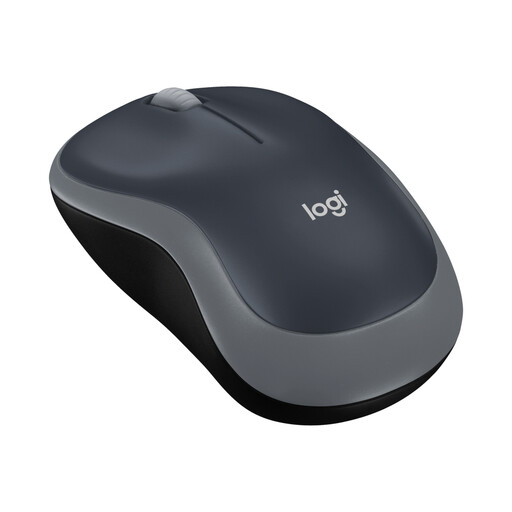
Why this product suits the profile: This compact wireless mouse uses a 2.4 GHz USB receiver, offers plug-and-play connectivity and is listed as compatible with Windows, macOS, Chrome OS and Linux.
The product data clearly specifies the connection, an on/off switch and battery life of up to 12 months rather than making unclear claims about rechargeable battery life.
75.2 g including the battery, an optical sensor with 1,000 DPI and a range of up to 10 m.
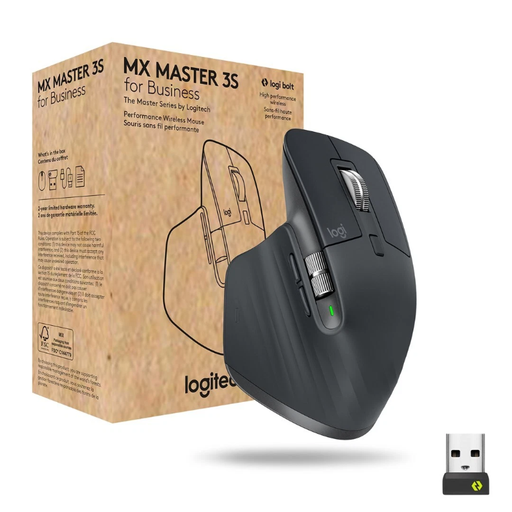
Why this product suits the profile: The right-handed design, seven programmable buttons and the ability to switch between up to three devices are ideal for longer office and work sessions.
Bluetooth and the Logi-Bolt receiver provide two connection options. The technical specifications also state USB-C charging and battery life of up to 70 days.
Darkfield sensor with up to 8,000 DPI and a MagSpeed scroll wheel, according to the product description.
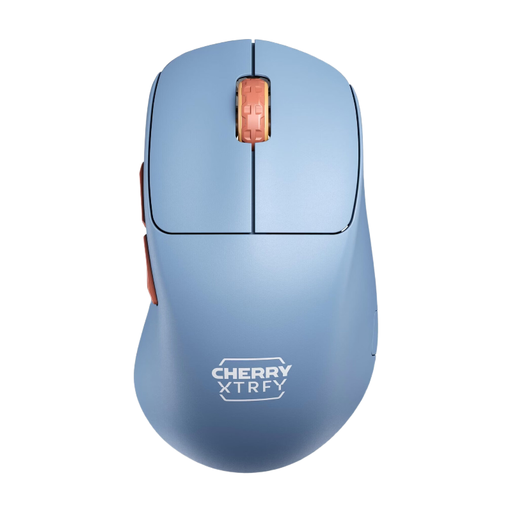
Why this product suits the profile: This right-handed gaming mouse is designed for users who prefer a low weight, 2.4 GHz wireless connectivity and adjustable polling rates for fast inputs.
Battery life is specified precisely as up to 90 hours at 1,000 Hz. According to the description, settings can be adjusted directly on the mouse.
53 g weight, Pixart-3395 sensor, up to 26,000 DPI and a USB-C charging port.
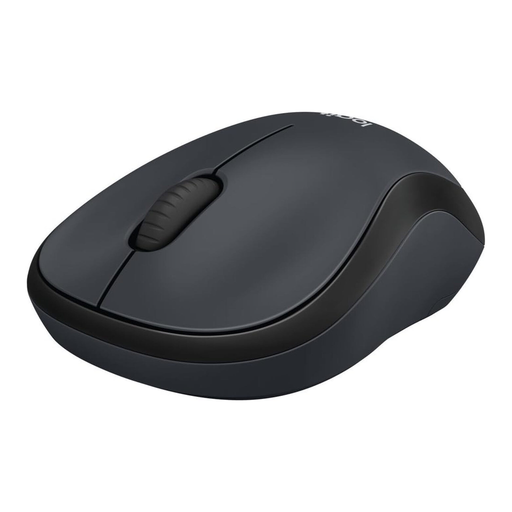
Why this product suits the profile: This compact, quiet mouse is designed for the office, home office and use on the go, and connects via a USB nano receiver.
According to Logitech, SilentTouch reduces clicking noise by more than 90% compared with conventional mice. Battery life is stated as up to 18 months.
Ambidextrous casing, optical tracking, a range of up to 10 m and an automatic energy-saving function.
We have put together a complete, regularly updated list of products that fully meet these strict selection criteria and the safety regulations applicable in the EU.
With a Bluetooth mouse, open your laptop’s Bluetooth settings, switch on the mouse and start the pairing process. With a wireless mouse, plug in the USB receiver. First, check whether your laptop has USB-A, USB-C or Bluetooth only.
Battery life depends on the connection, lighting, polling rate and battery type. According to product specifications, models with an AA battery can run for several months to several years. Rechargeable models are generally rated in days or hours. With gaming mice, a high polling rate reduces the possible battery life.
Yes, provided it offers a stable 2.4 GHz connection, a suitable sensor, low latency and a shape that works for the user. For competitive gaming, polling rate, weight, button placement and grip are more important than the highest possible DPI setting.