
Lieferung heute & morgen

Qualitätsgarantie

Willkommens-Angebote freischalten: KOSTENLOSE Lieferung | Bis zu 80 % RABATT | Kostenlose 30-Tage-JoyPlus-Testphase
App herunterladen
A wireless mouse keeps your desk tidy and is usually more practical on the go than a wired model. However, not every wireless mouse automatically offers greater comfort. Details such as the connection, hand shape and power supply often determine whether the mouse works reliably in everyday use.
As a Joybuy Product Recommendation Officer, I therefore filter product information according to transparent criteria and match it to suitable usage scenarios. This helps you avoid common buying mistakes without being swayed by individual marketing claims.
A high DPI value describes how far the mouse pointer moves in response to a particular movement. Lower to medium settings are often sufficient for office applications. A gaming mouse with 12,000 or 35,000 DPI can be useful if you want to adjust the sensitivity to your personal preferences. However, sensor quality, surface, software and your own habits remain decisive.
A Bluetooth mouse does not require a separate USB receiver. This is useful for laptops, tablets and devices with few USB ports. A 2.4 GHz mouse usually uses a nano receiver and can often be connected quickly via plug and play. However, a suitable USB port is required; USB-C laptops may need an adapter.
Models with Bluetooth and 2.4 GHz offer greater flexibility. Before buying, you should still check how many devices can actually be paired and whether switching is controlled by a dedicated button.
With a mouse powered by an AA battery, there is no need for regular charging, although the battery will eventually need replacing. Rechargeable models usually have a USB-C port or another charging cable. Claims such as ‘up to’ 70 or 90 days, or several months, depend on usage, lighting, polling rate and connection type.
A wireless mouse with long battery life is worthwhile for frequent users. If you travel often, you should also consider the weight, whether it can be used with a cable and how the receiver is stored.
For a mouse for PC and Mac, Windows and macOS support are important basic specifications. For Bluetooth models, the operating system should support the required Bluetooth version. A 2.4 GHz receiver, on the other hand, requires a compatible USB port.
You should also check:
An ergonomic mouse needs to suit your hand size and preferred grip style. Models for larger hands can be impractical for smaller hands, while compact travel mice offer less surface area to rest your hand on. Left-handed users should look for a specifically symmetrical or left-handed design.
Weight is also relevant: A lightweight mouse weighing around 54 to 75 grams can make fast movements easier. Heavier models often feel more stable on the desk. A blanket judgement is therefore not appropriate.
Programmable mouse buttons can store shortcuts for office work, image editing or gaming. What matters is how many buttons can actually be customised and whether an app is required to do so.
The polling rate indicates how often the mouse sends its position data to the computer per second. 1,000 Hz corresponds to 1,000 reports per second, while 8,000 Hz provides correspondingly more. A high rate can be interesting for certain gaming setups, but it requires suitable hardware and can increase energy consumption.
For libraries, open-plan offices or shared workspaces, a quiet mouse with reduced-click noise is a practical choice. Noise-level figures should be understood as manufacturer or product specifications, rather than universally applicable measurements.

Why this product suits the profile: The combination of a 2.4 GHz connection and Bluetooth 5.1 is suitable for Windows, macOS and Android devices. According to the product description, up to three devices can be connected and switched between.
The DPI settings of 800, 1,600, 2,400, 3,200 and 4,000 allow you to adjust the sensitivity instead of relying on a fixed setting. The advertised Silent-Touch design addresses the issue of loud clicking.
62 g weight, six DPI levels and a pre-installed AA battery.
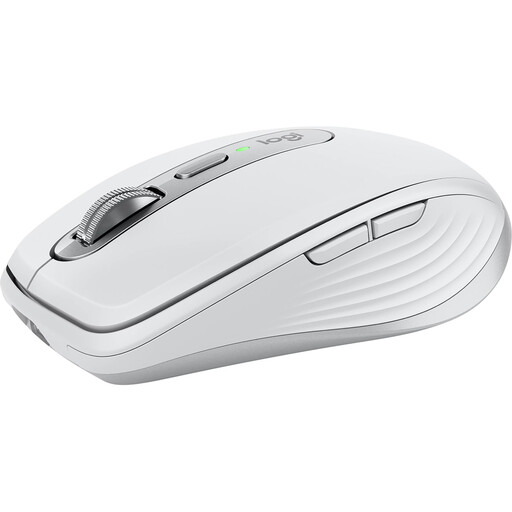
Why this product suits the profile: The compact model is designed for mobile working and, according to the product description, supports up to three devices via Bluetooth or 2.4 GHz.
USB-C charging replaces disposable batteries. Connecting to several devices reduces the need to pair the mouse repeatedly when switching between a PC, Mac or tablet.
8,000 DPI, six programmable buttons, USB-C charging port and a stated battery life of up to 70 days.
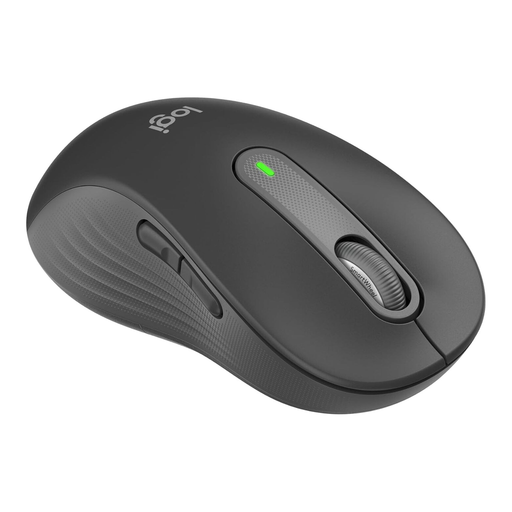
Why this product suits the profile: The explicitly left-handed shape for larger hands, combined with Bluetooth and Logi-Bolt support, meets specific requirements in everyday office use.
The design is not merely described as ‘ergonomic’; it is specifically intended for the left hand and larger hand sizes. According to the product information, the clicks are noise-reduced.
Up to 24 months of battery life according to the product information, two customisable side buttons and a SmartWheel scroll wheel.
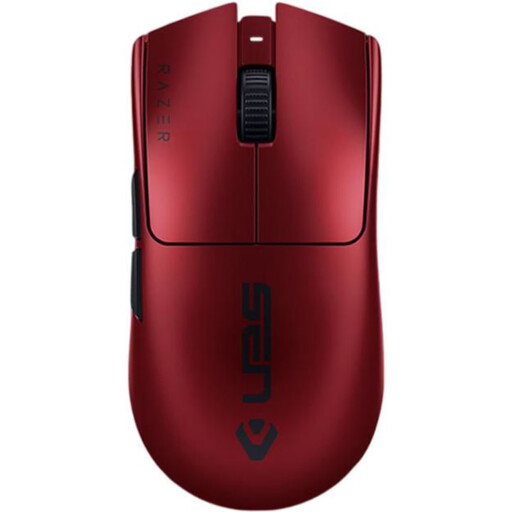
Why this product suits the profile: This model is aimed at users looking for a lightweight gaming mouse with high adjustable resolution, 2.4 GHz wireless and the option of using it with a wired USB-C connection.
The mouse can continue to be used via USB-C if the battery runs out. The 8,000 Hz polling rate should only be selected if your computer and game can make sensible use of this setting.
54 g weight, up to 35,000 DPI, six programmable buttons and a stated battery life of up to 95 hours.
We have put together a complete, regularly updated list of products that fully meet these strict selection criteria and the safety regulations applicable in the EU.
For a 2.4 GHz mouse, plug the USB receiver into a suitable port and switch on the mouse. For Bluetooth, activate Bluetooth on your computer, open the device settings and select the mouse. Some additional functions require manufacturer software; basic operation works on many models without separate drivers.
This depends on the battery or rechargeable battery type, lighting, polling rate and intensity of use. Product specifications range from several months to several years for energy-efficient office mice. For rechargeable models, the stated runtime should be treated as a guide. Taking regular charging breaks or keeping a replacement battery to hand helps prevent interruptions during the working day.
Yes, provided the connection, sensor, polling rate and shape suit your gaming style. Low latency, light weight and programmable buttons are often preferred for fast-paced games. For office or strategy games, however, ergonomics, quiet clicks and long-lasting power may be more important. It is not the ‘gaming’ label alone that matters, but the specific features.