
Lieferung heute & morgen

Qualitätsgarantie

Willkommens-Angebote freischalten: KOSTENLOSE Lieferung | Bis zu 80 % RABATT | Kostenlose 30-Tage-JoyPlus-Testphase
App herunterladen
A wireless mouse keeps your desk tidy, is practical when travelling and works with laptops, PCs, Macs and tablets. However, technical terms such as “Silent”, “Multi-Device” and high DPI values alone reveal little about whether a model suits your everyday needs. What matters is whether the connectivity, shape, power supply and compatibility genuinely match how you intend to use it.
A Bluetooth mouse connects directly to a device, provided that device supports Bluetooth. This leaves a USB port free. A wireless mouse, on the other hand, generally uses 2.4 GHz technology and requires a USB receiver. This often allows for straightforward plug-and-play setup, but is less convenient with many modern laptops that do not have a USB-A port.
Some models combine both options. A multi-device mouse can, for example, connect to a laptop via Bluetooth and to a PC using the USB receiver. Before buying, check which ports and wireless standards your devices actually support.
With a quiet mouse, manufacturers generally mean reduced clicking or scrolling noise. The operating noise can vary depending on the surface, scroll wheel and pressure applied to the buttons. For libraries, open-plan offices or home offices, specific information about noise reduction is therefore more useful than a general marketing term.
DPI describes pointer sensitivity. A higher setting moves the cursor further with the same hand movement. Moderate values are often sufficient for office work, browsing and word processing. More precise adjustment can be useful for image editing, large monitors or certain games. However, a high maximum value alone does not guarantee more comfortable control.
A mouse with a USB receiver is suitable for users who prefer quick setup on a PC or laptop. The receiver should ideally be compact and storable inside the mouse when not in use. For devices with few available ports, Bluetooth is often the more space-saving solution.
A multi-device mouse is worth considering if you work across several devices. Look out for:
According to the product specifications, many of the models listed offer a range of up to 10 metres. In everyday use, walls, other wireless sources and the position of the receiver can affect the connection.
An ergonomic mouse should suit your hand size and preferred grip. Right-handed models may feature a pronounced thumb rest, while symmetrical designs are suitable for both left- and right-handed users. Compact models are practical for travelling and smaller hands, but may provide less support for larger hands.
Check the following before buying:
The surface you use also matters: optical sensors work reliably on many matt surfaces, but may have limitations on glass or highly reflective surfaces. In such cases, a mouse mat can improve control.
Battery-powered models generally require an AA or AAA battery. This makes quick replacement easy, but creates ongoing costs. Rechargeable mice, on the other hand, require a charging cable and need to be charged regularly.
Manufacturer battery-life figures depend on usage, power-saving mode and wireless connection. An on/off switch and automatic sleep mode can help reduce power consumption. If storing the mouse for an extended period, remove the batteries in accordance with the manufacturer's safety instructions to prevent damage caused by leakage.
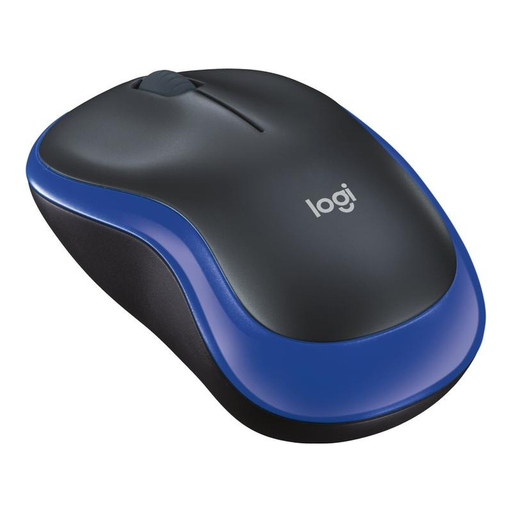
Why this product suits this profile: This compact mouse for laptops and PCs uses a USB nano receiver, comes with an AA battery and is designed for both left- and right-handed users.
The connection is made via a clearly assigned receiver rather than through an unclear multi-device pairing process. The technical specifications state 1000 DPI and battery life of up to one year.
Optical sensor, ambidextrous design and automatic connection via USB receiver.
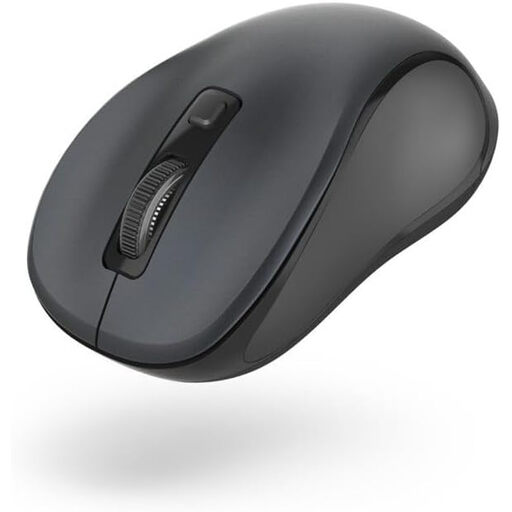
Why this product suits this profile: This Bluetooth mouse is compact, has a symmetrical shape and, according to the product description, is designed for quiet use.
The “quiet” claim is supported by specific details: Bluetooth 5.0, three DPI settings from 800 to 1600 and a stated range of up to 10 metres.
Ambidextrous use, AA battery and stated battery life of up to three months.
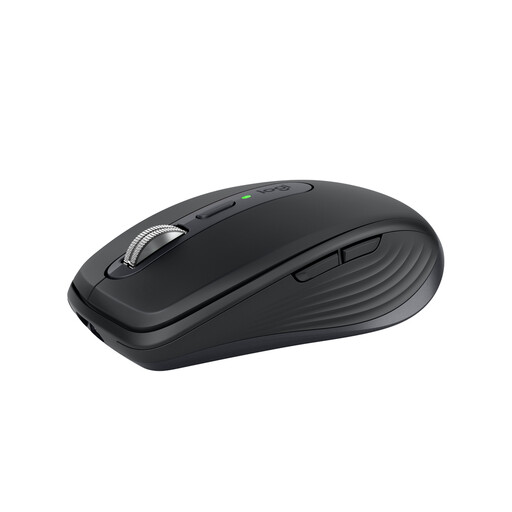
Why this product suits this profile: This model is designed for users looking for a compact mouse with Bluetooth, an optional Logi-Bolt receiver, programmable buttons and USB-C charging.
Rather than simply quoting a high DPI figure, it offers adjustable settings from 200 to 8000 DPI and a Darkfield sensor. The mouse supports up to three devices.
USB-C rechargeable battery with stated battery life of up to 70 days and six programmable buttons.
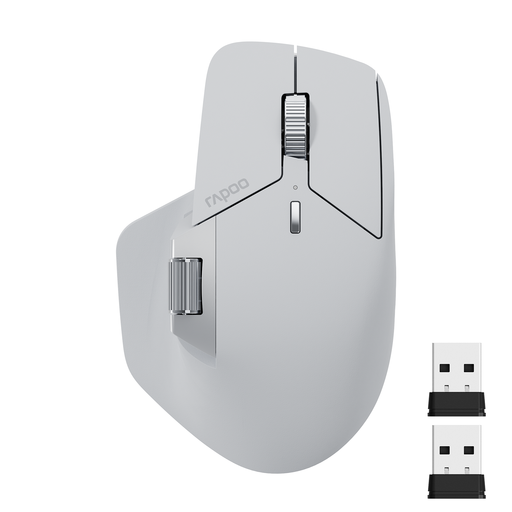
Why this product suits this profile: This multi-device mouse connects via Bluetooth 5.0 or 2.4 GHz and, according to the product specifications, supports up to four devices.
Its possible uses are clearly set out through specific connection types, seven DPI settings from 800 to 4000 and eleven programmable buttons. Software may be required for the additional functions.
Rechargeable battery, USB-C port and side scroll wheel for demanding workflows.
We have put together a complete, regularly updated list of products that fully meet these strict selection criteria and the safety regulations applicable in the EU.
That depends on the device. Bluetooth leaves a USB port free and is suitable for compatible laptops, tablets and PCs. A 2.4 GHz wireless mouse with a USB receiver is often particularly easy to set up. For maximum flexibility, choose a model with both types of connection.
Battery life varies depending on the model, usage and power-saving features. Product specifications range from several months to several years. With an integrated rechargeable battery, usage time also depends on charging cycles and charging habits. Battery-life figures should therefore be viewed as manufacturer estimates, not as a fixed guarantee for every household.
Not automatically. A Bluetooth mouse requires Bluetooth support. A wireless mouse requires a suitable USB port. You should also check the operating system and software requirements. Bluetooth or a suitable adapter is particularly important for tablets and modern laptops without a USB-A port.