
Lieferung heute & morgen

Qualitätsgarantie

Willkommens-Angebote freischalten: KOSTENLOSE Lieferung | Bis zu 80 % RABATT | Kostenlose 30-Tage-JoyPlus-Testphase
App herunterladen
A wireless mouse can keep your desk tidier and make it easier to switch between multiple devices. However, technical marketing claims do not automatically lead to the right buying decision. What matters is where you plan to use it, your hand size, the connection technology and what DPI or polling-rate figures actually mean.
A high-DPI mouse can move the pointer particularly quickly. For office work, image editing or programming, however, much lower settings are often sufficient. A very high maximum value is mainly relevant if you want to fine-tune sensitivity or need rapid movements for gaming.
It is therefore important to consider more than just the maximum value:
A Bluetooth mouse normally does not require a separate receiver, making it well suited to MacBooks, tablets and laptops with few ports. A 2.4 GHz connection with a USB receiver can provide low latency for gaming and desktop PCs. With some models, however, the receiver can only be used via USB-A or an adapter.
A wireless mouse with USB-C can be more practical if your laptop, docking station and charging cable are already based on USB-C. Before buying, check whether USB-C is only used for charging or also supports a wired data connection.
An ergonomic mouse needs to suit your hand size, grip style and preferred hand. A steeply angled shape may feel comfortable for some users, but it is not automatically suitable for every working situation. Weight and width also affect how easy the mouse is to handle.
Things to consider include:
Bluetooth saves a USB port and is practical for office, home office and mobile use. A 2.4 GHz receiver connects directly to the computer and is the preferred wireless connection for many gaming models. A tri-mode mouse combines Bluetooth, 2.4 GHz and a USB cable.
For a mouse for office and gaming, this flexibility can be useful: Bluetooth for your laptop, the wireless receiver for your desktop and USB-C when the battery needs charging.
DPI stands for “dots per inch” and describes how strongly the pointer responds to movement. A range of around 800 to 4,000 DPI is sufficient for many office applications. Gaming models often offer 20,000 DPI or more, although they are usually used at lower settings.
The polling rate indicates how many times per second the mouse reports its position to the computer. 1,000 Hz means up to 1,000 reports per second, while 8,000 Hz means up to 8,000. A higher rate can improve the responsiveness of on-screen movement, but requires compatible hardware and may increase power consumption.
Manufacturers’ battery-life figures refer to specific usage conditions. Features such as high polling rates, lighting or intensive wireless use can affect battery life. Also check whether a USB-C cable, receiver or charging dock is included.
For integrated lithium batteries, follow the manufacturer’s safety instructions: do not open or damage the battery, and only use suitable chargers or certified power sources. Old devices and batteries must not be disposed of with household waste. Take them to the designated collection points in accordance with the applicable WEEE and battery regulations.
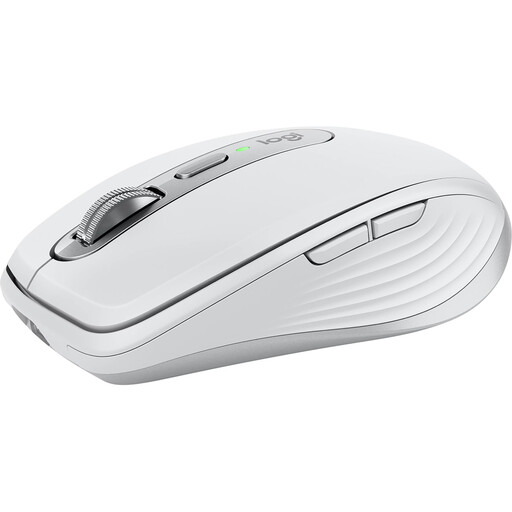
Why this product suits the profile: This compact Logitech mouse is designed for office work, studying and mobile working. Bluetooth, support for up to three paired devices and a weight of 99 g make it well suited to changing workspaces.
The 8,000 DPI sensor offers an adjustable range rather than just a single marketing figure. The specifications also state USB-C charging and a range of up to 10 m.
MagSpeed scroll wheel, quiet clicks, 6 programmable buttons and up to 70 days of battery life according to the manufacturer.
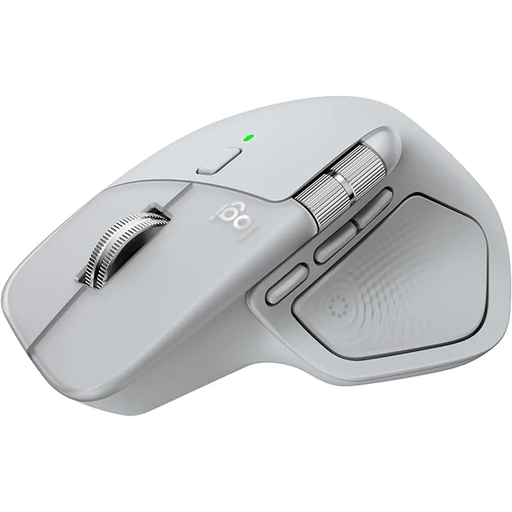
Why this product suits the profile: This larger mouse is designed for right-handed users and is aimed at people with demanding office, creative or development workflows across multiple devices.
The choice is based on more than just 8K DPI: the specifications document Bluetooth, a Logi-Bolt USB-C receiver, 7 controls and support for up to three devices.
MagSpeed wheel, thumb wheel, customisable haptic feedback and up to 70 days of battery life according to the manufacturer.

Why this product suits the profile: Its vertical design with a 57-degree angle is aimed at right-handed users who prefer a significantly different hand position from that of a flat mouse.
The ergonomic design is described as a specific construction rather than a general promise of comfort. Before buying, consider your hand size and the time needed to get used to the shape.
4,000 DPI sensor, Bluetooth and USB receiver, support for up to three devices and USB-C charging according to the product specifications.
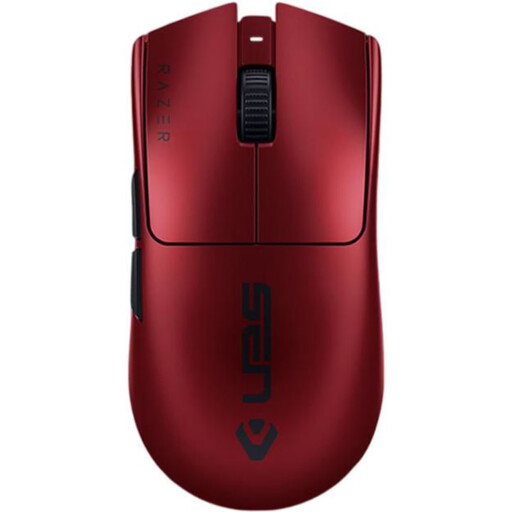
Why this product suits the profile: According to the product specifications, this lightweight gaming mouse weighs 54 g and combines 2.4 GHz wireless with USB-C wired operation. It is designed for fast FPS and esports setups.
The high DPI figure is backed up by specific performance data: an 8,000 Hz polling rate, six programmable buttons and five storable DPI profiles.
Optical Focus Pro sensor with up to 35,000 DPI, a weight of 54 g and up to 95 hours of battery life according to the supplier.
We have put together a complete, regularly updated list of products that fully meet these strict selection criteria and the safety regulations applicable in the EU.
For Bluetooth models, switch on the mouse and open your laptop’s Bluetooth settings. Then select the device shown. For wireless models, connect the USB receiver; depending on the model, pairing may take place automatically. A compatible port or adapter may be required for USB-C receivers.
Battery life depends on the sensor, wireless mode, polling rate, lighting and usage. In the product data listed above, manufacturers’ figures range from several weeks to around 95 hours for gaming models. A USB-C port lets you recharge the mouse without relying on disposable batteries.
Bluetooth can be sufficient for occasional gaming. For competitive games, many users choose a 2.4 GHz connection with low latency and a defined polling rate. The sensor, weight, shape, software support and compatibility with the relevant operating system are also important.