
Lieferung heute & morgen

Qualitätsgarantie

Willkommens-Angebote freischalten: KOSTENLOSE Lieferung | Bis zu 80 % RABATT | Kostenlose 30-Tage-JoyPlus-Testphase
App herunterladen
Managing multiple devices like PCs, laptops, and tablets has become the norm in modern work environments. A wireless multi-device keyboard addresses this challenge by providing centralised control. Instead of juggling different input devices, users can seamlessly switch between connected systems at the touch of a button. This reduces workspace complexity and can significantly boost productivity.
Choosing the right wireless keyboard depends on specific technical parameters that must align with your individual workflow.
Connectivity is a critical factor. Most multi-device keyboards use Bluetooth Low Energy (LE), ensuring broad compatibility with laptops, tablets, and smartphones without needing an extra receiver. Some models also offer a proprietary 2.4 GHz wireless connection via a USB dongle (e.g., Logi Bolt). This connection is often more stable and has lower latency, making it ideal for stationary workstations. A wired option via USB-C often doubles for charging and allows for failsafe use.
The choice of key switches affects the typing feel, noise level, and durability.
A functional keyboard for Mac and Windows must not only be compatible with both operating systems but also feature an appropriate key layout (e.g., with Cmd and Alt labels). The switching function, often called Easy-Switch, should allow you to quickly and reliably toggle between at least three paired devices using dedicated keys.
Most wireless keyboards have built-in lithium-ion batteries that are charged via USB-C. Battery life varies greatly depending on usage and whether the backlighting is activated. Some models use alternative power concepts like solar cells, which allow charging from ambient light and thus minimise maintenance.
The standard QWERTY layout is essential for the English-speaking market. In terms of form factor, a distinction is made between full-size keyboards with a number pad and compact layouts (e.g., 75% or TKL). Compact models save desk space and are easier to transport, making them attractive for mobile users and minimalist setups.
Based on the technical criteria above, we have compiled a selection of models that meet different demands for productivity and design.
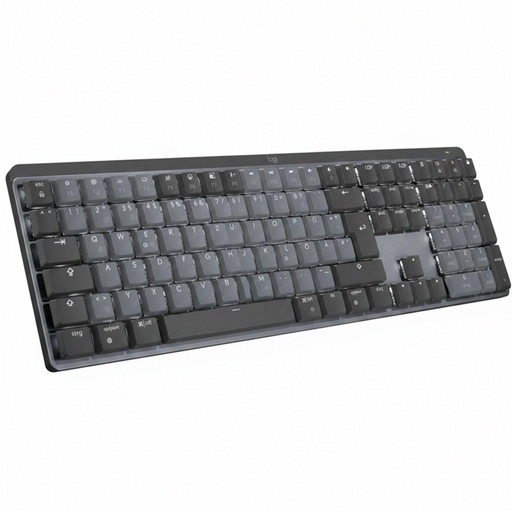
Why We Recommend It The Logitech MX Mechanical combines the precision of mechanical keys with a reduced noise level optimised for office environments. The low-profile Tactile Quiet Switches provide tangible feedback without a loud clicking sound. The smart backlighting, which automatically adjusts to ambient brightness and activates when your hands approach, is a functional feature for changing light conditions. Dual connectivity via Bluetooth and the Logi Bolt USB receiver ensures flexibility and a stable connection.
Pros
Who It's For This model is aimed at professionals, developers, and creatives who appreciate the tactile advantage of mechanical keys but need a quiet keyboard for the office or home office. It is ideal for users who switch between Windows and macOS systems in a multi-device workflow.
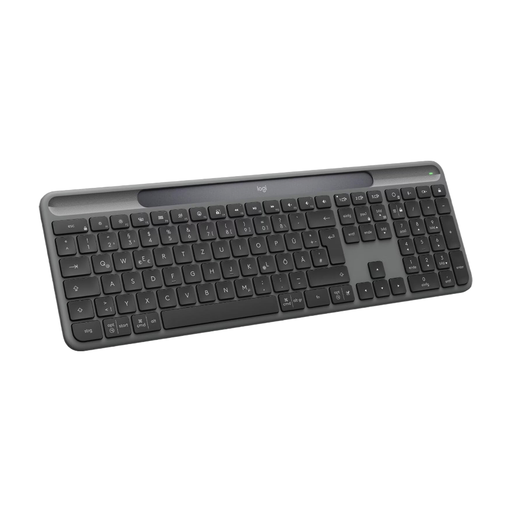
Why We Recommend It The Logitech Signature Slim Solar+ stands out for its innovative power supply. The Logi LightCharge solar technology continuously charges the keyboard using both sunlight and artificial light, making charging cables and battery changes obsolete. According to the manufacturer, the battery can last up to 10 years. The slim design with low-profile scissor switches offers a comfortable and quiet typing experience similar to that of a laptop. Its multi-device functionality for up to three devices via Bluetooth makes it a versatile tool.
Pros
Who It's For This office keyboard is ideal for users looking for a maintenance-free and eco-conscious solution. Its extremely quiet keys and low profile make it perfect for open-plan offices and users who prefer a laptop-like typing feel and want to go completely wireless.
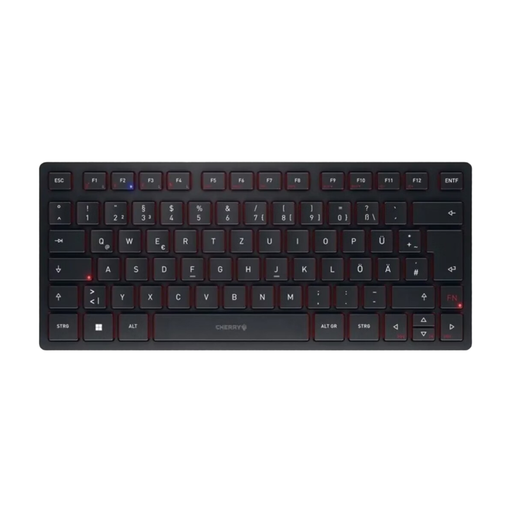
Why We Recommend It The CHERRY KW 9200 MINI is designed for maximum portability and connectivity. Its standout feature is the ability to connect and switch between up to four devices simultaneously (2x Bluetooth, 1x 2.4 GHz wireless, 1x cable). The precise CHERRY SX scissor-switch mechanism ensures a pleasant and quiet typing experience. The compact 75% layout without a number pad makes it extremely space-saving and ideal for mobile use, supported by the included carrying case.
Pros
Who It's For This model is the optimal choice for mobile professionals, commuters, and users with limited desk space. Anyone who needs maximum flexibility in device connection and frequently switches between the office, home office, and on-the-go will benefit from its high connectivity and compact design.
The models presented here cover specific use cases. If you are looking for other form factors, specialised functions, or different designs, our main category offers a wider selection of input devices for productive work environments.
Discover more models in the mobile keyboard category.
1. What is the difference between a Bluetooth keyboard and a wireless keyboard with a USB receiver? A pure Bluetooth keyboard connects directly to the built-in Bluetooth module of the end device (e.g., laptop, tablet). A wireless keyboard with a USB receiver (dongle) uses its own 2.4 GHz radio connection, which often has lower latency and greater stability but requires a free USB port on the device. Multi-device keyboards often combine both technologies for maximum flexibility.
2. Can I use a wireless multi-device keyboard with a Mac and a Windows PC at the same time? Yes, that is the core function of these keyboards. They are designed to be compatible with different operating systems like macOS and Windows. The keyboards have dedicated keys to switch seamlessly between paired devices. Many models also have key labels that account for both Windows- and Mac-specific keys (e.g., Alt/Cmd).
3. How important is the key switch technology (mechanical vs. scissor-switch) for an office keyboard? The choice depends on personal preference and the work environment. Mechanical switches offer distinct tactile feedback, which heavy typists often find more precise and comfortable. The scissor-switch mechanism allows for a slimmer design and is generally much quieter, which is an advantage in noise-sensitive offices. Both technologies can be suitable for professional use.