
Lieferung heute & morgen

Qualitätsgarantie

Willkommens-Angebote freischalten: KOSTENLOSE Lieferung | Bis zu 80 % RABATT | Kostenlose 30-Tage-JoyPlus-Testphase
App herunterladen
The search for the right wireless gaming keyboard with a German QWERTZ layout can quickly become overwhelming. Marketing buzzwords make big promises, but they often hide technical compromises that can detract from your gaming experience or productivity. Before you make a decision, it's crucial to understand the most common pitfalls that can lead to a bad purchase.
A frequent issue is latency. Not every wireless technology is suitable for responsive gaming. A high delay between a keystroke and the in-game action can make all the difference in critical moments. Another pitfall is the assumption that any mechanical keyboard is an automatic upgrade. The type of switches used is decisive for the typing feel and acoustics—the wrong choice can lead to rapid fatigue or unwanted noise. Finally, the variety of form factors often causes confusion. While a compact keyboard frees up more space for the mouse, the omission of essential keys like the numpad or arrow keys can complicate your daily workflow.
To make an informed decision, you should carefully examine three core technical aspects. These features determine the performance, flexibility, and longevity of your future keyboard.
The type of wireless connection is the most critical factor for performance. Many models advertise Bluetooth, but for demanding gaming, this technology is often not the first choice.
A mechanical keyboard is distinguished by its individual switches under each key. The choice of the right switch type is subjective but crucial for the user experience.
A Hot-Swap keyboard also offers the ability to replace the mechanical switches without soldering. This allows for easy customisation of the typing feel and straightforward repairs in case of a defect.
The size of the keyboard affects ergonomics and the available space on your desk. Be sure to look for a German QWERTZ layout to avoid compatibility issues and awkward key mapping.
Here are some recommendations tailored to specific user profiles that specifically avoid the pitfalls mentioned above.
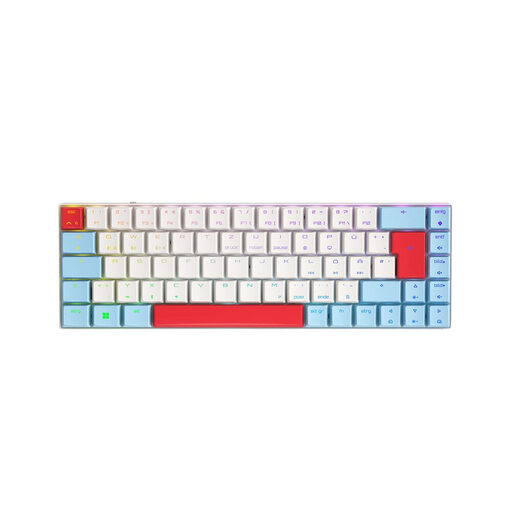
Why This Fits Their Persona: This model is designed for maximum speed and a minimal footprint. The 65% form factor creates ample room for sweeping mouse movements, which is crucial in FPS and MOBA games. The low-profile Speed switches enable extremely fast reactions.
The Tri-Mode connectivity with low-latency 2.4 GHz radio bypasses the delay trap of pure Bluetooth. The linear MX Speed switches are specifically designed for gaming and avoid the loud clicking of unsuitable mechanical switches.
Combines established switch technology (CHERRY MX) with a modern, compact design that offers a full feature set for gamers (Tri-Mode, RGB, German QWERTZ layout).
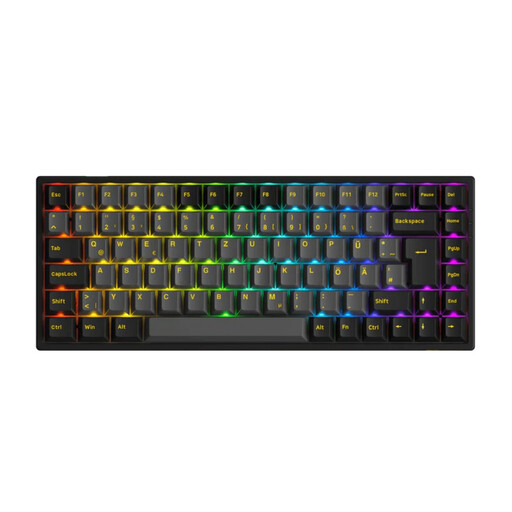
Why This Fits Their Persona: For users seeking a single keyboard for both gaming and productive work. The 75% layout retains the arrow and function keys but is more compact than a TKL model. The hot-swap capability provides room for future customisation.
The ISO-DE layout ensures all keys are in their familiar places. Tri-Mode connectivity covers all use cases, from low-latency gaming to a Bluetooth connection with a laptop. The Cream Yellow switches are linear and quiet, making them suitable for office environments.
High degree of customisation through 3-pin/5-pin hot-swap sockets and a balanced 75% layout that combines functionality and compactness. According to the manufacturer, a comprehensive accessory package is also included.
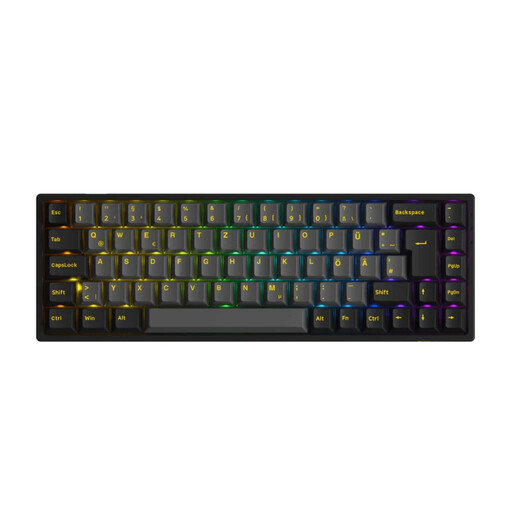
Why This Fits Their Persona: Ideal for users entering the world of mechanical keyboards who prefer a compact setup. The 65% format is space-saving but retains the essential arrow keys. The hot-swap feature invites experimentation with different switches.
This model offers modern features like Tri-Mode and hot-swap in a package that is often more affordable than premium alternatives. The correct ISO-DE layout prevents frustration for German-speaking users right from the start.
Delivers a high degree of future-proof functionality (hot-swap, Tri-Mode) in a very compact and sought-after 65% form factor. A great entry point into the world of PC gaming accessories.
We have compiled a complete, real-time updated list of products that fully meet these strict selection criteria and German regulations.
Battery life varies greatly depending on the model, usage, and especially the RGB lighting. With lighting activated, most batteries last between 15 and 50 hours. With lighting disabled, the runtime can increase to several hundred hours. Models with larger batteries (e.g., 3000 mAh or more) generally offer longer usage time. Many keyboards can continue to be used via a USB-C cable while charging.
For casual gamers or slower-paced game genres, a modern Bluetooth connection (version 5.0 or higher) is often sufficient. However, if you play fast-paced, competitive games like first-person shooters or fighting games where every millisecond counts, a 2.4 GHz radio connection is the recommended choice due to its significantly lower latency.
"Hot-swap" means you can easily pull out the keyboard's mechanical switches with an included tool and replace them with other compatible switches, without needing to solder. This is very beginner-friendly and ideal for anyone who wants to customise their keyboard's typing feel or try out different switch types without having to buy a whole new keyboard.