
Lieferung heute & morgen

Qualitätsgarantie

Willkommens-Angebote freischalten: KOSTENLOSE Lieferung | Bis zu 80 % RABATT | Kostenlose 30-Tage-JoyPlus-Testphase
App herunterladen
A wireless QWERTZ keyboard should provide reliable typing, work with your operating system and keep up with everyday use without slowing you down through missing keys or frequent charging. The choice ranges from a simple Bluetooth keyboard and compact office models to mechanical gaming keyboards with several connection options.
Marketing claims do not always make comparisons easier, however. Three common purchasing misconceptions occur particularly often:
A German keyboard should be explicitly identified as QWERTZ or ISO-DE. This is particularly important for products described as “Wireless Keyboard” or “Gaming Keyboard”, as these often use a US layout by default.
Also look out for:
A Bluetooth-only keyboard does not require an additional USB dongle and is suitable for laptops, tablets and smartphones. If you use several devices, the keyboard should be able to save multiple Bluetooth connections and allow you to switch between them quickly.
Depending on the model, a multi-device keyboard can manage three or four devices. Tri-mode keyboards usually combine:
For gaming, a 2.4 GHz connection or wired operation is often the more practical choice. Bluetooth may be sufficient for office work and mobile typing. A range of up to ten metres is a manufacturer’s figure and may be reduced by walls, metal surfaces or other wireless sources.
Membrane and scissor keyboards are generally quieter and slimmer. They are suitable for libraries, offices and shared spaces. Mechanical keyboards, on the other hand, offer a clearly defined keystroke. Linear, tactile and clicky switches differ in their actuation point, noise level and response.
An ergonomic keyboard with a wave-shaped design or wrist rest can influence your posture while typing. However, it cannot replace an individually suitable seating position or regular breaks. Check the actual dimensions: an ergonomically shaped full-size keyboard requires considerably more space than a compact 65% keyboard.
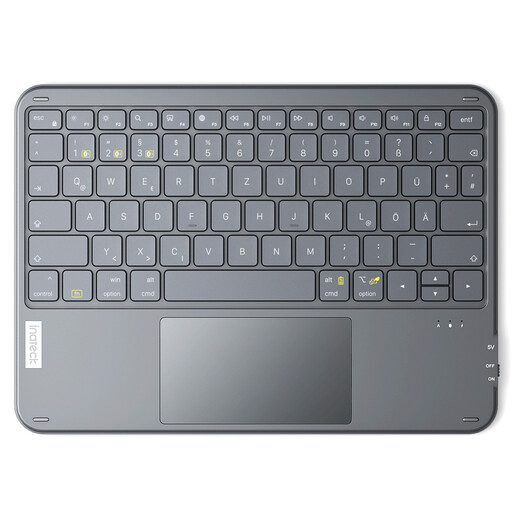
Why this product suits the profile: The combination of a German QWERTZ keyboard, touchpad and connection for up to three Bluetooth devices covers the basic requirements of a tablet, Windows PC and smart TV.
The German layout can be selected in the device settings. The 5 mm slim design and weight of 228 g are clearly specified.
Touchpad, 1.5 mm key travel, three Bluetooth channels and a stated standby time of up to 150 days.
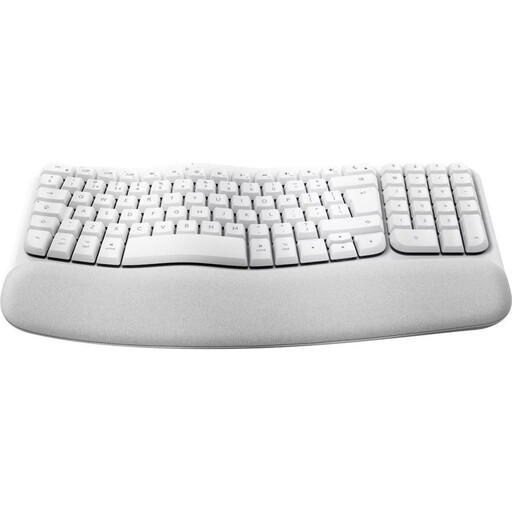
Why this product suits the profile: This full-size model is aimed at users who regularly work with a German layout in a home office and prefer a wave-shaped design with a padded wrist rest.
The layout is identified as German QWERTZ. The keys use a quiet membrane mechanism rather than loud clicky switches.
Bluetooth connection, support for up to three devices according to the product description, nine media keys and two AAA batteries included.
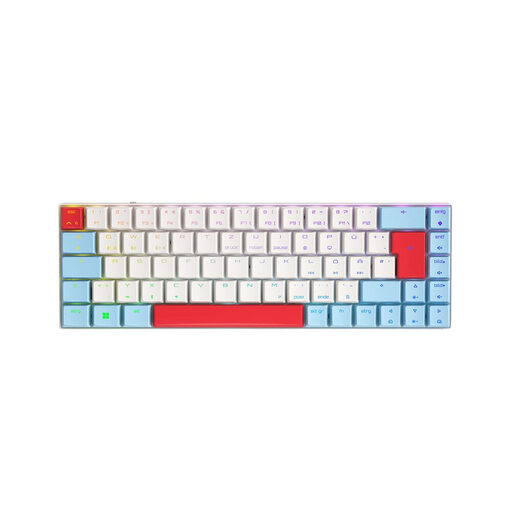
Why this product suits the profile: This German 65% keyboard is aimed at gamers and desktop users who want to combine a space-saving design with mechanical low-profile switches.
The layout is explicitly specified as German QWERTZ. For different scenarios, 2.4 GHz, Bluetooth and USB-C are available.
CHERRY MX Low Profile Speed switches, N-key rollover, anti-ghosting, RGB lighting and a 2,800 mAh battery according to the product specifications.
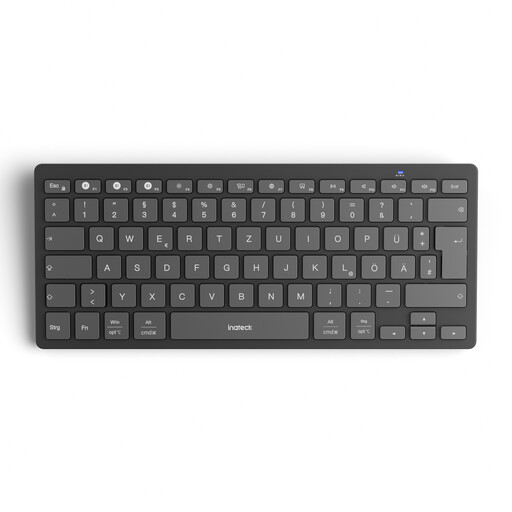
Why this product suits the profile: This slim model is designed for Windows, iPadOS, Android and iOS and can store up to three devices. This makes it suitable for studying, mobile working and changing workspaces.
Bluetooth 5.3, the German QWERTZ version and separate status indicators make it easier to monitor the connection, Caps Lock and battery level.
285 mm housing length, 217 g weight, 1.5 mm key travel and operation with two AAA batteries.
When searching for a wireless QWERTZ keyboard, it is also worth looking at models with a 75% or 80% layout. The Akko 3068B Plus has a 65% ISO-DE layout, while the ARZOPA K87 is offered as a compact mechanical keyboard with 87 keys, hot-swap functionality and RGB lighting. For Windows and Mac workstations with a numeric keypad, models from Rapoo are among the options to consider. The key thing is to make sure the layout, connection and operating system are compatible before buying.
We have compiled a complete, regularly updated list of products that fully meet these strict selection criteria and the safety regulations applicable in the EU.
In Windows, macOS, iPadOS or Android, open the settings for language and physical keyboard. Select German (QWERTZ) or German – Standard. With a US model, this will not automatically change the labels on the keys to German.
This depends on the connection, lighting and usage. Models with AAA batteries can operate for several months or up to 18 months according to the product specifications. Mechanical RGB keyboards often have a shorter runtime. Claims such as “up to” are intended as a guide and are not a guaranteed reflection of everyday use.
Yes, provided the switches and noise level suit your surroundings. Linear or low-profile switches are often quieter than clicky versions. If you work in a shared office, you should also consider membrane or scissor technology, moderate actuation force and switchable lighting.