
Lieferung heute & morgen

Qualitätsgarantie

Willkommens-Angebote freischalten: KOSTENLOSE Lieferung | Bis zu 80 % RABATT | Kostenlose 30-Tage-JoyPlus-Testphase
App herunterladen
A tidy, cable-free desk is essential for focused work in the office or at home. A rechargeable wireless keyboard and mouse combo promises just that: freedom, order, and uninterrupted productivity. Yet, the market is flooded with products whose promises don't hold up in practice. Before you make a decision, it's crucial to understand the typical pitfalls that often lead to frustration and unnecessary expense.
As a Joybuy Product Recommendation Officer, I will analyse the decisive features for you and help you make an informed choice that will genuinely improve your workday.
Many users invest in a wireless combo only to find it falls short of expectations after a short time. These three problems are particularly common:
To avoid the problems mentioned above, you should carefully check three technical aspects before buying. These define the quality and practicality of a combo.
The key advantage of a rechargeable combo lies in its sustainability and convenience. Look for sets with integrated NiMH batteries. These are characterised by low self-discharge and are designed for many charging cycles. However, the most important feature for professional use is the ability to continue using the keyboard and mouse while they are charging. A modern USB-C port makes charging easier, as the cable can be inserted in either direction and is compatible with many other devices. A wireless keyboard and mouse combo with a rechargeable battery that offers this feature guarantees uninterrupted work.
The key mechanism determines the typing feel, noise level, and lifespan of a keyboard. While basic models use cheap membrane technology, high-quality keyboards feature a keyboard with scissor switches (Scissor technology).
A wireless desktop combo should ensure a stable and secure connection. The industry standard is a 2.4 GHz wireless connection via a small USB receiver. For use in a corporate environment, AES-128 encryption is an important security feature. It protects the transmitted keystrokes from being intercepted by third parties and ensures confidential data transmission.
Based on the criteria above, we have identified several products suitable for specific user groups.
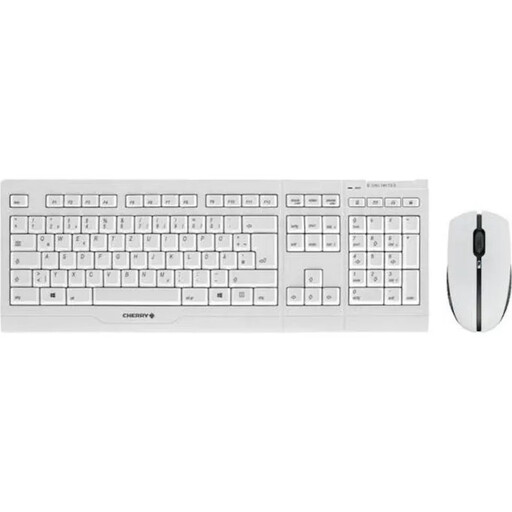
Why This Fits Their Persona: This combo is designed for continuous professional use. The full-size keyboard and durable, abrasion-resistant keys are ideal for heavy typists who need a reliable workhorse for daily tasks.
It solves the problem of work interruptions, as the keyboard and mouse are fully usable while charging. The abrasion-resistant laser etching on the keys prevents the characters from fading, thus avoiding the pitfall of poor durability.
Durability: The keyboard uses proven SX scissor technology and abrasion-resistant key lettering. Uninterrupted Work: Charging is possible during use.

Why This Fits Their Persona: This combo is aimed at users who value a modern, quiet, and aesthetically pleasing workspace. The whisper-quiet keys and mouse clicks are ideal for the home office, ensuring family or housemates are not disturbed.
It sidesteps the "silent" keyboard myth by using CHERRY SX scissor technology and additionally quiet mouse buttons. Charging via USB-C during use elegantly solves the battery trap.
Extremely Quiet Operation: Whisper-quiet keystrokes and mouse clicks. Modern Connectivity: Charges via the future-proof USB-C standard.
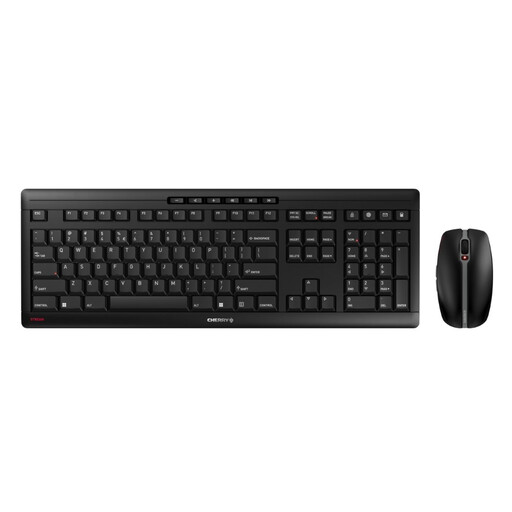
Why This Fits Their Persona: For users where the look of the workspace is just as important as its functionality. The black, elegant design of this CHERRY keyboard and mouse combo integrates seamlessly into modern and classic desk setups.
This combo combines sophisticated design with solid engineering. It avoids the typical pitfalls with rechargeable batteries that allow use-while-charging and the high-quality, quiet SX scissor technology.
Stable Design: An integrated metal plate ensures high torsional rigidity and a solid footing. Adjustable Mouse: The mouse sensitivity can be adjusted in 3 levels (1000/1600/2400 DPI).
We have compiled a complete, real-time list of products that fully satisfy these strict selection criteria and UK safety regulations.
Battery life varies depending on the model and usage intensity. High-quality combos like the featured CHERRY models offer several weeks or even months of use per charge. However, the crucial factor is not just the battery life, but the ability to continue using the devices while they are charging. This ensures your work is never interrupted by a dead battery.
Yes, the difference is clearly noticeable. The mechanics of scissor switches provide a shorter, more stable key travel compared to conventional membrane keyboards. This results in a quieter, more defined, and more pleasant typing sound, which is particularly advantageous in quiet work environments like offices or libraries.
Usually not. Most wireless desktop combos work via Plug and Play. You plug the included USB receiver into a free port on your computer, and the devices connect automatically. For advanced functions, such as remapping special keys, manufacturers like CHERRY offer optional, free software (e.g., CHERRY KEYS), but its installation is not required for basic operation.