
Lieferung heute & morgen

Qualitätsgarantie

Willkommens-Angebote freischalten: KOSTENLOSE Lieferung | Bis zu 80 % RABATT | Kostenlose 30-Tage-JoyPlus-Testphase
App herunterladen
A tidy, cable-free desk is not just a matter of aesthetics, but also of productivity. A wireless keyboard and mouse set is a natural choice for this. However, the market is flooded with tempting offers that, upon closer inspection, turn out to be impractical or short-lived. Before you invest, you should be aware of the typical pitfalls that often hide behind shiny marketing promises.
The 3 Most Common Pitfalls When Buying:
To make an informed decision that meets your needs, you should examine three core technical aspects. These parameters are crucial in determining the performance, comfort, and longevity of your new wireless keyboard and mouse.
The type of wireless connection directly impacts stability and flexibility.
Some sets offer both technologies, combining their advantages for maximum flexibility.
For users in English-speaking regions, a QWERTY keyboard is the standard. However, beyond the layout, pay attention to ergonomic features that make a difference during hours of daily use:
The type of keys determines the typing feel and volume.
For work environments where concentration is key, a quiet keyboard and mouse combo is a worthwhile investment.
Based on these objective criteria, we have identified some models that are suitable for specific user groups.
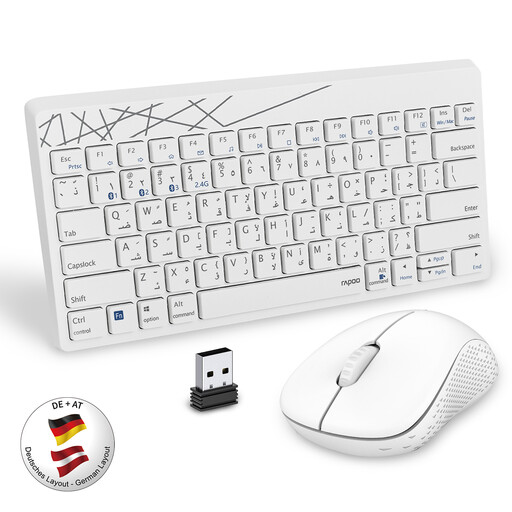
Why this set is a good fit: Ideal for users who seamlessly switch between their work PC, a personal tablet, and a Mac. The compact design saves space and is easy to transport.
This set solves the problem of misleading multi-device claims. It allows switching between up to three devices (via Bluetooth 3.0, 5.0, and 2.4 GHz) with dedicated keys—without cumbersome re-pairing.
The mouse features a precise 1300 DPI sensor and quiet clicks. The keyboard is spill-resistant, which increases its durability in daily use.
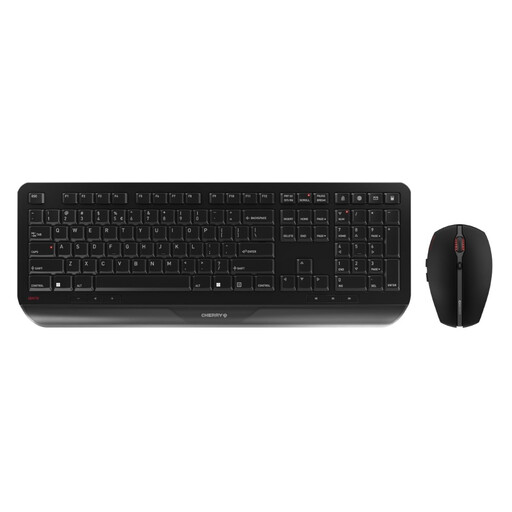
Why this set is a good fit: Designed for long workdays in the office or home office, where comfort and a quiet working atmosphere are a priority.
This set counters empty ergonomic promises with a firmly integrated palm rest. This is a concrete, physical feature that provides proven support and relief for the wrists.
The symmetrical 6-button mouse is suitable for both left- and right-handed users and offers switchable resolution (1000/2000 DPI). Ten practical hotkeys provide quick access to multimedia and office functions.

Why this mouse is a good fit: Designed for competitive gaming, where every millisecond and every movement counts. The mouse is aimed at right-handed users who require maximum precision and minimal latency.
This mouse debunks the myth that wireless devices are unsuitable for esports. It uses a stable 2.4 GHz wireless connection and a high-precision Pixart 3395 sensor to ensure lag-free, competition-level performance.
At just 53 grams, the mouse is extremely lightweight, allowing for fast, fatigue-free movements. The battery life is rated for up to 90 hours. All settings can be adjusted directly on the mouse, with no software installation required.
We have compiled a complete, up-to-date list of products that fully meet these strict selection criteria and safety standards.
The actual battery life depends heavily on individual usage, the frequency of backlight use, and the battery type. Manufacturer claims are often determined under ideal conditions. Models with an integrated, USB-C rechargeable battery are often more convenient in practice than those with replaceable batteries. Look for battery capacity specifications (in mAh) for a better comparison.
No, that is generally not necessary. Most modern sets use a single USB receiver that connects both the keyboard and mouse to the computer. If you choose a multi-device keyboard set with Bluetooth functionality, you can pair additional devices like tablets or laptops without any USB receiver at all and switch between them at the touch of a button.
Yes, modern wireless gaming peripherals are absolutely competition-ready. Leading models use a dedicated 2.4 GHz wireless technology that achieves extremely low latency (often 1 millisecond), making it indistinguishable from a wired connection in practice. High-quality optical sensors, such as those from the Pixart series, also ensure maximum tracking precision.