
Lieferung heute & morgen

Qualitätsgarantie

Willkommens-Angebote freischalten: KOSTENLOSE Lieferung | Bis zu 80 % RABATT | Kostenlose 30-Tage-JoyPlus-Testphase
App herunterladen
A wireless gaming mouse can help you keep your desk tidy, sit more flexibly and make quick movements. However, the wide range of options does not automatically make it easier to find the right one. Terms such as “ultralight”, “high DPI” or “8000 Hz” describe only individual features. What matters is how these specifications suit your grip style, the types of games you play and your computer.
The following points will help you assess marketing claims and avoid common mistakes when buying a wireless gaming mouse.
A gaming mouse with a high DPI rating can be set to be extremely sensitive. However, actual control also depends on the optical sensor, consistent tracking and the sensitivity settings used in the game. Values such as 26,000, 35,000 or 44,000 DPI are not necessary for many players. Anyone who plays at low sensitivity will also need sufficient space on their mouse mat.
A gaming mouse with an 8000 Hz polling rate theoretically reports its position to the computer more frequently than a 1000 Hz model. This can reduce the intervals between position updates, but it requires a compatible receiver, suitable software and sufficient system resources. According to the product information, the Razer Viper V3 Pro requires the separately available Razer HyperPolling Wireless Dongle for 8000 Hz. Without this receiver, the advertised rate cannot be used to its full potential.
An ultralight gaming mouse weighing 53 or 54 grams can feel light during fast movements. However, if its shape does not suit your hand size or grip style, everyday control may suffer. Right-handed users should look for a suitable side profile. A low front section can be useful for claw or fingertip grip, while palm-grip users often prefer a more pronounced rear section.
Weight affects the amount of force needed for rapid changes of direction. Models weighing around 53 to 60 grams are often aimed at users looking for a nimble mouse for FPS games or esports. A heavier mouse is not necessarily a disadvantage if extra buttons, a larger design or longer battery life are more important to you.
You should also consider:
An optical sensor uses LED or infrared illumination and a camera to detect movement. The maximum DPI figure is only one part of the technical specification. Tracking speed, maximum acceleration and the ability to fine-tune the settings are also relevant when choosing a mouse.
A DPI setting between 800 and 3,200 is sufficient for many competitive FPS players. Users with multiple monitors or limited desk space may prefer higher values. The mouse should be used on a suitable, matt mouse mat. Depending on the sensor, glass or highly reflective surfaces may cause limitations.
For gaming, 2.4 GHz wireless connections with a USB receiver are generally the most suitable, as they are designed to deliver low latency. Bluetooth is convenient for laptops and mobile workstations, but gaming mice do not always offer the same polling rate or response characteristics over Bluetooth.
A rechargeable gaming mouse should be chargeable via USB-C. Always check the stated battery life together with the polling rate used: a higher polling rate can increase power consumption. It is also useful to have wired operation while charging, an easily accessible receiver and an extendable receiver cable.
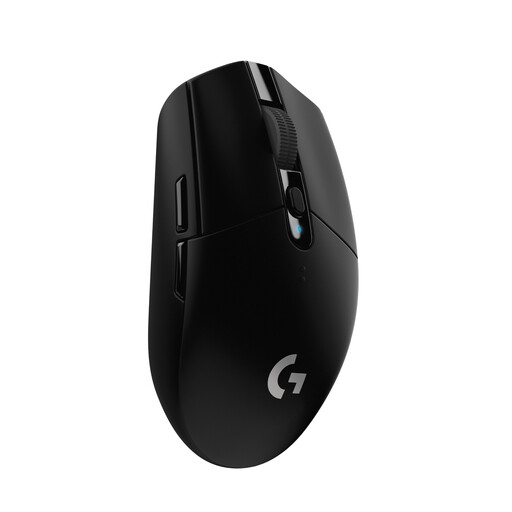
Why this product suits the profile: The mouse combines a 2.4 GHz LIGHTSPEED connection with a HERO sensor offering up to 12,000 DPI and an AA battery providing up to 250 hours of use.
Its features focus on a 1000 Hz polling rate and avoid the costly additional 8000 Hz technology that not everyone needs.
Six programmable buttons, an integrated Nano receiver and compatibility with PC and Mac.

Why this product suits the profile: The symmetrical 54 g body, Focus Pro 35K Gen-2 sensor and battery life of up to 95 hours are designed for users who demand low weight and extensive adjustability.
The product information lists polling rates from 1000 to 8000 Hz, making it clear that performance depends on the receiver being used.
Gen-3 optical switches with a stated lifespan of 90 million clicks and six programmable buttons.
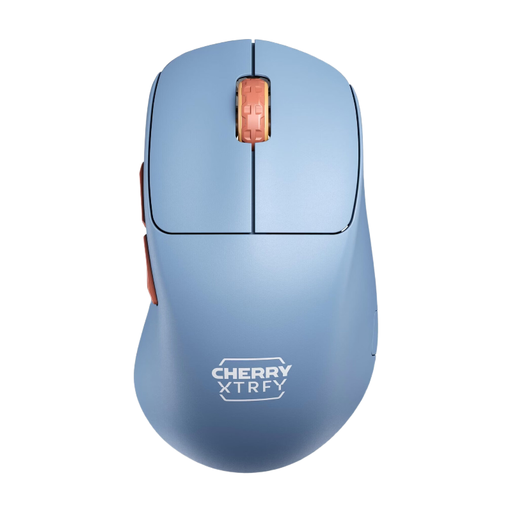
Why this product suits the profile: Its right-handed ergonomic shape, low front section and 53 g weight are designed for controlled movements.
The connection uses 2.4 GHz and supports up to 1000 Hz. This means it does not promise a higher polling rate than the technical specifications provide.
Pixart 3395 sensor with up to 26,000 DPI, USB-C charging port and stated battery life of up to 90 hours.
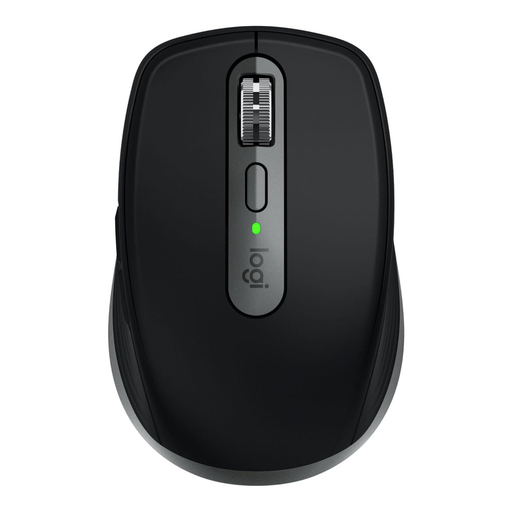
Why this product suits the profile: Bluetooth, multi-device switching and macOS and iPadOS support make it a practical work mouse for use on the go rather than a traditional esports mouse.
The choice is based not only on DPI, but also on quiet clicking, a compact design and practical multi-device use.
8,000 DPI sensor, USB-C battery offering up to 70 days of use and connectivity with up to three devices.
We have put together a complete, regularly updated list of products that fully meet these strict selection criteria and the safety regulations applicable in the EU.
Yes, provided it offers a stable 2.4 GHz connection, a suitable sensor and a sufficiently high polling rate. For many players, 1000 Hz is enough. A good receiver position, a charged device and a suitable mouse mat are also important.
Battery life depends on the model, polling rate, lighting and usage. The stated figures of 75 to 95 hours are manufacturers’ specifications under certain conditions. A mouse with USB-C charging can continue to be used while charging, provided the model supports this function.
The hardware connection often works on both platforms. Differences can occur with software, drivers and programmable profiles. You should therefore check the stated operating system support before buying. Bluetooth may be more convenient for Mac users with multiple devices; for competitive PC gaming, the 2.4 GHz receiver is generally the more suitable connection.