
Lieferung heute & morgen

Qualitätsgarantie

Willkommens-Angebote freischalten: KOSTENLOSE Lieferung | Bis zu 80 % RABATT | Kostenlose 30-Tage-JoyPlus-Testphase
App herunterladen
A wireless keyboard and mouse set can help keep your desk tidy and make setting up a PC or laptop easier. However, product claims such as “silent”, “ergonomic” or “long battery life” do not automatically guarantee the right choice. The technical details are what matter: the correct keyboard layout, the type of wireless connection, the power supply and the actual features of the keyboard and mouse.
Our selection is aimed at home users, people working from home, students and office workers in Germany. We focus on objectively verifiable specifications rather than general marketing claims.
A German layout is generally configured as a QWERTZ keyboard. On US QWERTY or Belgian AZERTY models, keys such as Y and Z, as well as special characters, are arranged differently. Labelling for ä, ö and ü may also be missing.
If you regularly write German texts, look specifically for “DE”, “German” or “QWERTZ”. The term “EU Layout” does not always mean that the keyboard has a German layout. For international product variants, it is worth checking the technical specifications and product image.
A 2.4 GHz wireless set usually works with a USB nano receiver. The keyboard and mouse are often already paired with this receiver. This makes setup easier on a Windows PC, but requires a free USB-A port.
A Bluetooth keyboard and mouse can be connected without a USB receiver and is practical for many tablets, Macs and laptops. However, depending on the operating system and number of devices, pairing may require more setup. Multi-device models combine Bluetooth and 2.4 GHz wireless, but are not automatically available as a complete set.
For battery-powered sets, battery life depends on usage, battery type and power-saving mode. Claims such as “up to” should therefore be understood as maximum values. You should also check whether batteries are included and whether they power both the keyboard and mouse.
A rechargeable keyboard and mouse set reduces the need for disposable batteries. Important factors include the charging port, whether the set can be used while charging and compatibility with the supplied cable. For example, the CHERRY DW 3000 specifies that separate batteries are required for the keyboard, while batteries for the mouse are included.
A full-size keyboard with a number pad is suitable for spreadsheets, accounting and data entry. However, it takes up more space than a compact 75% or 80% model. Before buying, compare the stated dimensions with the available desk width.
A quiet keyboard can be useful in shared spaces. Scissor mechanisms and low-profile membrane keys are often used for office applications. Mechanical keyboards, on the other hand, provide noticeably more tactile feedback depending on the switch type. Even “Silent” or “Quiet” switches are not completely noiseless; volume also depends on the keycaps, casing and bottom-out impact.
If you are looking for a mechanical keyboard for gaming or intensive typing, check the switch type, layout, lighting and connection options. However, a standalone mechanical keyboard does not replace a complete keyboard and mouse set.
A symmetrical mouse can be used by both left- and right-handed users. Ergonomically shaped models, on the other hand, are often designed for a specific hand. The DPI specification describes sensor resolution and does not automatically indicate everyday precision. Moderate values are usually sufficient for office tasks; adjustable DPI settings allow you to adapt the mouse to your screen size and personal preferences.

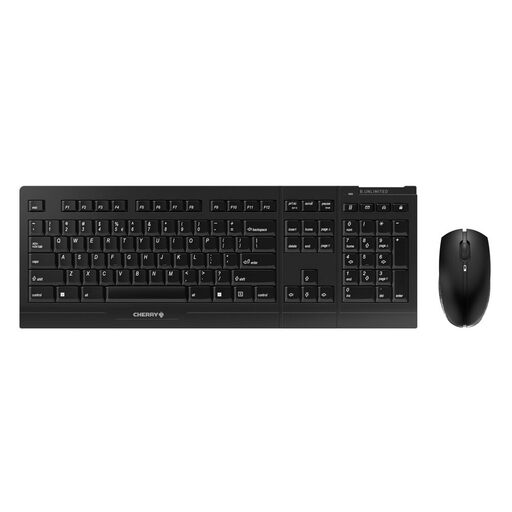
Why this product suits this profile: The set combines a full-size QWERTZ keyboard with a number pad and a mouse. It connects via a single 2.4 GHz nano receiver with a stated range of up to 10 metres.
The German QWERTZ layout is explicitly stated. SilentTouch technology and a spill-resistant design address typical requirements for everyday office use.
The stated battery life is up to 36 months for the keyboard and up to 18 months for the mouse, with eight shortcut keys.
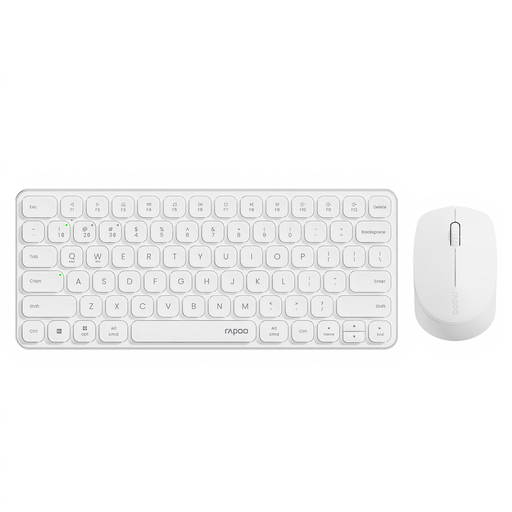
Why this product suits this profile: The combination of a full-size EU QWERTY layout, scissor mechanism and rechargeable NiMH batteries is designed for regular office and home office use.
The power supply is specified as rechargeable. According to the product information, the set can also be used while charging.
SX scissor mechanism, abrasion-resistant laser marking, AES-128 encryption and switchable mouse resolution of 1000 or 2000 DPI.
Why this product suits this profile: For users with a PC, tablet or several work devices, the set offers Bluetooth 4.0, Bluetooth 5.0 and 2.4 GHz wireless connectivity. According to the product information, it supports up to four devices.
The connection is not limited to a single mode. Before buying, however, check whether your intended devices support the required Bluetooth or USB connection.
Compact dimensions, scissor mechanism, quiet clicks and an adjustable mouse resolution from 800 to 2400 DPI.

Why this product suits this profile: The set is aimed at frequent typists looking for a quiet scissor keyboard, a number pad and rechargeable components for a permanent workstation.
The product information specifies USB-C charging, NiMH rechargeable batteries and use while charging. This eliminates the need to regularly buy suitable disposable batteries.
10 office and multimedia keys, six mouse buttons and three DPI levels of 1000, 1600 and 2400 DPI.
We have put together a complete, regularly updated list of products that fully meet these strict selection criteria and the safety regulations applicable in the EU.
With a 2.4 GHz wireless set, plug the USB nano receiver into a free USB-A port. On many models, the keyboard and mouse connect automatically. Bluetooth devices are paired through the system settings in Windows, macOS, Android or iPadOS. Before buying, check the connection type supported by the target device.
Battery life depends on the battery type, lighting, usage time and power-saving features. Manufacturer claims such as “up to 12 months” or “up to 36 months” are maximum values under specific conditions. Rechargeable models need to be charged regularly, but can continue to be used while charging if this is explicitly stated.
A quiet keyboard can reduce typing noise, making it suitable for shared rooms, video conferences or workspaces in living areas. However, no model is completely silent: the impact of your fingers and the mouse buttons also create noise. When choosing, the scissor mechanism, membrane technology and specific manufacturer information on noise reduction are useful points of reference.