
Lieferung heute & morgen

Qualitätsgarantie

Willkommens-Angebote freischalten: KOSTENLOSE Lieferung | Bis zu 80 % RABATT | Kostenlose 30-Tage-JoyPlus-Testphase
App herunterladen
A wireless mouse keeps your desk tidy, but choosing the wrong one can quickly become frustrating. Some models require a free USB-A port, while others work exclusively via Bluetooth. Specifications such as DPI, battery life and ‘ergonomic design’ are only useful when they suit the way you intend to use the mouse.
Typical buying problems arise from three avoidable pitfalls:
There are three common connection types for a wireless mouse:
Also check the information provided for Windows, macOS, ChromeOS, Linux, iPadOS or Android. ‘Mouse for PC and Mac’ does not necessarily mean that every extra button or configuration software feature is available on both platforms.
A mouse with an AA or AAA battery is ready to use straight away, but regular use involves ongoing replacement costs. The stated battery life depends, among other things, on usage, power-saving mode and the connection type.
A rechargeable mouse, on the other hand, requires a charging cable or charging dock. Check the connector, such as USB-C, as well as whether the mouse can be used in wired mode while charging. Figures such as ‘up to 70 days’ or ‘up to 24 months’ are maximum values and should be treated as a guide rather than a guaranteed usage period.
For longer office or home-working sessions, dimensions, weight and hand orientation are important. An ergonomic mouse may encourage a different hand position through its contoured shape, thumb rest or vertical design. However, whether the shape feels comfortable depends on your hand size, grip style and personal preference.
A quiet mouse reduces clicking noise and is suitable for libraries, shared offices or working late at night. The scroll wheel may still be audible. For gaming models, polling rate, sensor, weight, number of buttons and software support are also important. High figures such as 8,000 Hz or 35,000 DPI are mainly relevant to certain gaming and system configurations and are not essential for office tasks.
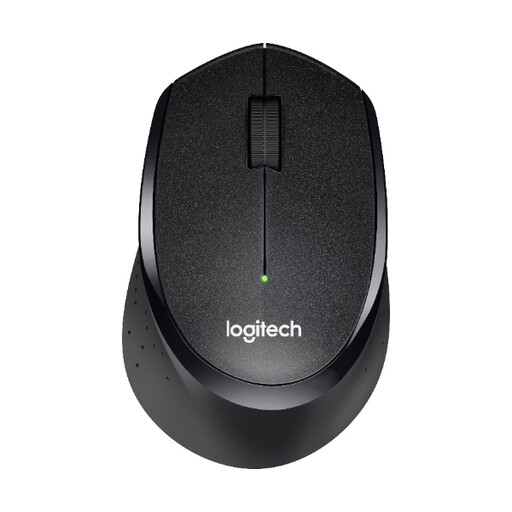
Why this product suits the profile: This 2.4 GHz wireless mouse uses a nano USB receiver and is specified for Windows, Mac, ChromeOS and Linux. That makes it suitable for traditional office and home computers with a USB port.
The product details specify plug-and-play operation, 1,000 DPI and a standby mode. This keeps setup and everyday use straightforward.
According to the product description, up to 10 metres of range and up to 24 months of battery life; three buttons and a right-handed shape.
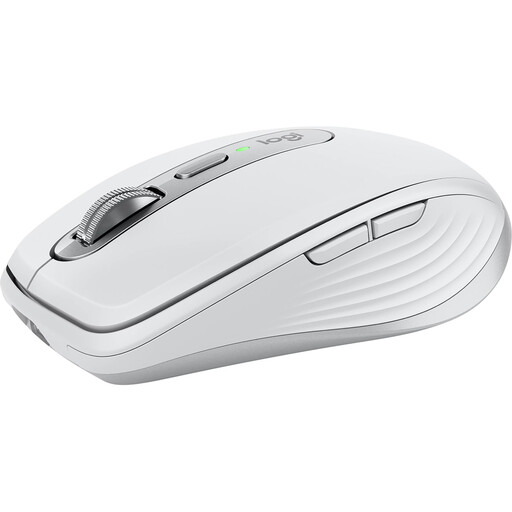
Why this product suits the profile: This compact mouse is designed for people who move between the office, home working and travel, and who use several devices.
Bluetooth and 2.4 GHz wireless connectivity are supported. You can also connect up to three devices, so you do not need a separate mouse for each one.
8,000 DPI, six programmable buttons, a USB-C charging port and, according to the product information, up to 70 days of battery life.

Why this product suits the profile: The vertical design is intended for users who want to try an alternative hand position during longer periods of work.
The 57-degree design is clearly described. Before buying, consider your hand size and allow time to adjust to a vertical ergonomic mouse.
400 to 4,000 DPI, Bluetooth and a USB receiver, support for up to three devices, plus a USB-C battery according to the product details.
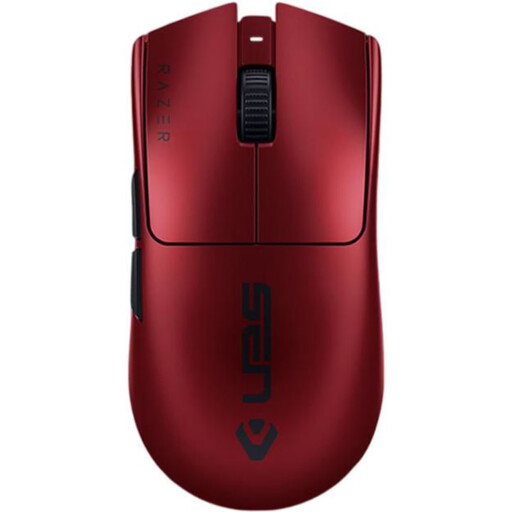
Why this product suits the profile: This model is aimed at PC and Mac users looking for a lightweight gaming mouse with programmable buttons and a wired fallback option.
The technical specifications list RF wireless connectivity and a USB-C cable. This means you can continue using the mouse when the battery needs charging or when wireless connectivity is not suitable in certain environments.
54 g weight, up to 35,000 DPI, six programmable buttons and, according to the product information, up to 95 hours of battery life.
We have put together a complete, regularly updated list of products that fully meet these strict selection criteria and the safety regulations applicable in the EU.
With a mouse that uses a USB receiver, plug the nano or wireless receiver into a suitable USB port and switch the mouse on. With a Bluetooth mouse, open your computer’s Bluetooth settings and start the pairing process. If you experience problems, first check the battery, switch, receiver and operating system.
The lifespan depends on the switches, housing, scroll wheel, rechargeable battery or disposable battery, and daily usage. Manufacturers’ power-supply specifications range from several months to several years, depending on the model. With an integrated rechargeable battery, its ability to hold a charge over time is an important factor. Regularly cleaning the mouse with a dry cloth can help reduce build-up around the scroll wheel and sensor.
For office and home working, a stable connection, a suitable hand shape and quiet clicks are usually more important than very high DPI values. If you frequently switch between devices, a multi-device mouse may be a good choice. During long working periods, the size of the mouse should suit your hand; an ergonomic design is one option, but it does not replace checking whether the fit is right for you.