
Lieferung heute & morgen

Qualitätsgarantie

Willkommens-Angebote freischalten: KOSTENLOSE Lieferung | Bis zu 80 % RABATT | Kostenlose 30-Tage-JoyPlus-Testphase
App herunterladen
A wireless mouse gives you more freedom of movement at your desk and helps you avoid cable clutter when you’re on the go. However, not every model is suitable for every use. A wireless mouse for the office has different requirements from a gaming mouse, a Bluetooth mouse for your MacBook or an ergonomic mouse for long working days.
As a Joybuy Product Recommendation Officer, I filter the most important product data and show you what to look out for before buying. This helps you avoid common purchasing mistakes without being swayed by high DPI figures or vague promises of comfort.
DPI describes how sensitively the sensor responds to movement. A high setting can be useful with large monitor resolutions or for certain games. For word processing, spreadsheets and browsing the internet, lower settings are often sufficient. Consistent tracking, the surface being used and the ability to adjust sensitivity are also important.
A wireless mouse with a 2.4 GHz USB receiver usually works as soon as you plug it in. However, it requires a USB-A port. A Bluetooth mouse connects without a dongle, but your computer must support Bluetooth and, depending on the operating system, manual pairing may be required.
Models with multiple connection options offer greater flexibility. Even so, check whether the USB receiver is included and whether your laptop has the right port.
For a mouse with an AA battery, battery life is stated in months and depends on usage, standby functionality and battery quality. A rechargeable mouse, on the other hand, is usually described in hours or days per charge. These figures cannot be compared directly.
You should also check the charging port. USB-C is convenient for everyday use, while a battery-powered model can continue to be used on the go without needing a charging break.
For a stationary office PC, a 2.4 GHz connection with a nano receiver is practical. If you’re looking for a mouse for PC and Mac, or one that can also be used with a tablet and smartphone, Bluetooth or multi-device functionality is preferable.
Before buying, check the following:
A compact, ambidextrous mouse fits easily into a laptop bag and is suitable for small to medium-sized hands. Right-handed users can benefit from a shaped thumb rest, while a vertical design requires a different hand position.
An ergonomic mouse should therefore not be chosen based on marketing claims alone. Width, height, weight and the hand’s natural position are what really matter. With a trackball mouse, you move the cursor using your thumb while the body remains on the desk. This can be practical when space is limited, although it takes a little time to get used to.
A silent mouse reduces clicking noise and is ideal for libraries, shared offices or working in the evening. The claim of “over 90 per cent less clicking noise” comes from the product information for the relevant Logitech models and is not a general comparison figure for all mice.
For productive workflows, programmable side buttons, a side-mounted scroll wheel or fast scrolling can be useful. For gaming, however, the sensor, polling rate, weight, number of buttons and support for configuration software are more important than a simple silent design.
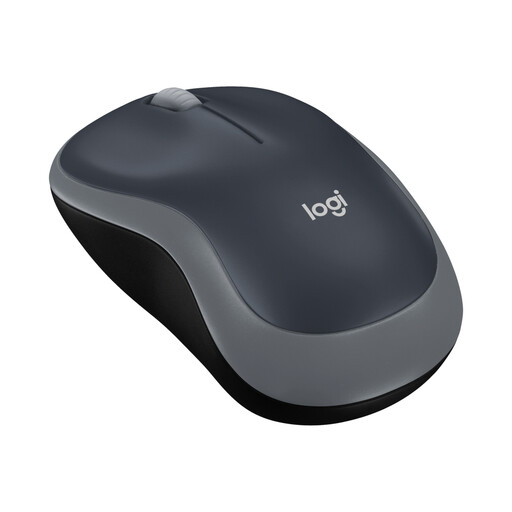
Why this product suits the profile: This compact wireless mouse is aimed at users looking for a straightforward solution for the office, studying or use on the go.
Plug-and-play via a nano USB receiver reduces set-up effort. The stated battery life is up to 12 months.
Ambidextrous design, 2.4 GHz connectivity and compatibility with Windows, Mac, ChromeOS and Linux according to the product information.
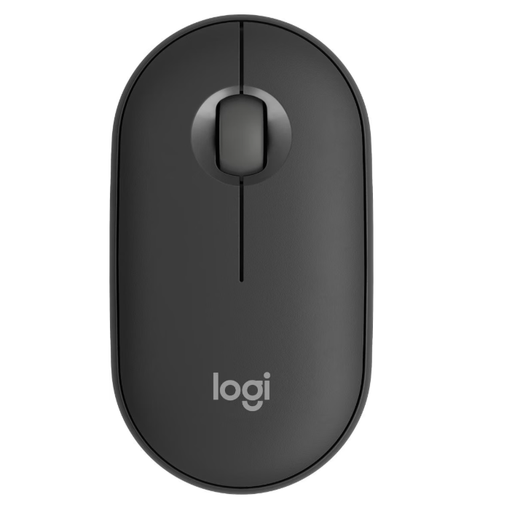
Why this product suits the profile: The slim, lightweight design is ideal for mobile workstations and switching between multiple devices.
Bluetooth and RF Wireless are available, and up to three devices can be connected according to the product description. Silent-Touch technology is designed to provide quieter use.
4000 DPI, ambidextrous design, a weight of 76 g and support for various operating systems according to the manufacturer’s information.

Why this product suits the profile: The vertical design is aimed at users who want an alternative hand position and multi-device support during long working sessions.
The design is clearly specified as a 57-degree vertical construction. This means buyers can see in advance that it is not a flat, standard mouse.
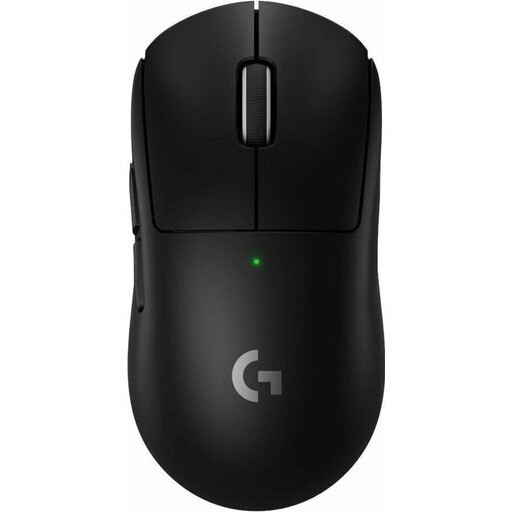
Why this product suits the profile: This model is designed for PC gaming and combines a low weight with adjustable gaming parameters.
The relevant gaming specifications are clearly stated: HERO 2 sensor, up to 44,000 DPI, an 8,000 Hz polling rate and five programmable buttons.
60 g weight, USB-C charging port and stated battery life of up to 95 hours.
For occasional use, a simple wireless mouse with an AA battery is often sufficient. In a home office, quiet buttons and a suitable hand shape are more important. If you switch between a work computer, laptop and tablet, choose a multi-device mouse with Bluetooth and stored connections.
A mouse with long battery life reduces maintenance, but it is not automatically the best solution. Frequent travellers should also look for a low weight, compact dimensions and secure storage for the receiver. Gamers, on the other hand, need low latency, a suitable polling rate and software for profiles or button assignment.
We have put together a complete, regularly updated list of products that fully meet these strict selection criteria and the safety regulations applicable in the EU.
For a wireless mouse, insert the nano USB receiver into an available USB port and switch the mouse on. A Bluetooth mouse is selected in the Bluetooth settings on your computer or tablet. With multi-device models, you can then switch between devices using a separate button.
Battery life depends on the connection, usage, sensor, standby mode and power supply. Depending on the model, product specifications range from several months to several years. For rechargeable mice, battery life is usually stated per charge and can vary considerably depending on usage.
Yes, provided the sensor, connection type, polling rate, weight and software are suitable for your use. For demanding gaming, a 2.4 GHz receiver is often designed to deliver low latency. Bluetooth is generally better suited to flexible everyday use, provided the specific application does not require particularly fast response times.