
Lieferung heute & morgen

Qualitätsgarantie

Willkommens-Angebote freischalten: KOSTENLOSE Lieferung | Bis zu 80 % RABATT | Kostenlose 30-Tage-JoyPlus-Testphase
App herunterladen
A wireless mouse frees up space on your desk and makes it easier to use your laptop, PC or tablet. However, not every model suits every workspace. Marketing terms such as “ergonomic”, “quiet” or “long battery life” only tell you so much. What really matters is the connection technology, shape, power supply and compatibility with your devices.
This buying guide explains what to look for in a wireless, Bluetooth or radio mouse, and which models suit different usage profiles.
A Bluetooth mouse requires a compatible Bluetooth module in the device you are connecting it to. Many modern laptops, tablets and Macs have one, but not every desktop PC does. A wireless mouse with a 2.4 GHz USB receiver, on the other hand, works via an available USB port.
Check the following before buying:
Some models combine Bluetooth with a wireless receiver. This can be useful if you want to switch between a laptop, PC and tablet.
A quiet mouse reduces clicking noise but still has a noticeable tactile pressure point. Claims such as “over 90% less clicking noise” come from the manufacturer and should be treated as a comparison value within the relevant product description. How loud the mouse actually seems depends on factors including the desk surface, how firmly you click and the acoustics of the room.
Silent-Touch models are particularly well suited to libraries, open-plan offices or working at night. Also check whether noise reduction applies only to the buttons or to the scroll wheel as well.
A mouse with long battery life may either run on an AA battery or have an integrated rechargeable battery. Battery-powered models do not need a charging cable, while rechargeable mice need to be charged regularly.
Bear the following in mind:
A range of up to 10 metres is standard for many wireless and Bluetooth mice. For your workspace, however, a stable connection is more important than the maximum distance. USB receivers should ideally be connected directly to the computer rather than behind obstructive metal surfaces.
A multi-device mouse can store several devices and let you switch between them at the press of a button. This is practical for users who, for example, work with both a work laptop and a personal PC.
The optical sensor determines how the mouse detects movement. The DPI figure describes pointer sensitivity: at a higher DPI, the cursor moves further with the same hand movement. For office work, a moderate range with precise adjustment is often sufficient. A setting of 4,000 or 8,000 DPI is not automatically necessary for every use.
More important factors include:
An ergonomic mouse should suit the size of your hand and your preferred hand. Compact models are ideal for use on the go and in smaller workspaces. Full-size mice often give larger hands more room to rest. With a left-handed or ambidextrous mouse, the symmetrical shape is particularly important.
If you want to move your hand as little as possible, you could also consider a trackball mouse. With vertical models, bear in mind that they may take longer to get used to. A mouse is no substitute for regular breaks or a well-designed workspace.
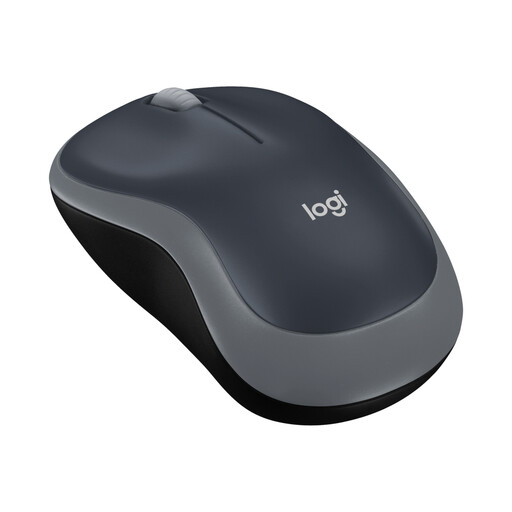
Why this product suits this profile: This compact wireless mouse uses a nano USB receiver, offers plug-and-play setup and runs on an AA battery. That makes it suitable for students, laptop users and straightforward office tasks.
The connection technology and required USB port are clearly specified. Battery life is stated as up to 12 months.
Ambidextrous design, an optical sensor with 1,000 DPI and wireless range of up to 10 metres according to the product details.
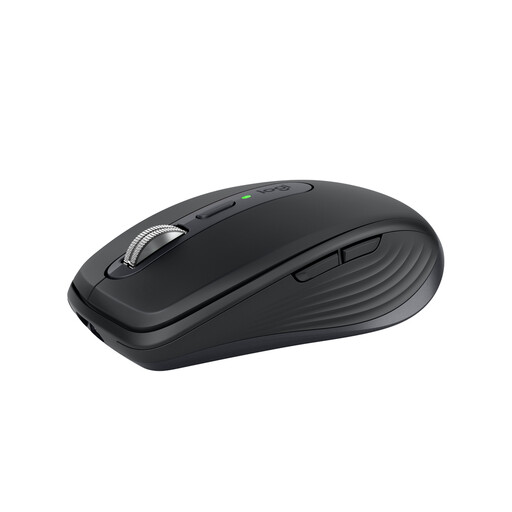
Why this product suits this profile: This compact Logitech wireless mouse is designed for changing workspaces and mobile use. Bluetooth, multi-device functionality and USB-C charging support flexible workflows.
The mouse supports up to three devices and lists Bluetooth and the optional Logi Bolt receiver as connection options.
Darkfield sensor with 200 to 8,000 DPI, MagSpeed scroll wheel, quiet clicks and a rechargeable battery lasting up to 70 days according to the manufacturer.
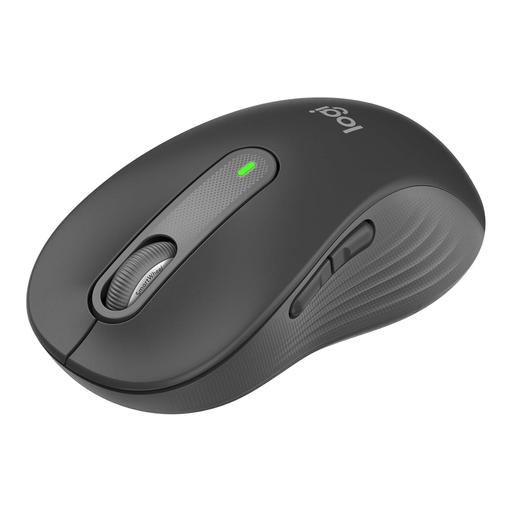
Why this product suits this profile: The L size is designed for larger hands. Bluetooth and a Logi Bolt receiver allow for different workspace configurations.
The product description explicitly points out the different sizes and right- and left-handed versions. This reduces the risk of choosing an unsuitable shape.
SilentTouch technology, customisable side buttons, SmartWheel and up to 24 months of battery life according to the manufacturer.
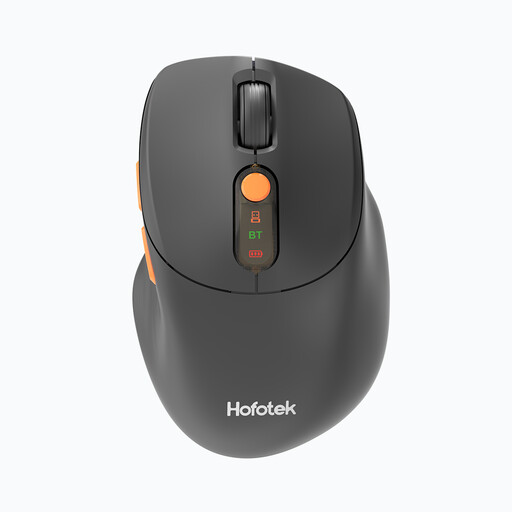
Why this product suits this profile: The M311 combines 2.4 GHz wireless connectivity with Bluetooth 5.1 and can be connected to up to three devices according to the description. This suits workspaces using multiple operating systems.
The connection options, included USB receiver and AA battery are listed in the product details.
Weight of 62 grams, Silent-Touch function and adjustable DPI range from 800 to 4,000 according to the product description.
We have put together a complete, regularly updated list of products that fully meet these strict selection criteria and the safety regulations applicable in the EU.
With a wireless mouse, plug the USB receiver into a suitable port, insert the battery and switch on the mouse. A Bluetooth mouse is paired in the Bluetooth settings of the device you are connecting it to. Additional drivers are often not required for basic functions.
Its lifespan depends on the switches, housing, usage intensity, battery care and transport. When it comes to power supply, manufacturers distinguish between rechargeable battery life and battery lifespan. Figures such as 12, 18 or 24 months should therefore not be confused with a guaranteed total lifespan for the mouse.
Battery-powered models regularly incur the cost of replacement AA batteries. Rechargeable models require electricity and a suitable charging cable. Also check whether a USB receiver is included or has to be purchased separately.