Creating large project pages
If you want to combine woodland photos and captions on an A4 page, you’ll need an A4-capable photo printer. Canon Germany and Epson Germany also list copying and scanning features for certain models.


A postcard-size printer may be enough for individual photos to stick in your project, while an A4-capable photo printer is a better fit for larger pages combining images and captions. If you regularly print several sets of photos, compare the cost of suitable ink and paper, as well as maintenance needs. Small instant prints are only suitable if their image area is large enough for your subjects.
If you want to combine woodland photos and captions on an A4 page, you’ll need an A4-capable photo printer. Canon Germany and Epson Germany also list copying and scanning features for certain models.
If you only want to stick in a few individual postcard-size photos and don’t need to print A4 photos on the same device, a compact model such as the Canon SELPHY CP1500 could be worth considering. Canon Germany lists the paper size for this model as 100 × 148 mm.
If you regularly need to print several sets of photos, it’s worth considering refillable ink or cartridges alongside suitable paper and maintenance needs. Canon Germany and Epson Germany describe different ink solutions for their respective photo printer models.
| What you need | What to check before you buy | Who it matters most to |
|---|---|---|
| Large project pages | Check the required finished size and whether the printer supports A4 photo paper; also check for copying and scanning features if you need them. | If you want to fit an image and caption on a large page, the print size is crucial. Around 36% of consumers are likely to prioritise A4 project pages. |
| Individual postcard-size photos | Check the finished size, power supply and availability of a compatible paper-and-ribbon set. | If you’re sticking individual woodland photos into a project book and don’t need A4, postcard size may be enough. Around 29% of consumers are likely to prioritise individual prints like these. |
| Regular sets of photos | Compare compatible paper and ink or ribbon; for tank printers, check the maintenance options too. | If you’re planning to print several sets of photos, suitable consumables and maintenance matter just as much as the printer itself. Around 21% of consumers are likely to prioritise regular photo sets. |
| Small mobile prints | Check the actual image area, app compatibility and whether film needs to be bought separately. | If you want to print small pictures straight from your smartphone for your project book, portability and image area are important. Around 14% of consumers are likely to prioritise small mobile prints. |
The usable image area may be smaller than the print medium. Fujifilm lists an image area of 62 × 46 mm for the instax mini Link 3, so it won’t produce a postcard-size photo.
First decide how large you need the woodland details to appear in your finished project, then compare the stated image area.
If the details come out too small, you may need to print the photos again in a larger size.
Photo printers need different consumables depending on the model. A paper-and-ribbon set for one printer won’t necessarily work with another.
Make a list of how many photos you plan to print, then check that the paper, ink or ribbon is compatible with the exact model.
For repeated printing, you may need cartridges, refill ink or a compatible paper-and-ribbon set, as well as paper. The Canon PIXMA G650 also has a replaceable maintenance cartridge.
Canon lists a mains adapter for the SELPHY CP1500; a battery is not included. The Fujifilm instax mini Link 3 has a built-in battery.
Check whether there’s a socket where you plan to print and what power supply the specific model uses.
You may need to buy a battery separately for the SELPHY CP1500 if you want to print without access to a socket.
The models relevant here range from the compact SELPHY CP1500 to the A4 photo printer PIXMA G650.
The Expression Photo XP-8700 uses individual photo ink cartridges, while the EcoTank ET-8500 uses refillable ink tanks. Both are described as A4 photo printers.
The instax mini Link 3 is a smartphone printer for small instant photos.
The DCP-J1050DW is an inkjet all-in-one printer for households that occasionally want to print on photo paper as well as everyday documents.
The Joybuy products below include mobile photo and thermal printers, as well as an A4 thermal printer model. Before you buy, check that each device’s colour reproduction and image area are suitable for your woodland photos.
 No image available
The product description mentions photo printing via a smartphone connection; according to the description, prints are in black and white. Check whether that’s suitable for colour woodland photos.
The product title says that 10 rolls of thermal paper are included. The printed surface may turn black if rubbed, according to the description.
 No image available
The product details mention photo printing and a smartphone connection. Check in advance that the image size and colour reproduction are suitable for your school project.
 No image available
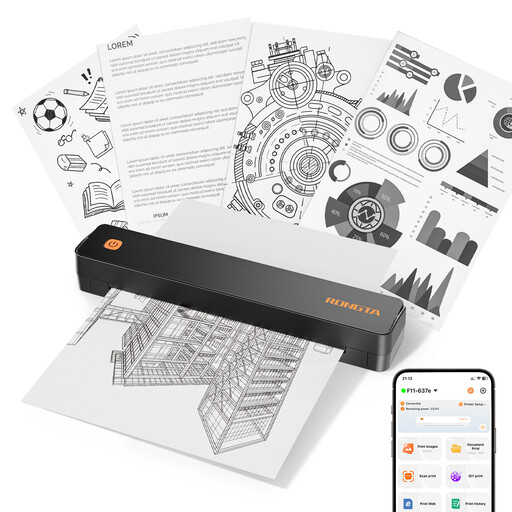
According to the product title, this model is designed for A4 printing; the product details also mention printing images. Check that the print type and size meet your needs for woodland photos.
The product title also lists A4/A5/B5 sizes, Bluetooth, 203 DPI and 16 mm/s.
 No image available
The product details mention photo printing and use with iOS or Android smartphones via an app. Check that the app is compatible with your device and that the printout is suitable for your project.
 No image available
This portable photo printer is designed for small pictures. The product details mention self-adhesive photo paper and printing from a smartphone via an app. The stated paper size is 50 × 76 mm, so it’s intended for small prints.
Yes, if you choose a suitable A4 all-in-one printer. Canon Germany lists printing, copying and scanning, as well as borderless A4 photo printing, for the PIXMA G650; Epson Germany describes these features for the XP-8700 too. The SELPHY CP1500, on the other hand, is designed for smaller photo media.
For affected Epson EcoTank and Expression models, Epson recommends running a nozzle check first and cleaning the print head if needed. Check the ink levels before cleaning; this advice applies to the Epson printer series mentioned.
Allow for photo paper that’s compatible with your model, as well as ink, cartridges or paper-and-ribbon sets. If something is faulty, your statutory rights are against the seller. Any additional guarantee is voluntary and subject to its own terms and conditions. The Verbraucherzentrale (German Consumer Advice Centre) makes a clear distinction between statutory consumer rights and a guarantee.
Under certain conditions, § 60a UrhG allows works to be used for non-commercial illustration in teaching; this provision also covers images. It isn’t blanket permission for every kind of use, and in particular doesn’t automatically allow you to publish the project publicly later. If you’re using someone else’s images, check the intended use and permissions.
In Germany, electrical waste must be taken to an authorised collection point or accepted by an authorised take-back service. It must not go in household rubbish. The German Federal Ministry for the Environment lists local collection points and take-back options offered by manufacturers and retailers.