Drivers dealing with variable signal
If you want to check your inbox at planned stopping points, check mobile coverage along your route. The Federal Network Agency notes that its map provides a forecast of local coverage.


For occasional email checks while safely parked, your smartphone hotspot will often be enough to start with, provided your employer allows this access method and you have suitable signal and data allowance. A separate battery-powered router may be a better option if you want to stay online for longer or connect several devices. Before choosing, check network coverage and your tariff along your route. 5G is only a deciding factor if it’s available at your stopping points and suits the way you plan to use it.
If you want to check your inbox at planned stopping points, check mobile coverage along your route. The Federal Network Agency notes that its map provides a forecast of local coverage.
If you’re accessing work information, check in advance which devices and access methods your employer allows. The Federal Office for Information Security recommends having clear rules for using communication channels when working remotely.
If you want to work during longer breaks using a laptop or several devices, battery life, SIM format and power supply are important factors to consider.
Start with your stopping points and your employer’s requirements. If your smartphone and tariff are enough for occasional checks, you may not need a separate router. For longer sessions with several devices, a dedicated hotspot could be more practical.
The Federal Network Agency describes its mobile coverage map as a forecast based on data from network operators. Compare coverage at your planned stopping points and, if possible, test the signal in person.
| Consideration | What to check before buying | Who it matters most to |
|---|---|---|
| Signal at your stopping point | Network and mobile standard at each stopping point; test the actual signal if possible. | If I need to access my inbox at different stopping points, a usable connection there matters more to me than a high advertised data rate. Around 33 % of consumers put signal at stopping points first. |
| Work access | Your employer’s requirements for devices and access methods; firmware updates and changeable login details. | If I’m checking work emails, I want to know in advance whether my device and chosen access method are allowed. Around 27 % of consumers prioritise employer approval and suitable secure access. |
| Battery life and devices | The battery life of the specific model, power supply and number of connections you need. | If I want to connect a laptop or other devices during longer breaks, I pay particular attention to battery power and charging options. Around 20 % of consumers prioritise longer use and connecting several devices. |
| Data tariff | Data allowance, any speed limits and the tariff’s term; if travelling abroad, check where it can be used. | If I don’t want a second tariff without a clear need, I compare my phone’s data allowance with that of a separate hotspot. Around 20 % of consumers look first at their tariff and ongoing data use. |
Even a 5G-capable router needs a usable network at each stopping point. A coverage map is a forecast, and your location and actual conditions can affect the result.
Check the network and tariff for your planned stopping points and, if possible, test the signal in person.
A separate router needs a suitable data service. If you’re getting a new German prepaid SIM, the subscriber details must be checked before it can be activated.
Compare the router and a suitable tariff together, and allow time to activate a new prepaid SIM before setting off.
TP-Link notes that the actual battery life of the M7200 may vary depending on usage and the number of connected devices.
Plan a suitable charging option for longer stops and check what power supply the specific model needs.
Having your own Wi-Fi network doesn’t establish whether your employer allows the device or access method for work information.
Ask your IT team about the rules in place before buying or using a device.
A range of mobile MiFi devices, including LTE models such as the M7200 and M7650, for different needs.
The Nighthawk range includes mobile routers; the M3 MH3150 is a 5G model.
Travel hotspots with a separately available Cloud SIM data service; according to the manufacturer, the G4 Pro can also take a Nano SIM.
The Spitz AX GL-X3000 is a 5G/LTE gateway with dual-SIM functionality.
This selection includes mobile LTE hotspots and other router models suited to accessing your inbox on the move. For each device, check that its mobile service and power supply suit your planned stopping points.
 No image available
For a stop where LTE is available, provided you can arrange a suitable power source.
LTE Cat 6, Wi-Fi 6, Nano SIM and USB-C power supply. The product details list speeds of up to 300 Mbps and AX 600 Mbps for Wi-Fi; the device needs a suitable power source.
 No image available
For mobile use at stopping points with LTE coverage and a suitable data tariff.
The product name describes a portable hotspot with a Nano SIM, a 2,200 mAh battery and speeds of up to 150 Mbps. Battery life depends on usage conditions.
 No image available
For a mobile LTE hotspot, provided you have a compatible Nano SIM with a data tariff and a suitable charging option.
The product name lists a 2,000 mAh battery, download speeds of up to 150 Mbps and upload speeds of up to 50 Mbps. The stated battery life isn’t a guaranteed travel time.
 No image available
Could be a good fit if there’s a socket available to power it at your stopping points.
The product name describes a 4G router with Wi-Fi 6, dual-band Wi-Fi and Gigabit Ethernet. The setup described requires a mains adapter and a suitable socket.
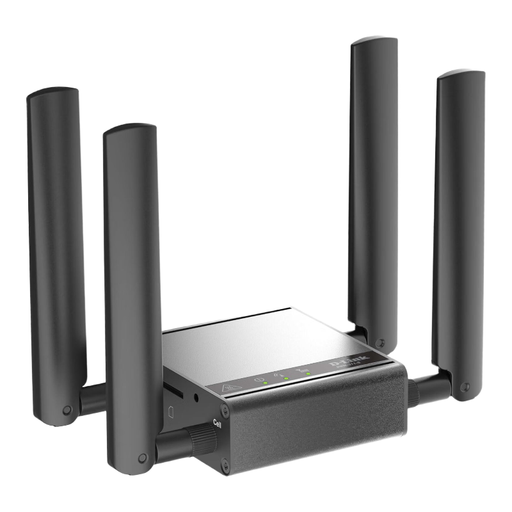 No image available
Worth considering if you’re looking for an M2M modem for indoor use, rather than a straightforward battery-powered hotspot for short stops.
This model is listed as a router, gateway and modem. The setup described requires a power supply and Ethernet.
Under Section 23(1a) of the German Road Traffic Regulations (StVO), drivers are generally not allowed to pick up or hold an electronic communications device. Its use is also subject to strict conditions, including voice control and brief glances adapted to the road and traffic conditions. A safe place to stop is the obvious choice for dealing with your inbox. The exception under Section 23(1b) of the StVO for a stationary vehicle generally requires the engine to be fully switched off; an automatic stop-start system isn’t enough. Source: Federal Ministry of Justice, German Road Traffic Regulations.
No. The Federal Office for Information Security recommends setting clear rules about which information may be handled outside the organisation and which communication methods are approved for that purpose. Check your employer’s requirements; having your own router doesn’t replace that approval.
Insert a suitable, activated SIM and check the connection before setting off. The Federal Office for Information Security recommends changing the default administrator password and keeping the router’s firmware up to date. For the TP-Link M7200, the manufacturer lists Micro-USB charging.
For occasional trips within the EU, “Roam like at home” generally applies, but fair-use limits may be relevant, particularly with unlimited or very cheap data tariffs. Check your specific contract. If you’re using a separate router, check whether its SIM or data service can be used in your destination country. Source: Your Europe, European Union.
Yes. Providers of German prepaid mobile services must verify the accuracy of the subscriber details against an identity document before activating the SIM. Make sure you allow time to get it activated before your journey. Source: Federal Network Agency.