For consistent overall shots and regular product photos, a mirrorless camera with a suitable lens offers more flexibility, but also means thinking about the lens and set-up. For fine weaving details, it’s the close-focusing ability of the specific lens that matters. If you only need a few images, you could start by trying your smartphone, as Adobe suggests this as an option on a limited budget. With changing window light, keeping your set-up consistent and choosing the right white balance are important.
Which option is right for you?
Photographing weaving details
If you want to show the weave, edges and texture of the material from close up, check how close the specific lens or compact camera can focus. Nikon Germany gives a minimum focusing distance of 0.2 m for the NIKKOR Z DX 16–50 mm; OM Digital Solutions describes close-ups of up to 1 cm for the TG-7. These figures relate to these specific products and are not a general comparison.
Creating a consistent look for a basket shop
If you’re photographing several baskets from similar angles, a repeatable set-up and control over exposure and colour will help. Format recommends a reliable set-up and repeatable workflow; Canon Germany notes that natural light can change how colours appear.
Getting started with minimal equipment
If you only need a few product photos to begin with, you can see whether your existing smartphone is good enough in the light from your window. Adobe suggests a smartphone as an option on a limited budget.
What should you look for when buying?
Mirrorless camera with interchangeable lenses
A good fit if: you regularly photograph whole baskets and details, and want to control the framing and settings yourself.
Consider: a lens, tripod and extra space may all be part of your set-up; a standard zoom isn’t automatically a macro lens.
Compact camera with a close-up function
A good fit if: tight shots of individual woven areas matter more to you than an interchangeable lens system you can expand. OM Digital Solutions says the TG-7 can take close-ups from as little as 1 cm away.
Consider: the TG-7 has a fixed lens; the short focusing distance alone doesn’t mean it will also frame whole baskets as you’d like.
Your existing smartphone
A good fit if: you’re only photographing a few baskets to start with and can judge from your own images whether the details, colours and framing meet your needs.
Consider: results depend on the specific smartphone and what you need from it; a general recommendation can’t tell you how an unknown model will perform.
| What matters |
What to check when buying |
Who should pay particular attention? |
| Fine weaving detail |
Check the minimum focusing distance and the framing you can achieve with the specific lens. |
If individual loops need to be clearly visible in the image, I’d check the close-focusing distance first. Around 37% of consumers put weaving details at the top of their list. |
| Consistent colours |
Look for adjustable white balance and consider using a repeatable lighting set-up. |
With changing window light, I want basket colours to look similar across a series of photos. Around 27% of consumers put consistent colours first. |
| Repeatable shots |
Plan for suitable framing and a stable camera set-up; a tripod can keep the camera in a fixed position. |
If I’m showing several baskets from similar angles, keeping the camera in the same position matters to me. This applies to around 18% of consumers who prioritise repeatable shots. |
| Minimal extra equipment |
Try your existing smartphone and check whether the camera kit includes the lens you need. |
If I only take photos occasionally, I’d like to use the equipment I already have to begin with. Around 18% of consumers put keeping extra equipment to a minimum first. |
Common buying mistakes
-
Assuming megapixels mean close-up capability
The camera body’s resolution alone doesn’t tell you how close the lens you’re using can focus. The key factors are the shooting distance and the framing you can achieve with the specific camera and lens combination.
Before buying, check the complete camera and lens package to make sure it can capture the level of detail you want.
You may need a different lens later to capture very small weaving details.
-
Confusing image stabilisation with a repeatable set-up
Stabilisation can reduce camera shake, but it won’t fix the framing or keep the camera and basket in the same positions across a series of photos.
Plan the camera position and background together. Think of a tripod and in-lens stabilisation as two different kinds of help.
A tripod takes up space, and repositioning it for different shots can take extra time.
-
Choosing a close-up compact camera for every basket shot
The TG-7’s close-up capability of up to 1 cm, as stated by OM Digital Solutions, is for tight shots. For a whole basket, the framing and available shooting space also need to work.
Consider separately whether you want to take an overall shot, a close-up or both.
Camera brands to consider
Canon
The EOS R50 with RF-S 18–45 mm is a mirrorless camera option for overall shots, with an RF lens mount you can build on.
- Canon Germany lists the EOS R50 as having 24.2 MP and includes the RF-S 18–45 mm as a kit lens.
- These specifications don’t prove a particular advantage for basket photography; check how close the specific lens can focus to capture weaving details.
Nikon
The Z50II with NIKKOR Z DX 16–50 mm is a Z system option for overall shots and closer detail photography.
- Nikon Germany lists the Z50II as having 20.9 MP; the stated minimum focusing distance for this specific zoom is 0.2 m.
- The lens specification doesn’t guarantee consistent detail at every focal length, and it isn’t a comparison between brands.
Sony
The ZV-E10 II with E PZ 16–50 mm F3.5–5.6 OSS II is an interchangeable-lens kit that could also be worth considering if you’re planning product videos.
- Sony Germany lists the ZV-E10 II as having an APS-C sensor with approximately 26 MP and includes the kit lens.
- Its vlogging focus doesn’t prove it offers extra benefits for stationary baskets. Check how close the lens can focus to capture weaving details.
OM SYSTEM
The Tough TG-7 is a compact camera option if you need to shoot from close up without changing lenses.
- OM Digital Solutions lists approximately 12 MP and close-ups from as little as 1 cm away.
- The close-up specification alone doesn’t show whether it can also capture a suitable overall shot of the basket.
Camera options at Joybuy
The Joybuy products below are camera options. For basket photography in window light, the framing you want and the right shooting distance are key considerations.
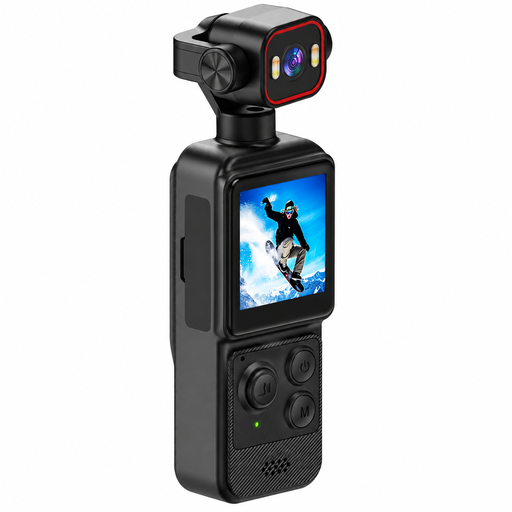 No image available
4K mini action camera with clip
Check whether the stated 140° field of view and shooting distance suit the framing you want for your basket.
Features listed in the product title: 4K, 1.54-inch display, 140° wide angle, app control, LED lighting and 1200-mAh battery.
View at Joybuy
 No image available
Sony Alpha 6100 APS-C mirrorless camera with 16–50 mm power zoom lens
The 16–50 mm power zoom is listed in the product title; check whether the minimum focusing distance of this specific lens suits the weaving details you want to capture.
Features listed in the product title: APS-C camera and 16–50 mm power zoom lens.
View at Joybuy
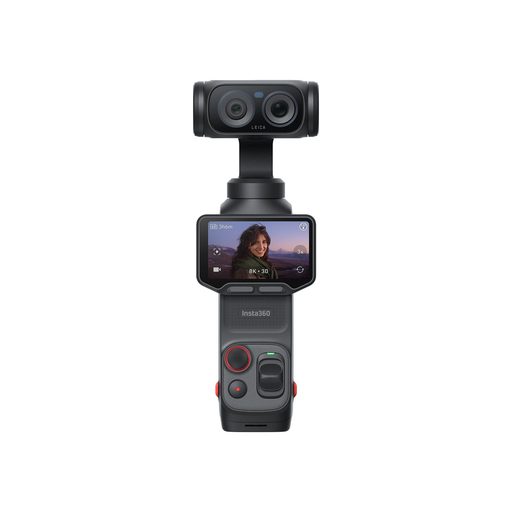 No image available
Insta360 Luna Ultra Standard Bundle, Cosmic Black
Before buying, check the shooting distances and framing this version offers for your basket photos.
Features listed in the product title: Standard Bundle and Cosmic Black colour option.
View at Joybuy
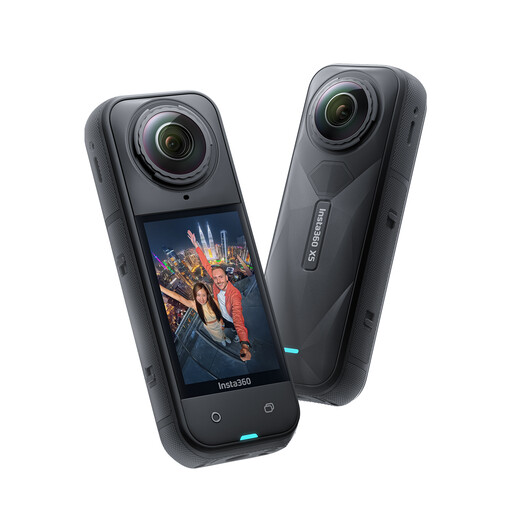 No image available
Insta360 X5 waterproof 8K 360° action camera
Check whether 360° capture and the shooting distance suit the views you want to show of your baskets.
Features listed in the product title: 8K, 360° capture, replaceable lens, three-hour battery life, built-in wind guard, stabilisation and waterproof design.
View at Joybuy
Frequently asked questions
Do I need a macro lens to photograph baskets?
Not necessarily for a shot of the whole basket. If you want individual loops to fill the frame, check the shooting distance and framing you can achieve with the specific lens; the camera’s resolution alone doesn’t mean it has macro capability.
How do I get started with basket photography in window light?
Position the basket and camera consistently, and choose a simple background. Watch how the light and colours change between shots. A tripod keeps the camera steady, while white balance helps you achieve the colour reproduction you want.
Is my smartphone good enough for basket photography?
It may be enough for a few photos in good window light, as long as the results from your particular device meet your needs. Start by photographing a basket and checking the weaving details, colours and framing before you buy a camera system.
How can I keep colours as consistent as possible in changing window light?
Use a repeatable lighting set-up and pay attention to white balance. Canon Germany explains that natural light can look warmer or cooler depending on the conditions; using the same settings and a controlled workflow can help make your shots more consistent.


