Joining on your own from a busy shared house
If you often join in the discussion, clear audio matters. Don’t assume a built-in microphone will reliably filter out the noise of a shared house.


If you’re joining on your own from a laptop, first check that your voice comes through clearly and that you can keep the camera’s view focused on your workspace. A room camera won’t automatically solve the problem of being on your own. For handwritten drafts, you’ll want a desk view that’s easy to adjust; a conference camera is more suitable if several people are joining together on one device. Manufacturers’ claims about noise reduction are no substitute for testing the sound with the actual noise levels in your shared house.
If you often join in the discussion, clear audio matters. Don’t assume a built-in microphone will reliably filter out the noise of a shared house.
If you share a communal space with others, check what the camera will show and how you can cover it or switch it off when you’re not on a call.
If you switch between conversation and handwritten passages, you’ll need a desk view that you can set up at your own workspace and check beforehand.
A good fit if: you’re sitting at your computer on your own and mainly want to speak or share text on screen.
The trade-off: A narrow field of view shows less of the shared space, but won’t capture a group sitting beside you. If background voices are a problem, a separate microphone worn closer to your mouth may be more useful than upgrading the camera alone.
A good fit if: you want to share handwritten notes or sketches during the writing workshop.
The trade-off: Set up the viewing angle using your monitor and desk, then check before the session that the text is legible. According to Insta360, some virtual background features are disabled on the Insta360 Link 2C Pro in DeskView mode.
A good fit if: several housemates are joining together on one device and need to be seen and heard.
The trade-off: A room camera needs a suitable setup and connection, and may show more of your private surroundings than a webcam for an individual workspace.
Your choice depends on what matters most for the way you’ll use the camera. The percentages refer to consumers’ top priority in the shared-house writing workshop described here.
| Priority | What to check when buying | Who it matters most to |
|---|---|---|
| Clear voice | Microphone pickup and position at your actual seat; if needed, use a separate microphone worn closer to your mouth. | If I want to be heard clearly while reading aloud and discussing ideas, even with the noise of a shared house, I’ll test the audio from my seat. Around 33% of consumers prioritise a clear voice. |
| What’s visible in the shared house | Field of view, camera position and preview; operate the lens cover and microphone mute separately. | If I want to control which parts of the shared home are visible, the camera’s field of view is crucial. Around 27% of consumers prioritise control over the image and surroundings. |
| Sharing paper drafts | How to switch to desk view, and the lighting, angle and legibility before the workshop. | If I want to show handwritten text, I need to be able to set up the desk view quickly and make sure it’s easy to read. Around 20% of consumers put paper drafts first. |
| Easy connection | Check the cable against the USB port you have; test the camera choice and permissions beforehand. | If I want to set up the camera on my existing computer without any fuss, I’ll check the connections and software requirements. Around 13% of consumers prioritise a straightforward setup. |
| Joining as a group | Whether several people will be joining, how many need to be captured and whether everyone can be heard clearly in a test call. | If we’re joining together on one device, we need a solution that captures our group without bringing too much of our private surroundings into view. Around 7% of consumers prioritise joining as a group. |
In n-tv Produkt-Check’s test, the Anker PowerConf C200 only reduced background noise to a limited extent. That result can’t be applied to all cameras.
Test the audio from your usual seat, with the kind of noise you can expect during a workshop.
If the built-in microphone isn’t good enough for your surroundings, you may need a separate audio device.
A cover blocks the lens, but doesn’t automatically switch off the microphone. Logitech says the video on the Brio 500 can be switched off while audio remains active.
Check the camera and microphone status separately, both before and after the workshop.
Logitech describes the MeetUp 2 as a solution for small meeting rooms. In a shared house, a wide room view may also show private areas and housemates who aren’t taking part.
First, check whether several people really will be joining together. Also consider the camera’s position, power supply and connection.
The resolution actually transmitted also depends on the video service, account, settings and connection. Zoom lists additional requirements for Full HD video in meetings.
Check the requirements of the workshop platform you use before choosing a camera based solely on its higher stated resolution.
The Brio 500 is worth considering for an individual workspace with a desk view; the MeetUp 2 is a separate product line for small meeting rooms.
The PowerConf C200 is a desk webcam for buyers who want to adjust the field of view.
The SmartCam C960 is described as a straightforward Full HD USB webcam for an individual workspace. It’s not the same as versions called C960 2K or C960 4K.
The Link 2C Pro is an option if you want to show paper drafts from time to time using DeskView.
These Joybuy products are described as webcams for a single workspace. Compare their connections, field of view and features with your computer and the way you’ll use them in your workshop.
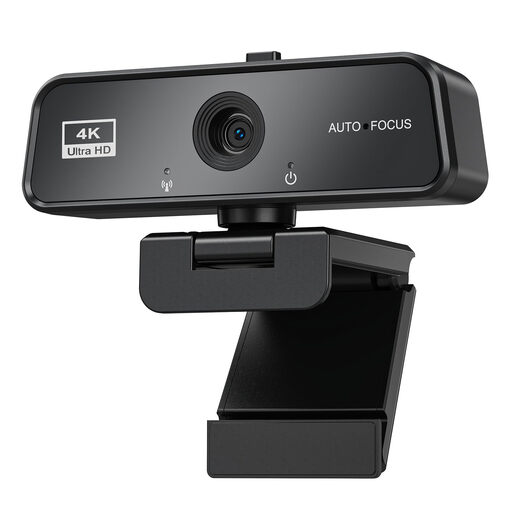 No image available
Described as a webcam for video calls on a PC; check that its connections and features are compatible with your computer.
The product name lists autofocus, a microphone, privacy cover, Auto Light Correction and Plug & Play, as well as Windows and Mac compatibility.
 No image available
It’s worth considering as a USB webcam for a single workshop workspace; test the microphone and field of view from your seat.
The product description lists a 78° field of view, a built-in stereo microphone and autofocus. It also mentions an adjustable desk stand and tripod, as well as compatibility with Windows and Mac OS.
 No image available
Described as a webcam for meetings and calls; check beforehand whether you want to use its additional software features.
The product description lists a 78° horizontal viewing angle, autofocus, Auto-Framing and integrated stereo microphones. According to the description, Auto-Framing requires Dell Peripheral Manager.
 No image available
Described as a webcam for video calls and conferences; check that the clip-on mount works with your screen.
The product name lists a clip-on mount and an integrated microphone with noise reduction.
 No image available
Described as a webcam for desktop and streaming use; the camera’s resolution alone doesn’t determine the resolution your workshop will be streamed at.
The product name lists autofocus, two microphones and a privacy cover.
No. The camera’s resolution alone doesn’t guarantee a 4K stream. The video service, account, settings and connection all play a part; Zoom lists additional requirements for Full HD video in meetings. Check the requirements of the platform you actually use.
First, set up the view of your face and the lighting, then test the desk view with a real page of text. According to Logitech, you tilt the Brio 500 downwards; with the Link 2C Pro, you adjust the mount manually for DeskView and select the mode in the Link Controller.
Yes, if you don’t want any sound from your home to be transmitted. The cover only blocks the lens; according to Logitech, video on the Brio 500 can be switched off while audio remains active. Mute the microphone separately in the app or on the audio device.
When you buy online from a trader in the EU, you generally have a 14-day right to cancel, starting from delivery; Your Europe lists exceptions and rules on return costs. If goods are faulty, you have a statutory guarantee against the seller, which is separate from any voluntary manufacturer’s warranty. Your Europe says this guarantee must last for at least two years from receipt of the goods.
The Bundesnetzagentur says devices that can transmit video or audio without people noticing are prohibited. This is not the same as an ordinary USB webcam openly used for a video call. Don’t include housemates who aren’t taking part in the workshop without their knowledge; whether a particular recording is lawful depends on the circumstances and legal basis, so there’s no general answer.