
Lieferung heute & morgen

Qualitätsgarantie

Willkommens-Angebote freischalten: KOSTENLOSE Lieferung | Bis zu 80 % RABATT | Kostenlose 30-Tage-JoyPlus-Testphase
App herunterladen
An electric height-adjustable desk can make it easier to switch between sitting and standing during the working day. But the motor isn’t the only thing that matters. Many models look similar in product photos, yet differ considerably in terms of desktop space, weight capacity, cable management and safety features.
Three common pitfalls can make choosing a desk tricky:
A 120 x 60 cm desk is often big enough for a small study, student room or compact home-working space. It has room for a laptop or a single monitor, keyboard and mouse. If you use two screens, work with documents or have gaming accessories, a 160 x 70 cm desk is usually more practical.
Depending on the model, the JOYFURNOS desks featured here have a stated height range of around 72 to 120 cm. Whether that range is right for you depends on your height, sitting position and office chair. When standing, your forearms should rest comfortably on the desktop. So choose the desk height based on your preferred working position, rather than focusing only on the lowest or highest setting.
An electric standing desk should wobble as little as possible, even at its highest setting. Factors such as a steel frame, adjustable feet and even weight distribution all play a part. The product specifications for the JOYFURNOS desks mentioned here state a maximum static load of 70 kg. The Loctek model is listed at 60 kg.
These figures don’t represent additional carrying capacity. The combined weight of the desktop, monitor arms, screens, computer, speakers and work materials must stay within the stated limit. The desk should also be placed on a level surface. When raising or lowering it, make sure the cables won’t catch on a wall, radiator or other fixed object.
A desk with a memory function lets you recall stored sitting and standing heights at the touch of a button. This is particularly useful if several people share the same desk or you regularly switch between two positions. A desk with a USB-C port can make it easier to charge compatible devices directly from the control panel. Check the product details for information about charging speed and compatibility.
Integrated cable management, such as cable grommets, an organiser or hooks, helps keep loose wires away from the edge of the desk. The desk also needs enough clearance to move freely: the JOYFURNOS models’ instructions advise against placing the desk directly against a wall while it’s moving. Keep liquids away from the electrical components.
Several of the models described have overheat protection that activates after around two minutes of continuous adjustment. According to the product information, you should then wait 18 minutes before using the desk again. This is unlikely to be an issue during normal use, but it’s worth bearing in mind if you adjust the height frequently.

Why it suits this profile: The compact desktop is ideal for a simple home-working setup, a laptop workspace or a study area. Four stored height settings make it easy to switch between positions.
The product details clearly state the dimensions, height range and 70 kg static load capacity. Cable grommets, a storage pouch and a hook help keep loose items off the desktop.
Four memory height settings, a steel frame, cable grommets and a stated static load capacity of 70 kg.
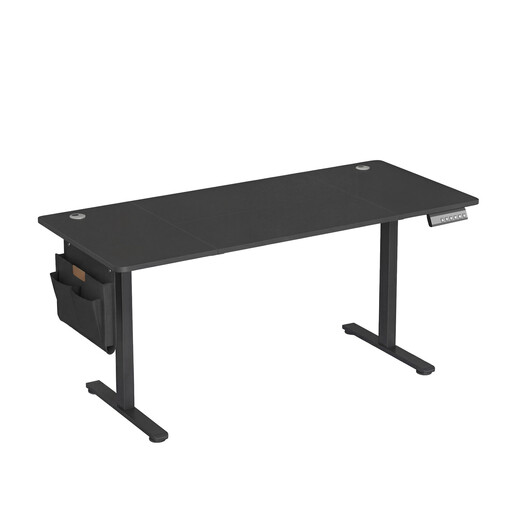
Why it suits this profile: The larger desktop gives you room for several monitors, paperwork and accessories. It’s a good fit for a more extensive office or gaming setup.
The 160 x 70 cm desktop reduces the risk of having to place accessories too close together. It also has a stated static load capacity of 70 kg, adjustable feet and a locking function on the control panel.
Two cable grommets, an organiser, hooks, a USB-C port on the controller and a height range of 72 to 120 cm.
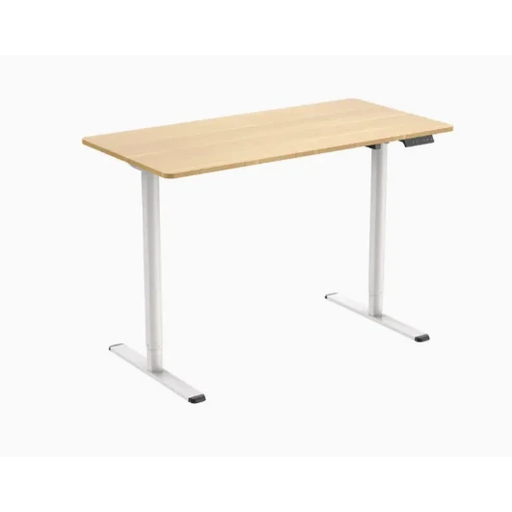
Why it suits this profile: This model is for anyone looking for a compact desktop and four memory settings, with clear information about its height range and adjustment speed.
The specifications list a height range of 73 to 118 cm, an adjustment speed of 15 mm/s and a maximum load of 60 kg. This makes it easy to assess the key details before you buy.
Four memory presets, six buttons on the control panel and a 1200 x 600 mm desktop.
We’ve put together a complete, regularly updated list of products that meet these strict selection criteria and fully comply with the safety regulations in force in the EU.
Adjust your office chair so your feet rest firmly on the floor. When sitting, the desktop should let you keep your shoulders relaxed and your forearms roughly horizontal. When standing, adjust the desk so you can reach the keyboard and mouse without raising your shoulders. You can then save your preferred positions using the memory buttons.
Its lifespan depends on factors including the motor, frame, load, assembly and frequency of use. Distributing the load evenly, keeping the screws tight and staying within the stated weight limit can help keep the desk working well. Avoid using it continuously close to its maximum static load capacity.
It isn’t possible to calculate this accurately without details of the motor’s power, adjustment time and frequency of use. The desk usually only uses power while changing position. For a realistic estimate, you’ll need the technical specifications for the model and how many times you adjust its height each day.