
Lieferung heute & morgen

Qualitätsgarantie

Willkommens-Angebote freischalten: KOSTENLOSE Lieferung | Bis zu 80 % RABATT | Kostenlose 30-Tage-JoyPlus-Testphase
App herunterladen
A drawing tablet for kids promises creative fun without paint stains on walls and hands. However, not every model lives up to its promise. Many parents invest in what seems like a practical toy, only to find it becomes unusable after a short time or raises safety concerns. Before you make a decision, it's important to know the common pitfalls that often only become apparent after the purchase.
The three most common problems are:
To avoid these disappointments, you should check a few basic technical features before buying.
A good creative toy is distinguished by its thoughtful details. For a drawing tablet, the material, screen, and usability are the most crucial factors.
Safety should always come first. Look for products made from ABS plastic (Acrylonitrile Butadiene Styrene). This material is not only robust and impact-resistant but also free from harmful plasticizers. A reliable indicator of compliance with European safety standards is the CE marking. It signals that the product meets legal requirements. Another important point is a battery compartment that can only be opened with a tool (e.g., a small screwdriver) to prevent children from accessing the button cell battery.
Most modern drawing tablets use pressure-sensitive LCD technology. These screens do not require a backlight and produce no blue light, making them easier on the eyes than traditional tablets. The screen size is an important factor for the intended purpose:
A good electronic drawing board has two essential buttons: an erase button and a lock button. The erase button clears the entire drawing at the touch of a button. The lock function is just as important: it deactivates the erase button, preventing a little masterpiece from being accidentally deleted. Also, check if the included stylus can be securely attached to the casing to prevent it from getting lost.
Based on these objective criteria, we have identified a few models that are suitable for different needs.
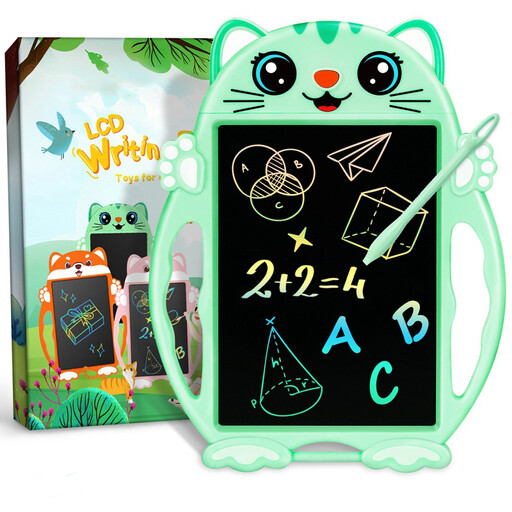
Why it's a good fit: With its compact 8.5-inch format and lightweight casing, this model is ideal for younger children. The appealing design encourages drawing without being overwhelming. It's a straightforward and safe option for entering the world of electronic drawing boards.
According to the manufacturer, the casing is made of eco-friendly ABS plastic, which is free of BPA and lead. The rounded edges minimise the risk of injury.
Its low weight of just 178 g and compact dimensions make it especially easy for small children to handle and perfect for transport.

Why it's a good fit: The 10-inch screen provides ample space for detailed drawings and first writing exercises. It's a great choice for children who have already discovered a love for drawing and need more room for their creativity. Ideal as a durable **gift for kids**.
The material is described as high-strength and moisture-resistant, which suggests good impact resistance and longevity, thus counteracting the pitfall of poor durability.
The large 10-inch screen offers significantly more drawing surface than standard models, encouraging more complex drawings and writing attempts.
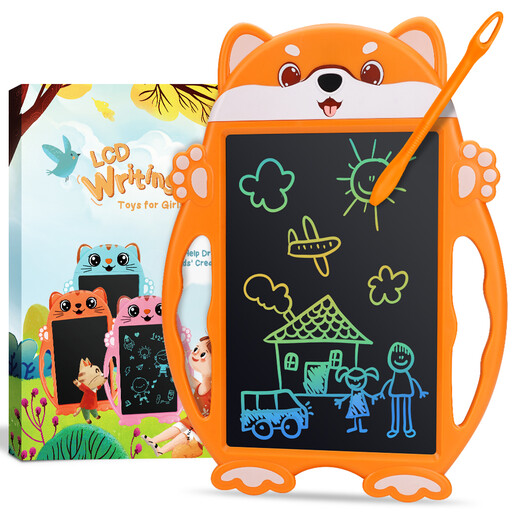
Why it's a good fit: This model combines a low weight with a robust casing, making it a reliable companion for long car rides, waits at restaurants, or holidays. The slim design ensures it fits in any bag.
Its simple operation with just one erase button and sturdy construction make it resilient to the typical rigours of travel and avoids frustration from complex features.
The ergonomic design and low weight of 178 g are specifically tailored to the needs of children on the move, providing a clean and quiet activity.
A thoughtful selection of gifts can have a lasting impact on a child's creativity and development. Discover more ideas that have been vetted for safety and educational value.
1. How long does the battery in an LCD writing tablet last? Most drawing tablets use a standard button cell battery (e.g., CR2025). Since energy is only consumed when the erase button is pressed, a battery can last from several months to over a year, depending on the frequency of use. The battery can usually be easily replaced.
2. Is an electronic drawing board harmful to children's eyes? Unlike tablets or smartphones, the LCD screens on these drawing boards do not have their own backlight. They reflect ambient light, much like paper. As a result, they emit no blue light, which is why they are considered easy on children's eyes.
3. Can you save drawings on a magic slate? Standard models of a magic slate for kids do not have a memory function. The drawing is completely erased when the erase button is pressed. To temporarily save a work of art, you can use the lock function, which prevents accidental deletion.