
Lieferung heute & morgen

Qualitätsgarantie

Willkommens-Angebote freischalten: KOSTENLOSE Lieferung | Bis zu 80 % RABATT | Kostenlose 30-Tage-JoyPlus-Testphase
App herunterladen
A gaming room should not only look modern, but also work well in everyday use: the gaming desk needs to provide enough space, the gaming chair must remain stable, and the gaming lighting should neither cause glare nor consume unnecessary electricity. However, anyone who shops based solely on RGB effects or product images often overlooks important details.
A desk measuring 120 cm in width may be sufficient for one monitor, a keyboard and a mouse. With two monitors, speakers, a console or streaming equipment, however, space can quickly become limited. Depth is also crucial: a PC desk with only a shallow surface leaves little distance between you and the monitor and offers hardly any room for a large gaming mouse mat.
An RGB LED light strip can look impressive in product images. In practice, however, its length, connection, mounting surface and controls are what matter. An extension does not automatically work as a standalone light. Before buying, check whether it is compatible with your existing system and whether a suitable USB or mains connection is available.
A gaming bean bag or gaming floor chair requires sufficient free space and should be suitable for your height and weight. Details such as maximum load capacity, padding thickness and dimensions are therefore more important than an eye-catching colour scheme. Furniture should also be placed on a level surface, with enough room for the chair to move.
Before placing your order, it is worth making a simple sketch showing the monitor, PC case, keyboard and accessories. Pay attention to:
An L-shaped gaming desk can make better use of corners. Measure the room layout in advance, as the direction of the corner cannot be changed flexibly in every room.
A classic gaming chair is suitable for long periods of sitting at a desk. A gaming bean bag or swivel floor chair is better suited to console gaming, watching films or creating a flexible lounge area. Check:
A high stated load capacity is no substitute for a suitable sitting position. For longer periods of computer work, position the seat so that your forearms and legs can rest comfortably.
Indirect lighting behind the monitor or on the wall reduces harsh contrasts in the room. An RGB LED light strip should be fitted so that the LEDs do not shine directly into your eyes. For smart lights, the app, sensors, charging method and preset effects are practical selection criteria.
3D PVC wall panels can create an accent wall behind the desk. Before installation, check the condition of the wall, the adhesive surface and the number of square metres required. With a set containing 20 tiles measuring 30 × 30 cm each, take the stated coverage of 1.8 m² into account. Self-adhesive installation may be unsuitable for delicate or uneven walls.
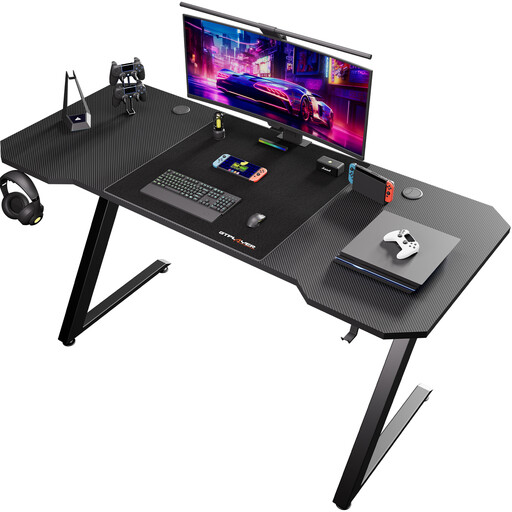
Why this product suits the profile: The compact surface is suitable for a simple PC setup with one monitor and essential equipment.
The dimensions of 120 × 60 cm make the available working area clear and help prevent purchases based on unclear size information.
Carbon-fibre surface and headphone hook; according to the product details, the desk is designed for gaming and computer work.
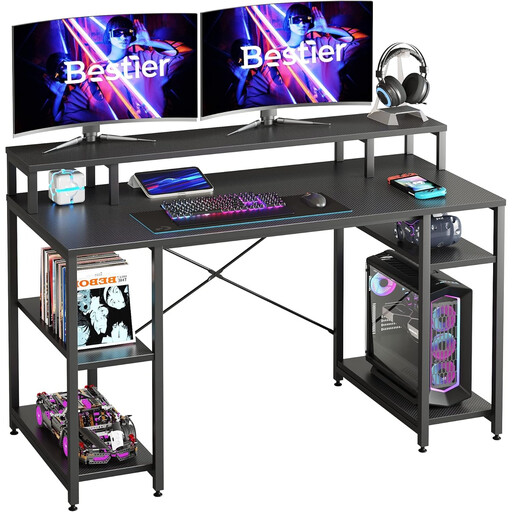
Why this product suits the profile: The 140 cm-wide desktop and several storage areas appeal to users with a dual-monitor or streaming setup.
The product details specify the dimensions, combination of materials and storage space. This makes it easier to assess how well it will fit the room before installation.
Raised monitor shelf, four storage compartments and a metal frame with X-bracing, according to the manufacturer’s details.
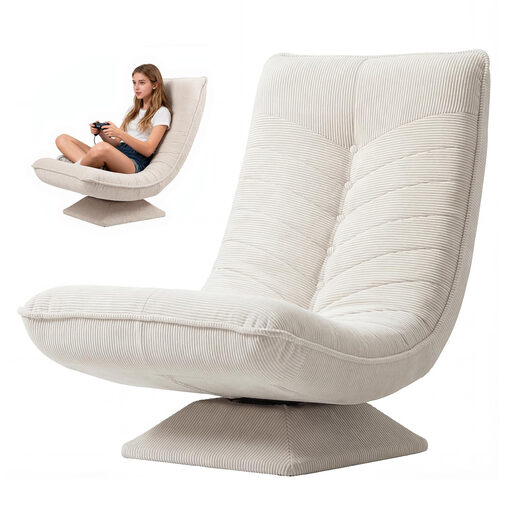
Why this product suits the profile: This floor chair is suitable for consoles, reading or a flexible entertainment area away from the PC desk.
The maximum load capacity of 150 kg and the warning against uneven surfaces are clearly stated. The chair is not designed to be used as a step or climbing aid.
360° swivel function, backrest adjustable up to 120° and foldable construction requiring no assembly.
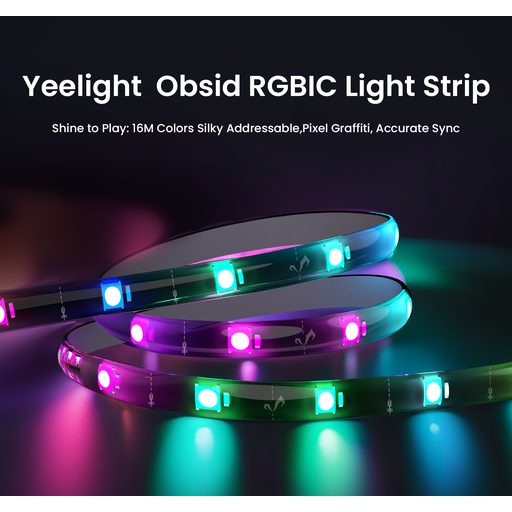
Why this product suits the profile: This extension is ideal for users who want to expand existing Yeelight lighting around a desk, TV or room wall.
The length of 1 m is clearly stated. Check compatibility with your existing lighting solution before ordering, as this is an extension product.
RGBIC technology according to the product name, with the option to expand an existing ambient lighting setup.
Small components often have a greater impact on everyday usability than extra decoration. A gaming mouse mat should suit the desk surface and have a non-slip underside. The “Lethality 250” is described as having a textile surface, rubber base and compatibility with optical and laser sensors.
For mobile or occasional lighting, the Yeelight Vega RGB Night Light may be worth considering. According to the product details, it features motion sensors, eleven preset effects, magnetic mounting and USB-C charging. Before using it, check whether the sensor range and intended position are suitable for the room.
For an accent wall, calculate the required quantity and coverage in advance. The DIY set with black PVC tiles is supplied with 20 pieces and has a stated coverage of 1.8 m². For a larger wall, plan on using several packs accordingly.
We have put together a complete, regularly updated list of products that fully meet these strict selection criteria and the safety regulations applicable in the EU.
A few square metres are often enough for a single PC desk, provided you plan for the desk, seating and cable routes. Before buying, take doors, radiators, windows and sockets into account. With an L-shaped gaming desk, the direction of the corner is also important.
Indirect lighting behind the monitor or on the wall creates less direct glare than exposed LEDs. An RGB LED light strip should be compatible with your existing controls. For smaller areas, a battery-powered or USB-C rechargeable light can offer greater flexibility.
The key factors are load capacity, seat dimensions, backrest adjustment, padding and stability. For long periods of computer use, the chair should be suitable for the desk height. A gaming floor chair or gaming bean bag, on the other hand, is primarily designed for low seating positions and flexible use.