
Lieferung heute & morgen

Qualitätsgarantie

Willkommens-Angebote freischalten: KOSTENLOSE Lieferung | Bis zu 80 % RABATT | Kostenlose 30-Tage-JoyPlus-Testphase
App herunterladen
A 140 cm gaming desk gives you more freedom of movement than a compact 120 cm desk, but it also requires enough space in the room. For PC gamers, streamers, students and home-office users, appearance is only part of the picture. A sturdy construction, sensibly positioned features and a surface suited to everyday use are what really matter.
Many products promote RGB lighting, a carbon-fibre look or an ‘ergonomic’ design. However, these terms reveal little about how practical a desk actually is for daily use. That is why our selection focuses on clear dimensions, materials and features that can be assessed properly.
‘140 cm’ usually refers to the width. However, depth and height are also important for everyday use. A desk measuring 140 × 60 cm can accommodate several devices, but it may quickly feel crowded with large monitor stands and speakers. Before buying, check the following:
RGB lighting can change the atmosphere, but it does not automatically improve your workspace or cable management. Check whether the LEDs can be controlled via an app, whether a timer is available and how the power supply works. With a gaming desk with RGB lighting, you should also make sure that the electrical components are protected from moisture and that the desk is disconnected from the power supply before cleaning.
A PC desk may look sturdy in product images even when important specifications are missing. Check whether the frame is made of metal, whether the desktop has sufficient reinforcement and whether a CPU holder or side storage compartment is suitable for your computer. For shelving, the usable height matters more than the total number of compartments.
A width of 140 cm is practical for a setup with one or two monitors, provided the desktop is not restricted by large attachments. A desk with monitor stand creates additional storage space and raises the screen. This can change your viewing angle, but it does not replace a seating position tailored to your needs.
With a depth of 60 cm, you should check the monitor distance based on your own screen size. Mouse movements, keyboard width and the possible addition of a laptop must also be taken into account.
A sturdy desk needs a construction that resists twisting. Metal frames, crossbars and properly connected legs are tangible indicators of stability. A carbon-fibre or carbon-fibre desk surface often refers to the appearance or coating; it is not automatically evidence of genuine carbon material.
Look out for:
A desk with USB ports or integrated sockets can shorten cable runs. Nevertheless, check whether the connections are suitable for your devices. Extension leads and power supplies must not be overloaded. A desk with headphone holder provides convenient storage, while a CPU holder can keep the computer off the floor. The permitted size and load capacity must be checked against your PC case.
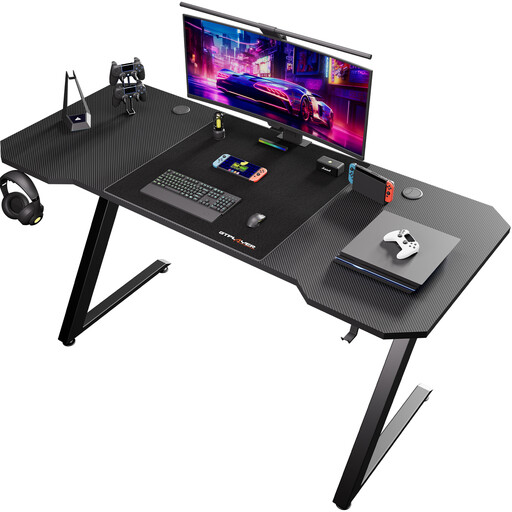
Why this product suits this profile: Measuring 120 × 60 cm, this gaming desk is a more compact option for smaller rooms, student accommodation or a single-monitor setup. Its carbon-fibre look and headphone hook cover key feature requirements without the need for a 140 cm desk.
The precise external dimensions make the space requirements clear. The headphone hook is listed as a separate feature rather than being visible only in a product photo.
120 × 60 cm desktop, carbon-fibre surface according to the product description and integrated headphone hook.
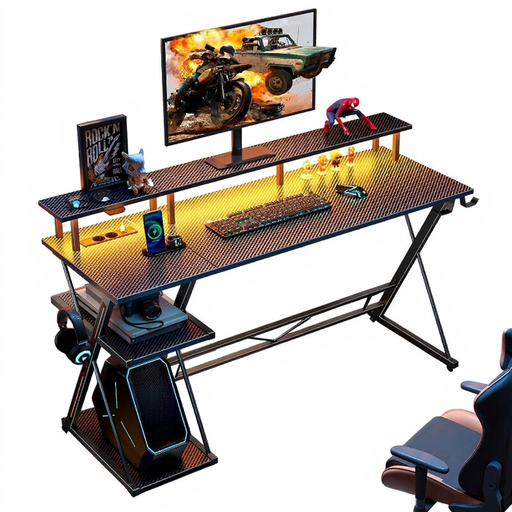
Why this product suits this profile: This model combines a width of 140 cm with a metal frame, monitor stand, CPU holder and charging unit. It is aimed at users who want to combine gaming and home-office work at one desk.
The features are clearly specified: two AC sockets, two USB ports, app-controlled RGB lighting and a CPU holder for towers up to 47 cm high according to the product description.
140 cm desktop, metal frame, monitor stand, side-mounted CPU holder, plus two AC and two USB connections.
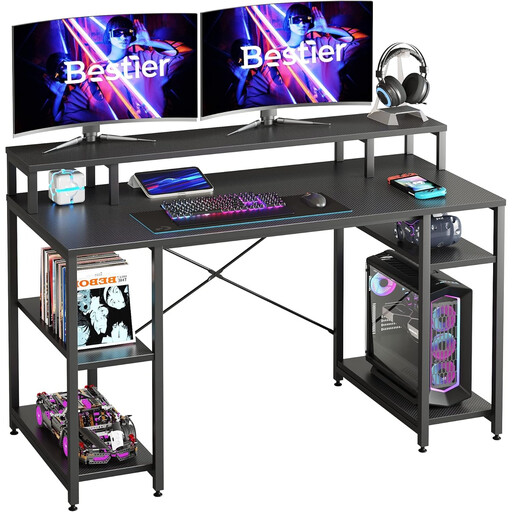
Why this product suits this profile: Four storage areas, a monitor shelf and adjustable shelves are ideal for users with a printer, books, accessories or a larger PC workstation. This design also works well in an office or living space.
The storage solution is defined by specific dimensions and features: 140 × 60 × 85.5 cm, a monitor shelf, one drawer and adjustable compartments rather than purely decorative shelving.
Metal frame, P2 wood-based panel, X-shaped crossbar, monitor shelf, one drawer and four shelving compartments according to the product description.
Before assembly, check that the intended location has a level, stable surface. In rented accommodation or home offices, it is worth measuring the door width and the available space. Cables should not be under tension, and electrical connections should not be positioned where liquids could be spilt.
For a combined gaming and home-office setup, clear zoning is recommended: place the monitor and keyboard in the centre, frequently used accessories to the side, and the PC on a dedicated holder or shelf. With a desk featuring a monitor stand, the screen height should suit your seating position. Make sure the assembly instructions and all supplied fittings are present before placing any load on the desk.
We have put together a complete, regularly updated list of products that fully meet these strict selection criteria and the safety regulations applicable in the EU.
That depends on the monitor width, the stands and your preferred arrangement. With a depth of 60 cm, you should also consider the distance from your seating position. An integrated monitor shelf can free up space on the main desktop, but it also takes up some width.
Its lifespan depends on the frame, desktop, assembly and load. A metal frame with crossbars can offer greater structural stability than a simple, unreinforced design. The key is to stay within the stated maximum load and regularly check that all screw connections remain tight.
The lighting’s energy consumption depends on the LED power, brightness and how long it is used. App control with a timer can help limit operating time. Integrated USB ports and sockets should only be used within their stated electrical ratings.