
Lieferung heute & morgen

Qualitätsgarantie

Willkommens-Angebote freischalten: KOSTENLOSE Lieferung | Bis zu 80 % RABATT | Kostenlose 30-Tage-JoyPlus-Testphase
App herunterladen
AI smart glasses with a display sound like a practical addition for work, travel and international communication. In practice, though, a long list of features alone won’t determine whether they suit your daily routine. Display brightness, comfort, reliance on software and the actual availability of individual features all matter.
According to the product information, the INMO GO3 Smart Glasses weigh 58 g and feature a 1500-nit display, AR navigation, real-time translation in 98+ languages and automatic meeting notes. Before buying, however, it’s worth checking what’s included, what app support is available and how the glasses fit into the situations you’ll use them in.
The “1500 nits” figure describes the display’s brightness. On its own, it doesn’t tell you how easy content is to see in direct sunlight, through tinted lenses or in changing light conditions. The position of the image, text size and available adjustment options also affect the experience.
If you’re considering AR glasses with a display for business travel or navigation, check the following:
The product description lists real-time translation in 98+ languages. That doesn’t necessarily mean every language has the same features. Speech recognition, text display, offline use and the need for an internet connection may vary.
If you’re part of an international team or travel frequently, check that the languages you need most are supported before you buy. You should also find out whether translations appear directly on the glasses or are processed through a connected smartphone.
Features such as navigation, meeting notes and AI interaction often require an app, Bluetooth, internet access or a compatible smartphone. Without a connection, some features may be limited. Before ordering, check the technical details and user manual for information on battery life, charging time, storage and data privacy.
At 58 g according to the product information, the INMO GO3 is among the lighter smart glasses in this product class. Even so, if you plan to wear them for long meetings or while travelling, pay attention to the nose pads, how the arms fit and whether they cause pressure points. Lightweight smart glasses are only practical for everyday use if they sit securely and don’t need constant adjustment.
The stated brightness of 1500 nits is a measurable guide to the display. When deciding whether to buy, also consider resolution, field of view, focal distance and how the glasses are operated. High brightness alone doesn’t guarantee a clear, comfortable display.
A quick checklist can help before you buy:
The term smart glasses with navigation describes a feature; it doesn’t automatically mean they offer full offline navigation. If you plan to use them for work, it’s worth having a conventional smartphone as a backup too.
The products below cater to different needs. Only the INMO GO3 is a pair of AI and AR smart glasses; the other products can complement a mobile workflow with storage and power.
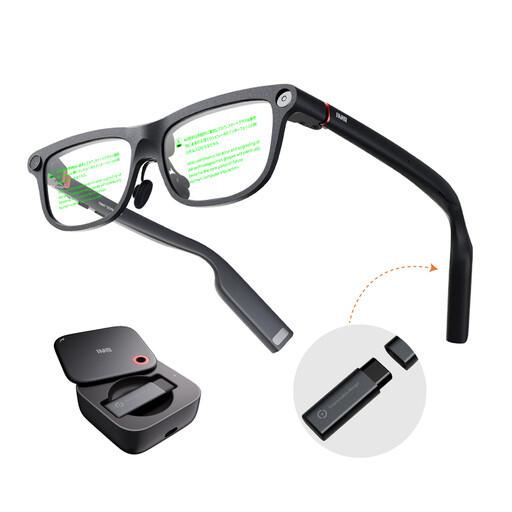
Why this product suits this profile: These glasses combine a display, translation, AR navigation and meeting notes in one device, making them a good choice for anyone who wants to try these features in a mobile system.
Key details such as 58 g, 1500 nits and 98+ languages are clearly stated. You’ll still need to check compatibility, battery life and app requirements before buying.
58 g weight according to the product information; display with a stated brightness of 1500 nits; translation, navigation and note-taking features.
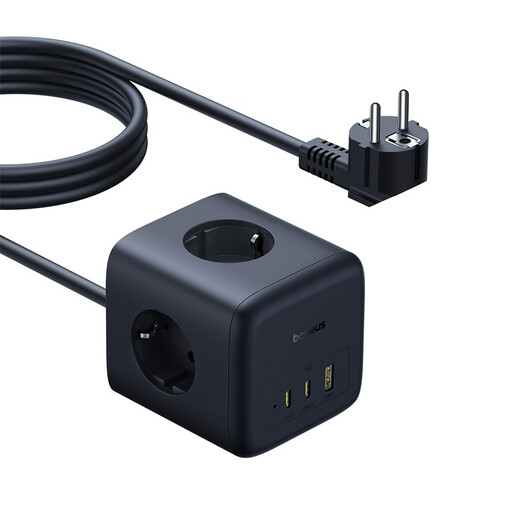
Why this product suits this profile: For a permanent workspace, this charging station complements smart glasses, a smartphone, tablet and other devices with its multiple connections.
The connections and output ratings are clearly listed, so you can check in advance whether its charging capacity and available ports suit your workspace.
3 AC sockets, 1 USB-A port and 1 USB-C port; USB-C output up to 67 W according to the product information; 1.5 m cable.
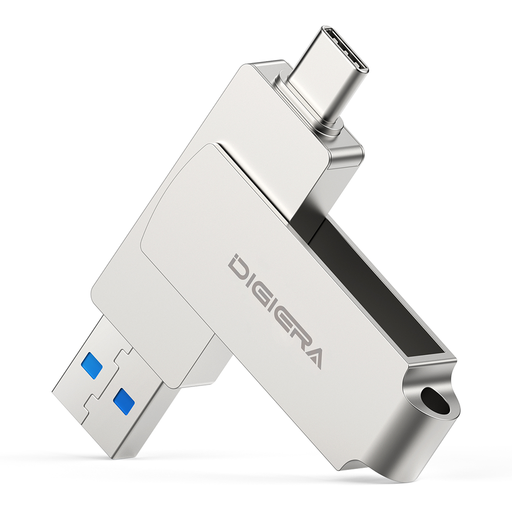
Why this product suits this profile: Business travellers and people with lots of documents can carry meeting files, presentations and backups using USB-A and USB-C.
The dual interface reduces the risk of having to rely on a single connection standard while you’re travelling. You should still keep an additional backup of important data.
512 GB capacity; USB-A and USB-C ports; stated read speeds of up to 500 MB/s; 360-degree swivel casing.
We’ve put together a complete, regularly updated list of products that meet these strict selection criteria and fully comply with the safety regulations in force in the EU.
Features such as AI processing, translation and navigation may require a connection to a smartphone or the internet. Before buying, check which operating systems are compatible, whether an app is required and if you’ll need any accounts. The product information doesn’t specify offline use for every feature.
Battery life depends on display brightness, translation, navigation and connection type. As the available product information doesn’t state a guaranteed battery life, check this directly on the product page or in the user manual.
According to the product description, the INMO GO3 includes a meeting notes feature. Before using it for confidential conversations, check data privacy, whether participants need to give their consent, where data is stored and whether it may be processed in the cloud. The glasses can support your workflow, but they don’t replace the need to review and store meeting notes in line with your company’s internal policies.