
Lieferung heute & morgen

Qualitätsgarantie

Willkommens-Angebote freischalten: KOSTENLOSE Lieferung | Bis zu 80 % RABATT | Kostenlose 30-Tage-JoyPlus-Testphase
App herunterladen
Smart glasses with a display show information directly in your field of vision, without you having to constantly reach for your smartphone. Depending on the model, features range from notifications and navigation to translation, AI assistance and teleprompter applications.
For professionals, travellers and presenters, however, it’s not just the number of features that matters. Display technology, wearing comfort, data privacy and the actual battery life determine whether a pair of smart glasses remains practical in daily life or ends up sitting unused after a short time.
Some models use a small micro-LED display or an optical waveguide that projects text and symbols into a limited area. This is different from a large-scale 3D overlay of your surroundings. So before you buy, you should be clear on the following:
A pair of glasses with a micro-LED display is particularly suitable for short pieces of information. If you expect extensive content or videos, you should check the technical specifications for display area and app compatibility carefully.
Translation, AI functions, meeting notes and navigation often require a connection to your smartphone or to online services. Without this connection, individual features may be limited. So check the following before you buy:
A pair of AI glasses is therefore not automatically an independent device. It can serve as a discreet control and display unit, but depending on the range of features, it remains reliant on the associated software.
Manufacturers’ battery life figures usually refer to a defined usage scenario. Frequent translations, navigation, high display brightness or continuously activated voice functions can increase power consumption. Pay attention to the distinction between:
A charging case can extend mobile use, but it doesn’t make the glasses completely independent of recharging.
A display should present information legibly without unnecessarily obscuring your surroundings. With an AR pair of glasses, brightness, contrast and the position of the overlays are also relevant. Figures such as “1500 nits” describe the maximum brightness of the display, but on their own they don’t tell you how pleasant the display will look in every lighting condition.
For conversations, navigation and notifications, compact overlays are usually sufficient. If you’re looking for a teleprompter pair of glasses, you should also pay attention to text size, scrolling speed and voice control.
The weight of the models presented here is, for example, 36 and 58 grams respectively. What matters isn’t just the figure on the spec sheet, but also the weight distribution on the nose pads and temples. For longer wearing periods, you should look out for the following points:
With the Even G2, according to the product information, a magnesium alloy frame with titanium temples is used. Prescription lenses are fitted and sold separately, according to the information provided.
If you prefer a pair of smart glasses without a camera, you should explicitly check the product description for image and video recording. A camera-free design can make using the glasses in meetings, offices, schools or public spaces more straightforward. Nevertheless, microphones, smartphone apps or cloud-based AI services may still process personal data.
Before using the glasses in meetings or during conversations, we recommend:
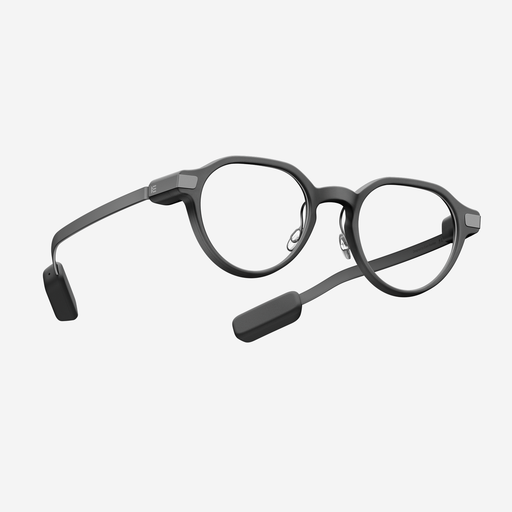
Why this product fits the profile: This camera-free model combines a classic panto design with display functions for notifications, translation and navigation. It’s suitable for users who want to get to know the central features of a display pair of glasses.
The product information explicitly mentions a camera-free design, an integrated micro-LED system and a battery life of up to two days with regular use.
36 grams weight, voice control, translation into more than 35 languages according to product information and charging case included.
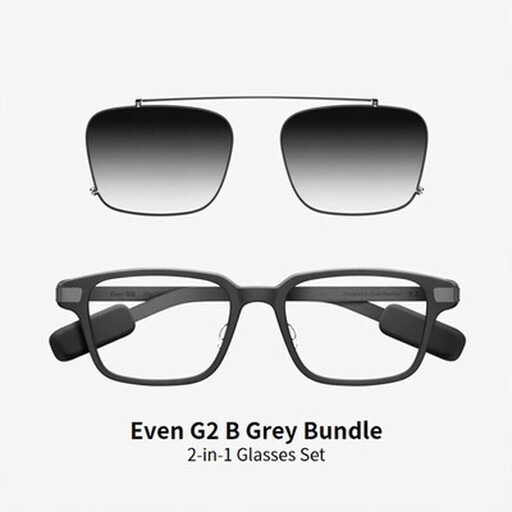
Why this product fits the profile: The bundle combines a rectangular display pair of glasses with a clip-on sun lens and accessories. This makes it interesting for both work and everyday life when different lighting conditions need to be considered.
The product description mentions the camera-free design, the separate sun clip-on and the charging case. This allows buyers to compare the equipment with their intended use before purchasing.
Micro-LED display, 36 grams weight, teleprompter function and stated battery life of up to two days with regular use.
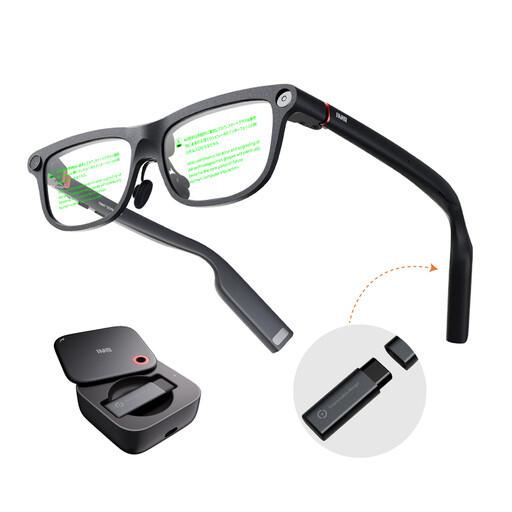
Why this product fits the profile: The INMO GO3 is aimed at travellers, international business contacts and users who want to combine translation, AR navigation and meeting notes in one device.
The specifications mention weight, display brightness and language range concretely. This makes it easier to assess whether translation and display fit your travel or work profile.
58 grams weight, 1500 nits stated display brightness, real-time translation into more than 98 languages according to product information and AR navigation.
We’ve put together a complete, regularly updated list of products that fully meet these strict selection criteria and the safety regulations in force in the EU.
The glasses usually receive information from your smartphone or a connected app and display text, symbols or alerts via an integrated display. Voice commands can support operation, depending on the model. Before setting them up, you should check app permissions, the Bluetooth connection and any available accounts.
Models such as the Even G2 and the INMO GO3 list real-time translation as a product feature. The actual quality can depend on the language, internet connection, environment and conversation situation. For important business or legal content, the translation should not be used unchecked as the sole basis.
The battery life depends on display brightness, voice control, navigation and translation. For the Even G2, up to two days with regular use and up to two weeks with the charging case are stated. These figures are to be understood as manufacturer information and may vary in individual use.